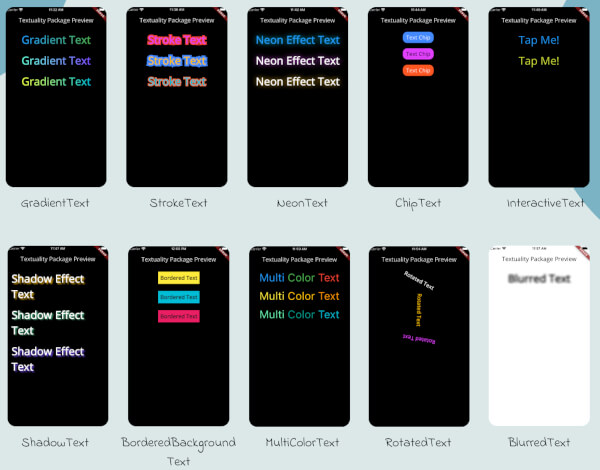
Textuality는 텍스트 위젯의 기능을 고급 시각 효과로 확장하는 Flutter 패키지입니다. 개발자들이 그라디언트 채우기, 테두리 외곽선, 네온 조명, 그림자 효과를 텍스트에 직접 적용할 수 있게 해주며, 복잡한 커스텀 페인팅 없이도 UI 미학을 향상시킵니다. 사용이 간편하도록 설계되어 기존의 Flutter 프로젝트에 쉽게 통합될 수 있습니다. 이 패키지는 Android, iOS, Web, macOS, Windows, Linux 등 여러 플랫폼을 지원하여 표현력 있는 타이포그래피가 필요한 크로스플랫폼 앱에 이상적입니다.
사용 사례
눈에 띄는 제목 만들기
게임에 장식용 텍스트 효과 추가하기
앱 온보딩 화면 개선
생동감 있는 텍스트로 테마 UI 설계하기
시각적 대비를 통한 접근성 향상
주요 기능
그라데이션 텍스트 스타일
스트로크 및 외곽선 효과
네온 글로우 효과
그림자 및 깊이 강화
간단한 API 통합
적합한 대상
시각적 매력이 필요한 UI 디자이너
창의적인 앱을 개발하는 개발자
크로스플랫폼 모바일 및 웹 프로젝트
동적 또는 애니메이션 텍스트를 가진 앱
고려 사항
무거운 효과를 사용하면 성능에 영향을 미칠 수 있습니다
제공된 스타일 외의 제한적인 사용자 지정
다양한 플랫폼 간의 신중한 테스트가 필요합니다
고성능 애니메이션에 적합하지 않음
원본 README
연결된 소스 저장소의 README 원문 스냅샷입니다. 최신 내용은 저장소에서 확인하세요.
Textuality Package
Textuality is a powerful Flutter package that enhances the appearance of text widgets with a variety of customizable text effects and styles. With this package, you can easily add gradient text, stroke text, neon effects, shadow effects, interactive text, and more to your Flutter app.
Features
GradientText: Add gradient colors to your text.
StrokeText: Apply an outline or stroke around your text.
NeonText: Create a glowing neon text effect.
ChipText: Display text inside stylish chip-like containers.
ShadowText: Add customizable shadows to your text.
InteractiveText: Make text interactive for clicks, taps, or custom gestures.
MultiColorText: Display text in multiple colors, even within the same string.
RotatedText: Rotate the text in any direction, including vertical.
BlurredText: Add a blurred effect to your text.
BorderedBackgroundText: Add a border around the background of your text.
Each widget accepts various optional parameters for customization, such as style, text alignment, maxLines, overflow, and more.
Installation
To use the textuality package in your Flutter project, follow these steps:
Add the package to your pubspec.yaml file:
dependencies:textuality:^0.0.1
Run the following command to install the package:
flutter pub get
💻Example
Below is an example of how to use the Textuality package in your Flutter app: