
 v0.2.3
text_to_speech
Flutter 플러그인은 음성 합성(TTS, Text-to-Speech) 서비스를 제공합니다.
150좋아요 33930일 다운로드150Pub 점수
AndroidiOSWebmacOS
Flutter 플러그인은 TTS(Text-to-Speech) 서비스를 제공합니다

{"sdk":"flutter"}{"sdk":"flutter"}^0.1.1^0.1.3^0.1.2{"sdk":"flutter"}아래는 영문 원문 스냅샷입니다. 최신 내용은 GitHub에서 확인하세요.
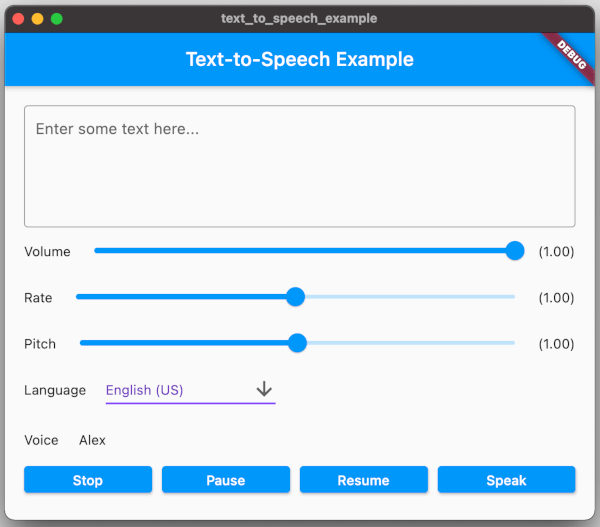
A Flutter plugin provides TTS (Text-To-Speech) Service. This plugin aims to offer the most of TTS API feature from iOS, Android, web, and macOS.
screenshot.png
To use this plugin, add text_to_speech as a dependency in your pubspec.yaml file:
dependencies:
  text_to_speech: ^0.2.3
21TextToSpeech.Engine.INTENT_ACTION_TTS_SERVICE in the queries elements of Android Manifest (See Android documentation).<queries>
<intent>
<action android:name="android.intent.action.TTS_SERVICE" />
</intent>
</queries>
7.010.14(See Apple documentation).
| Feature | Android | iOS | Web | macOS |
|---|---|---|---|---|
| speak | :white_check_mark: | :white_check_mark: | :white_check_mark: | :white_check_mark: |
| stop | :white_check_mark: | :white_check_mark: | :white_check_mark: | :white_check_mark: |
| pause | - | :white_check_mark: | :white_check_mark: | :white_check_mark: |
| resume | - | :white_check_mark: | :white_check_mark: | :white_check_mark: |
| set volume | :white_check_mark: | :white_check_mark: | :white_check_mark: | :white_check_mark: |
| set rate | :white_check_mark: | :white_check_mark: | :white_check_mark: | :white_check_mark: |
| set pitch | :white_check_mark: | :white_check_mark: | :white_check_mark: | :white_check_mark: |
| set language | :white_check_mark: | :white_check_mark: | :white_check_mark: | :white_check_mark: |
| get language | :white_check_mark: | :white_check_mark: | :white_check_mark: | :white_check_mark: |
| get voice | :white_check_mark: | :white_check_mark: | :white_check_mark: | :white_check_mark: |
To start, import the dependency in your code:
import 'package:text_to_speech/text_to_speech.dart';
Then, create instance of TextToSpeech class:
TextToSpeech tts = TextToSpeech();
Speak
String text = "Hello, Good Morning!";
tts.speak(text);
Set Volume
Volume range: 0-1 where 0 is silence, and 1 is the maximum volume (the default behavior).
double volume = 1.0;
tts.setVolume(volume);
Set Rate
Rate range: 0-2.
1.0 is the normal and default speech rate. Lower values slow down the speech (0.5 is half the normal speech rate). Greater values accelerate it (2.0 is twice the normal speech rate).
double rate = 1.0;
tts.setRate(rate);
Set Pitch
Pitch range: 0-2.
1.0 is the normal pitch, lower values lower the tone of the synthesized voice, greater values increase it.
double pitch = 1.0;
tts.setPitch(pitch);
Set Language
Accepting locale tag name of specific language, e.g. 'en-US'. You can retrieve list of supported language using getLanguage function.
String language = 'en-US';
tts.setLanguage(language);
Get Languages
Provide list of supported language codes in locale tag name format, e.g. 'en-US'. You can get display name for specific language code
String language = 'en-US';
tts.setLanguage(language);
Get Voice
We can get all available voices or get voices of specific language. This function will returns particular voice name.
List<String> voices = await tts.getVoices();

String language = 'en-US';
List<String> voices = await tts.getVoiceByLang(language);
You can find example in the example folder and run it to check the implementation.
Move to example directory:
$ cd example
Run Android / iOS
$ flutter run -d <device_name>
Run Web
$ flutter run -d chrome
Run macOS
$ flutter run -d macOS