
 v0.0.2
rolling_switch
매력적인 애니메이션을 가진 사용자 정의 스위치 버튼으로 색상, 아이콘 및 기타 미적 요소를 사용자 정의할 수 있습니다.
59좋아요 17930일 다운로드150Pub 점수
AndroidiOSWebmacOSWindowsLinux
Flutter 앱용 완전히 사용자 정의 가능한 롤링 스위치 위젯

{"sdk":"flutter"}^0.0.1{"sdk":"flutter"}^1.5.3아래는 영문 원문 스냅샷입니다. 최신 내용은 GitHub에서 확인하세요.
Rolling Switch Package
Full customizable rolling switch widget for flutter apps forked from this library
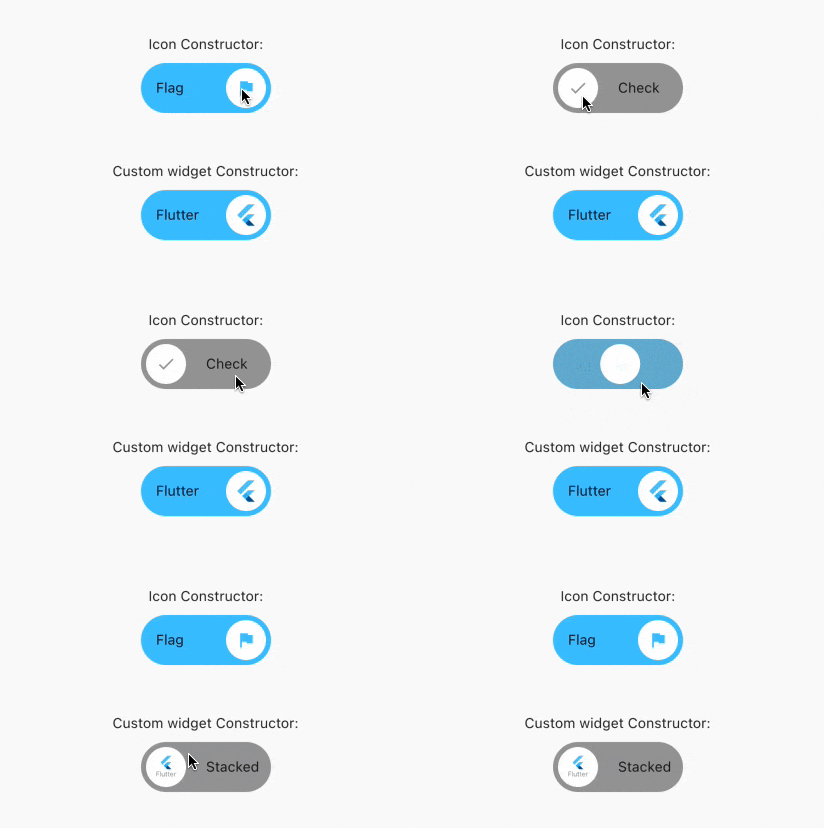
Custom Switch button with attractive animation,
made to allow you to customize colors, icons, custom widget and other cosmetic content.
Manage the widget states in the same way you do with the classical material's switch widget.
style: lint https://img.shields.io/github/license/jamescardona11/rolling_switch https://img.shields.io/pub/v/rolling_switch
Import this library into your project:
roling_switch: ^latest_version
RollingSwitch.icon(
  onChanged: (bool state) {
    print('turned ${(state) ? 'on' : 'off'}');
  },
  rollingInfoRight: const RollingIconInfo(
    icon: Icons.flag,
    text: Text('Flag'),
  ),
  rollingInfoLeft: const RollingIconInfo(
    icon: Icons.check,
    backgroundColor: Colors.grey,
    text: Text('Check'),
  ),
),
const RollingWidgetInfo(icon: FlutterLogo())
RollingSwitch.icon(
  rollingInfoRight: const RollingIconInfo(
    backgroundColor: Colors.green,
  ),
  rollingInfoLeft: const RollingIconInfo(
    backgroundColor: Colors.grey,
  ),
)
RollingSwitch.icon(
  ...
  circularColor: (icon: FlutterLogo())
)
RollingSwitch.icon(
  rollingInfoRight: const RollingIconInfo(
    text: Text('Flag'),
  ),
  rollingInfoLeft: const RollingIconInfo(
    text: Text('Stack'),
  ),
)
RollingSwitch.icon(
  ...
  enableDrag: true
)
https://github.com/jamescardona11/rolling_switch/blob/main/img/example.gif?raw=true