
v0.3.1
drift_flutter
Flutter 앱에서 플랫폼 간에 쉽게 드리프트 데이터베이스를 설정할 수 있습니다.
70좋아요 45만30일 다운로드160Pub 점수
AndroidiOSWebmacOSWindowsLinux
Valve Index® 라이트하우스의 전원 상태를 제어하는 Flutter 앱

Flutter 앱에서 플랫폼 간에 쉽게 드리프트 데이터베이스를 설정할 수 있습니다.
블루투스 저전력 장치에 연결하고 통신하기 위한 플러터 플러그인입니다.
 v2.3.2+8
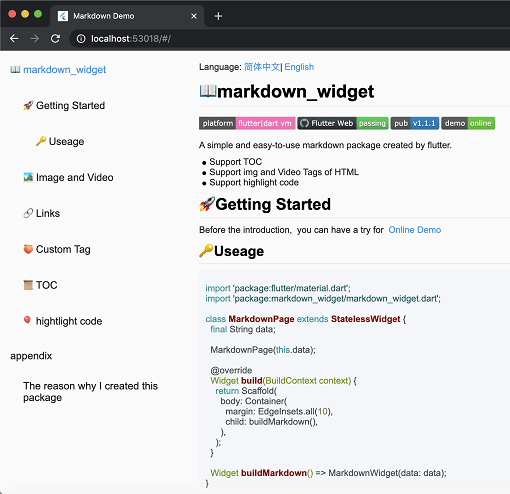
새로운 마크다운 패키지입니다. 목차(TOC) 기능, 코드 강조 표시를 지원하며 모든 플랫폼을 지원합니다.
iOS, Android, 웹 및 OpenHarmony에서 진동 API를 처리하기 위한 플러그인입니다.
 v0.3.0
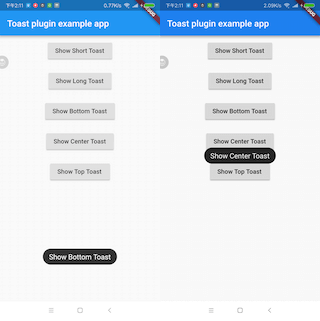
Flutter 토스트 플러그인입니다.
Dart로 작성된 포터블 마크다운 라이브러리로, 마크다운을 HTML로 변환할 수 있습니다.
상호 배제 및 일반 및 읽기-쓰기 뮤텍스의 구현
https://materialdesignicons.com/ 기반의 커뮤니티 기반 마테리얼 디자인 아이콘 플러터 패키지입니다.
웹 프로젝트에서 웹 블루투스 API를 사용하기 위한 라이브러리입니다. IO 프로젝트에서도 잘 작동합니다.
{"sdk":"flutter"}^0.28.0^9.0.0^12.0.1^2.2.1^6.3.25.9.55^1.8.1^3.1.0^3.1.2^3.1.4^0.3.0^2.28.2^0.2.5^2.1.5^1.9.1^1.3.0^6.1.5+1^2.0.2^0.20.2^12.1.0^1.16.0^7.3.0{"path":"lighthouse_provider/lighthouse_back_ends/flutter_blue_plus_back_end"}^1.1.0^2.2.0{"path":"lighthouse_provider/lighthouse_back_ends/flutter_web_bluetooth_back_end"}{"path":"lighthouse_provider/lighthouse_back_ends/bluez_back_end"}{"path":"lighthouse_provider/lighthouse_provider"}{"path":"lighthouse_provider/lighthouse_back_end"}{"path":"lighthouse_provider/lighthouse_providers"}{"path":"lighthouse_provider/lighthouse_back_ends/fake_back_end"}{"path":"shared/shared_platform"}{"path":"lighthouse_provider/lighthouse_logger"}^1.35.8^2.3.2+8{"sdk":"flutter"}^2.28.2^2.7.0^6.0.0{"path":"lighthouse_provider/lighthouse_test_helper"}아래는 영문 원문 스냅샷입니다. 최신 내용은 GitHub에서 확인하세요.
Power management app to control the Valve Index® lighthouses from your phone.
Inspired by lighthouse-v2-manager but that project is desktop only. And if your computer doesn't have a bluetooth adapter then it is useless. Sadly the Valve Index® doesn't provide it's bluetooth adapter to the system and thus can't be used for that. Fortunately most phones do have bluetooth support, so I made this app to easily change the power state of a Lighthouse.
The app also supports Vive Base stations.
lighthouse pm in actionThis project gives no warranty that you won't brick your lighthouses!
It MOST probably won't actually brick your lighthouses, but I'm not liable in case that it does. Since the method used to change the power state of the lighthouses is the same as the one that Valve uses it is very unlikely to actually brick the lighthouse.
If for whatever reason your lighthouse does get bricked, please create an issue so we can prevent other users from bricking theirs.
Before you install this app, make sure that your phone supports bluetooth low energy (BLE). Almost all phones made after 2013 support this.
NOTE F-Droid will build the app from sources so it may be up to 24 hours behind on a release from Github. Also F-Droid sings the app with their own key, so you can't upgrade from a Github/ Google Play release to an F-Droid release.
Get it on F-DroidNOTE The Google Play version may be behind by a version because of the approval process.
Get it on Google playGoogle Play and the Google Play logo are trademarks of Google LLC.
Another way is to install the app using sideloading. Grab the APK from
the releases page
and sideload this onto your
device.
Since the app is made in Flutter it should be able to run on iOS device with a minimal amount of tweaking. I however don't have any Apple device so I can't test this.
If there is anyone who does want to pick this up and support that part then please look at contributing.
There has been a little bit of validating on the iOS version. So if you are able to and really want to you can try "sideloading" it onto your iDevice.
Because the app uses generated code you will first need to
run dart run build_runner build or dart run build_runner watch
before the app can be build.
While the app is in development there may be changes to the local database, there will not be any migrations written unless it's between actual versions. So you may need to clear the app storage before some new features start working.
For web builds you will need to download sqlite3.dart and drift_worker.js
and place these in the web folder. This can be done from
here for sqlite3.dart and
here for drift_worker.js.
If you want to debug with chrome on a platform where web bluetooth is behind a startup flag, then follow the tutorial provided by the flutter_web_bluetooth library here.
For linux builds you no longer need the sqlite3 dev library on your computer as it now comes with
the sqlite3_flutter_libs library.
The database for user settings is stored under ~/.local/share/lighthouse_pm/settings.sqlite feel
free to remove it if you need to reset the settings.
Sometimes before you can create a release build you will need to assemble the Android component
before an Android build can be created.
Run ./gradlew assemble inside the ./android folder before
running flutter build apk/ flutter build appbundle