패키지, 저장소 및 앱 카테고리 검색

markdown_widget 표지
패키지 상세v2.3.2+8

markdown_widget

새로운 마크다운 패키지입니다. 목차(TOC) 기능, 코드 강조 표시를 지원하며 모든 플랫폼을 지원합니다.

AndroidiOSWebmacOSWindowsLinux
30일 다운로드
1만
좋아요
411
Pub 점수
160

패키지 설치

flutter pub add markdown_widget

패키지 개요

공개 정보를 바탕으로 생성한 선택 가이드입니다.

Flutter용 크로스 플랫폼 마크다운 렌더링 패키지로, 목차 생성, 코드 블록의 구문 강조, 안드로이드, iOS, 웹, 맥OS, 윈도우, 리눅스에서의 원활한 통합을 지원합니다. 단순성과 성능을 고려하여 설계되었으며, 최소한의 구성으로 풍부한 마크다운 콘텐츠를 표시할 수 있게 해줍니다. 이 패키지는 지속적으로 유지보수되며, 마크다운 소스로부터 동적 텍스트 렌더링이 필요한 앱에 사용하기 위해 설계되었습니다.

사용 사례

  • 앱 내에서 문서 렌더링
  • 사용자가 생성한 콘텐츠 표시
  • 도움말 또는 자주 묻는 질문 섹션 만들기
  • 동적 블로그 포스트 생성
  • 지식 기반 인터페이스 구축

주요 기능

  • 목차 지원
  • 구문 강조
  • 크로스 플랫폼 호환성
  • 경량이고 빠른 렌더링
  • 사용자 지정 스타일
  • 모든 주요 플랫폼을 지원합니다

적합한 대상

  • 문서 앱
  • 교육 도구
  • 콘텐츠 중심 애플리케이션
  • 개발자 도구
  • 웹 및 데스크톱용 Flutter 앱

고려 사항

  • 마크다운 소스 형식이 필요합니다
  • 기본 HTML 렌더링에 제한됨
  • 사용자 정의 테마 조정이 필요할 수 있습니다
  • 복잡한 레이아웃에 적합하지 않습니다
  • 성능은 콘텐츠 크기에 따라 달라집니다
  • 내장된 이미지 로딩 지원 없음

원본 README

연결된 소스 저장소의 README 원문 스냅샷입니다. 최신 내용은 저장소에서 확인하세요.

Language:简体中文 | English | 日本語

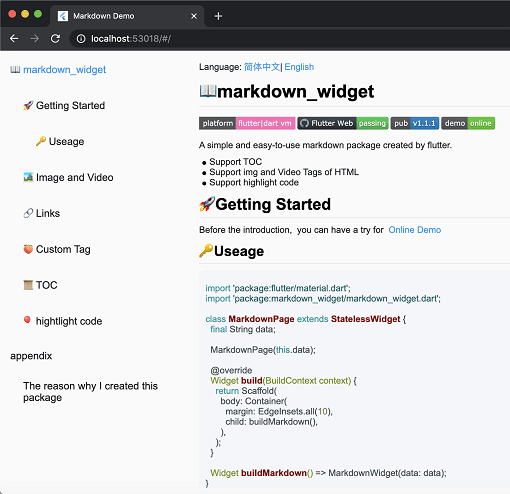
screen

📖markdown_widget

Coverage Status pub package demo

A simple and easy-to-use markdown rendering component.

  • Supports TOC (Table of Contents) function for quick location through Headings
  • Supports code highlighting
  • Supports all platforms

🚀Usage

Before starting, you can try out the online demo by clicking demo

import 'package:flutter/material.dart';
import 'package:markdown_widget/markdown_widget.dart';

class MarkdownPage extends StatelessWidget {
  final String data;

  MarkdownPage(this.data);

  @override
  Widget build(BuildContext context) => Scaffold(body: buildMarkdown());

  Widget buildMarkdown() => MarkdownWidget(data: data);
}

If you want to use your own Column or other list widget, you can use MarkdownGenerator

  Widget buildMarkdown() =>
      Column(children: MarkdownGenerator().buildWidgets(data));

Or use MarkdownBlock

  Widget buildMarkdown() =>
      SingleChildScrollView(child: MarkdownBlock(data: data));

📁 More Examples

For advanced usage examples, check out the example/lib/markdown_custom folder in the repository:

  • video.dart - Custom video tag support
  • latex.dart - LaTeX math formula rendering
  • mermaid.dart - Mermaid diagram support (flowcharts, sequence diagrams, etc.)
  • html_support.dart - HTML tag extension
  • custom_node.dart - Custom node implementation examples

These examples demonstrate how to extend the package with custom tags and features.

🌠Night mode

markdown_widget supports night mode by default. Simply use a different MarkdownConfig to enable it.

  Widget buildMarkdown(BuildContext context) {
    final isDark = Theme.of(context).brightness == Brightness.dark;
    final config = isDark
        ? MarkdownConfig.darkConfig
        : MarkdownConfig.defaultConfig;
    final codeWrapper = (child, text, language) =>
        CodeWrapperWidget(child, text, language);
    return MarkdownWidget(
        data: data,
        config: config.copy(configs: [
        isDark
        ? PreConfig.darkConfig.copy(wrapper: codeWrapper)
        : PreConfig().copy(wrapper: codeWrapper)
    ]));
  }
Default mode Night mode

🔗Link

You can customize the style and click events of links, like this

  Widget buildMarkdown() => MarkdownWidget(
      data: data,
      config: MarkdownConfig(configs: [
        LinkConfig(
          style: TextStyle(
            color: Colors.red,
            decoration: TextDecoration.underline,
          ),
          onTap: (url) {
            ///TODO:on tap
          },
        )
      ]));

📜TOC (Table of Contents) feature

Using the TOC is very simple

  final tocController = TocController();

  Widget buildTocWidget() => TocWidget(controller: tocController);

  Widget buildMarkdown() => MarkdownWidget(data: data, tocController: tocController);

  @override
  Widget build(BuildContext context) {
    return Scaffold(
        body: Row(
          children: <Widget>[
            Expanded(child: buildTocWidget()),
            Expanded(child: buildMarkdown(), flex: 3)
          ],
        ));
  }

🎈Highlighting code

Highlighting code supports multiple themes.

import 'package:flutter_highlight/themes/a11y-light.dart';

  Widget buildMarkdown() => MarkdownWidget(
      data: data,
      config: MarkdownConfig(configs: [
        PreConfig(theme: a11yLightTheme),
      ]));

🧬Select All and Copy

Cross-platform support for Select All and Copy function.

image

🌐Html tag

As the current package only implements the conversion of Markdown tags, it does not support the conversion of HTML tags by default. However, this functionality can be supported through extension. You can refer to the usage in html_support.dart for more details.

Here is the online HTML demo showcase

🧮Latex support

The example also includes simple support for LaTeX, which can be implemented by referring to the implementation in latex.dart

Here is the online latex demo showcase

🔷Mermaid diagram support

The example includes support for Mermaid diagrams, which can render flowcharts, sequence diagrams, state diagrams, and more. Refer to the implementation in mermaid.dart

Features:

  • Multiple diagram types (flowchart, sequence diagram, state diagram, ER diagram, etc.)
  • Theme support (auto light/dark mode)
  • Interactive display modes (code only, diagram only, or both)
  • Fullscreen viewer with pan & zoom support
  • Independent horizontal scrolling for wide diagrams
  • Smart caching and debouncing for optimal performance

Here is the online Mermaid demo showcase

import 'package:markdown_widget/markdown_widget.dart';
import 'markdown_custom/mermaid.dart';

// Basic usage
final isDark = Theme.of(context).brightness == Brightness.dark;
final preConfig = PreConfig(
  wrapper: createMermaidWrapper(
    config: const MermaidConfig(),
    isDark: isDark,
    preConfig: preConfig,
  ),
);

MarkdownWidget(
  data: markdown,
  config: config.copy(configs: [preConfig]),
)

// With custom configuration
final preConfig = PreConfig(
  wrapper: createMermaidWrapper(
    config: MermaidConfig(
      displayMode: MermaidDisplayMode.codeAndDiagram,
      diagramPadding: EdgeInsets.all(16.0),
      showLoadingIndicator: true,
    ),
    isDark: isDark,
    preConfig: preConfig,
  ),
);

🍑Custom tag implementation

By passing a SpanNodeGeneratorWithTag to MarkdownGeneratorConfig, you can add new tags and the corresponding SpanNodes for those tags. You can also use existing tags to override the corresponding SpanNodes.

You can also customize the parsing rules for Markdown strings using InlineSyntax and BlockSyntax, and generate new tags.

You can refer to this issue to learn how to implement a custom tag.

If you have any good ideas or suggestions, or have any issues using this package, please feel free to open a pull request or issue.

🧾Appendix

Here are the other libraries used in markdown_widget

Packages Descriptions
markdown Parsing markdown data
flutter_highlight Code highlighting
highlight Code highlighting
url_launcher Opening links
visibility_detector Listening for visibility of a widget;
scroll_to_index Enabling ListView to jump to an index.

카테고리

의존성

의존성 목록 6 개

소스 저장소

이 패키지를 사용하는 프로젝트