
 v0.5.1
interactive_slider
Apple Music에서 사용되는 슬라이더 위젯을 영감으로 한 커퍼티노 테마의 상호작용 가능한 연속 슬라이더 위젯입니다.
138좋아요 1.8천30일 다운로드160Pub 점수
AndroidiOSWebmacOSWindowsLinux
카퍼티노 테마의 상호작용 가능한 연속 슬라이더 위젯입니다.

{"sdk":"flutter"}{"sdk":"flutter"}^5.0.0아래는 영문 원문 스냅샷입니다. 최신 내용은 GitHub에서 확인하세요.
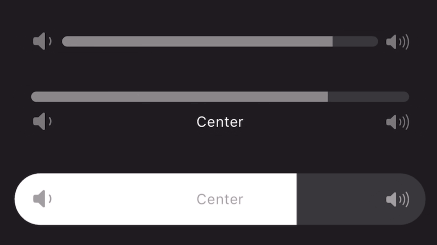
A continuous or segmented slider widget inspired by the volume slider in the Apple Music app. This widget can be used with little to no setup but is still fully customizable!
Animated gif of slider being used Animated gif of slider being used Animated gif of slider being usedUse the stock slider or customize:
Add to your dependencies:
dependencies:
  interactive_slider: ^0.5.0
Then import:
import 'package:interactive_slider/interactive_slider.dart';
InteractiveSlider(
  startIcon: const Icon(CupertinoIcons.volume_down),
  centerIcon: const Text('Center'),
  endIcon: const Icon(CupertinoIcons.volume_up),
  min: 1.0,
  max: 15.0,
  onChanged: (value) => setState(() => _value = value),
)
Please report any bugs and open any pull requests via GitHub.