
 v0.0.5
glossy
Glossy: 현대적인 앱 디자인과 세련된 사용자 인터페이스에 적합한 슬림한 글래스모픽 UI 효과를 만들기 위한 Flutter 패키지입니다.
115좋아요 1.6천30일 다운로드140Pub 점수
AndroidiOSWebmacOSWindowsLinux
이것은 제가 만든 글래스모픽 UI 컴포넌트를 만들기 위한 플러터 패키지입니다. 이 종속성을 프로젝트에 추가하려면 flutter pub add glossy를 실행하세요. 자세한 정보는 ReadMe 파일을 참조하세요.

{"sdk":"flutter"}{"sdk":"flutter"}^2.0.0아래는 영문 원문 스냅샷입니다. 최신 내용은 GitHub에서 확인하세요.
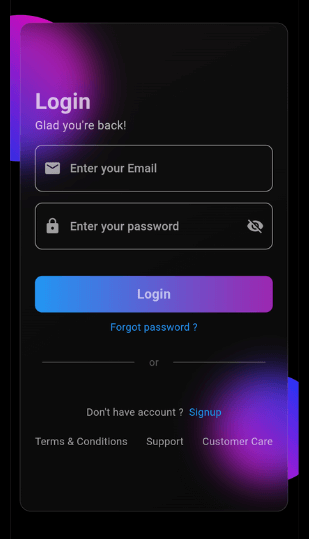
App Screenshot
This Flutter package allows you to easily create glass morphism effects in your Flutter applications. Glass morphism is a design trend that involves using blurred, semi-transparent elements to create a frosted glass-like effect.
To use this package, add glossy as a dependency in your pubspec.yaml file:
dependencies:
  flutter:
    sdk: flutter
  glossy: ^0.0.5
Open your termilar in the project level and run this command.
flutter pub add glossy
You can use the GlossyContainer widget provided by this package to create glass morphism effects. Here's a basic example:
import 'package:flutter/material.dart';
import 'package:glossy/glossy.dart';

void main() {
  runApp(const MyApp());
}

class MyApp extends StatelessWidget {
  const MyApp({super.key});

  @override
  Widget build(BuildContext context) {
    return MaterialApp(
      home: Scaffold(
        backgroundColor: Colors.black,
        appBar: AppBar(
          title: const Text('Glass Morphism Example'),
        ),
        body: Center(
          child: SizedBox(
            width: 300,
            height: 300,
            child: Stack(
              children: [
                Container(
                  height: 140,
                  width: 140,
                  decoration: (BoxDecoration(
                      color: Colors.purple,
                      borderRadius: BorderRadius.circular(70))),
                ),
                Align(
                  alignment: Alignment.bottomRight,
                  child: Container(
                    height: 140,
                    width: 140,
                    decoration: (BoxDecoration(
                        color: Colors.purple,
                        borderRadius: BorderRadius.circular(70))),
                  ),
                ),
                Align(
                  alignment: Alignment.center,
                  child: GlossyContainer(
                    width: 200,
                    height: 200,
                    borderRadius: BorderRadius.circular(12),
                    child: const Center(
                      child: Text(
                        'Glass Morphism',
                        style: TextStyle(
                          fontSize: 20,
                          fontWeight: FontWeight.bold,
                          color: Colors.white,
                        ),
                      ),
                    ),
                  ),
                ),
              ],
            ),
          ),
        ),
      ),
    );
  }
}
width: The width of the container required.height: The height of the container required.borderRadius: The border radius of the container.blur: The amount of blur to apply to the container.child: The widget placed inside the glass container.color: Background color of the container.opacity: Opacity of the container.strengthX: Strength of blur in the horizontal direction.strengthY: Strength of blur in the vertical direction.border: Border of the container.blendMode: Blend mode for applying filter.gradient: Gradient of the container.boxShadow: Box shadows for the container.image: Background image of the container.imageOpacity: Opacity of the background image.If you find this project helpful and would like to support its development, you can connect with me on social media:
Your support and feedback are greatly appreciated and will help in further improving this project.