
 v2.1.0+1
rotated_corner_decoration
RotatedCornerDecoration 패키지는 코너 배지를 생성하고 적용하기 위해 개발되었습니다. TextSpans의 자동 회전 기능을 제공합니다.
113좋아요 4630일 다운로드150Pub 점수
AndroidiOSWebmacOSWindowsLinux
회전된 TextSpan을 사용하여 모서리 장식을 만드는 Flutter 패키지

{"sdk":"flutter"}아래는 영문 원문 스냅샷입니다. 최신 내용은 GitHub에서 확인하세요.
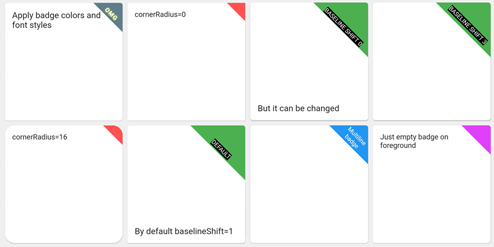
Take a look at the provided example application for how to use the CornerDecoration.
screenshot1678647469887
Container(
  foregroundDecoration: RotatedCornerDecoration.withColor(
    color: Color(0xffffd700),
    badgeSize: Size(16, 16),
  ),
),
screenshot1678647470825
Container(
  foregroundDecoration: RotatedCornerDecoration.withColor(
    color: Colors.red,
    spanBaselineShift: 4,
    badgeSize: Size(64, 64),
    badgeCornerRadius: Radius.circular(8),
    badgePosition: BadgePosition.topStart,
    textSpan: TextSpan(
      text: 'OMG',
      style: TextStyle(
        color: Colors.white,
        fontSize: 12,
        letterSpacing: 1,
        fontWeight: FontWeight.bold,
        shadows: [
          BoxShadow(color: Colors.yellowAccent, blurRadius: 8),
        ],
      ),
    ),
  ),
),
screenshot1678647471437
Container(
  foregroundDecoration: RotatedCornerDecoration.withColor(
    color: Colors.blue,
    badgeSize: Size(64, 64),
    textSpan: TextSpan(
      text: 'Multiline\nbadge',
      style: TextStyle(fontSize: 10),
    ),
  ),
),
screenshot1678647472293
Container(
  foregroundDecoration: RotatedCornerDecoration.withColor(
    color: Colors.black87,
    badgeSize: Size(64, 64),
    spanBaselineShift: 2,
    textSpan: TextSpan(
      children: [
        TextSpan(
          text: 'LOREM\n',
          style: TextStyle(
            fontSize: 10,
            fontWeight: FontWeight.bold,
            color: Colors.redAccent,
          ),
        ),
        TextSpan(
          text: 'IPSUM',
          style: TextStyle(
            fontSize: 7,
            fontStyle: FontStyle.italic,
            letterSpacing: 5,
            color: Colors.yellow,
          ),
        ),
      ],
    ),
  ),
),
screenshot1678647473029
Container(
  foregroundDecoration: RotatedCornerDecoration.withColor(
    color: Colors.brown,
    badgeSize: Size(112, 56),
    textSpan: TextSpan(
      text: 'WEIRD BADGE',
      style: TextStyle(fontSize: 10),
    ),
  ),
),
screenshot1678647473739
Container(
  foregroundDecoration: RotatedCornerDecoration.withColor(
    color: Colors.blueGrey,
    badgeSize: Size(64, 64),
    textSpan: TextSpan(
      text: 'WOW',
      style: TextStyle(fontSize: 10),
    ),
    spanHorizontalOffset: -12,
  ),
),
screenshot1678647478380
Container(
  foregroundDecoration: RotatedCornerDecoration.withColor(
    color: Colors.green,
    badgeSize: Size(64, 64),
    textSpan: TextSpan(
      text: 'SHIFT 1',
      style: TextStyle(fontSize: 10, backgroundColor: Colors.black),
    ),
  ),
),
screenshot1678647479092
Container(
  foregroundDecoration: RotatedCornerDecoration.withColor(
    color: Colors.green,
    badgeSize: Size(64, 64),
    spanBaselineShift: 3,
    textSpan: TextSpan(
      text: 'SHIFT 4',
      style: TextStyle(fontSize: 10, backgroundColor: Colors.black),
    ),
  ),
),
screenshot1678647479917
Container(
  foregroundDecoration: RotatedCornerDecoration.withGradient(
    gradient: LinearGradient(
      begin: Alignment.topRight,
      end: Alignment.bottomLeft,
      colors: [Colors.blue, Colors.lightGreenAccent],
    ),
    badgeSize: Size(64, 64),
  ),
  decoration: RotatedCornerDecoration.withGradient(
    badgePosition: BadgePosition.topStart,
    gradient: LinearGradient(
      begin: Alignment.topLeft,
      end: Alignment.topRight,
      stops: [0, 0.5, 1],
      colors: [
        Colors.purpleAccent,
        Colors.amber,
        Colors.blue,
      ],
    ),
    badgeSize: Size(64, 64),
  ),
),
screenshot1678647480605
Container(
  foregroundDecoration: RotatedCornerDecoration.withGradient(
    gradient: RadialGradient(
      center: Alignment.topRight,
      radius: 1.5,
      stops: const [0, 0.25, 0.5],
      colors: [
        Colors.redAccent,
        Colors.redAccent.withOpacity(0.5),
        Colors.redAccent.withOpacity(0),
      ],
    ),
    badgeSize: const Size(64, 64),
  ),
  decoration: RotatedCornerDecoration.withGradient(
    badgePosition: BadgePosition.topStart,
    gradient: SweepGradient(
      center: const FractionalOffset(0.27, -0.65),
      colors: List.generate(360, _generator),
    ),
    badgeSize: const Size(64, 64),
  ),
),
screenshot1678647483564
Container(
  foregroundDecoration: RotatedCornerDecoration.withColor(
    color: Colors.lightBlue,
    badgeSize: Size(64, 64),
    badgeShadow: BadgeShadow(color: Colors.black, elevation: 4),
  ),
),
screenshot1678647484300
Container(
  foregroundDecoration: RotatedCornerDecoration.withColor(
    color: Colors.indigo,
    badgeSize: Size(64, 64),
    badgePosition: BadgePosition.bottomStart,
    textDirection: TextDirection.ltr,
  ),
),
screenshot1678647485147
Container(
  foregroundDecoration: RotatedCornerDecoration.withColor(
    color: Colors.indigo,
    badgeSize: Size(64, 64),
    badgePosition: BadgePosition.bottomStart,
    textDirection: TextDirection.rtl,
  ),
),
EXPERIMENTAL FEATURE!
use isEmoji: true to disable span rotating
you can shift span position with spanHorizontalOffset and TextStyle.height parameters
screenshot1678649657350
Container(
  foregroundDecoration: RotatedCornerDecoration.withColor(
    color: Colors.purple,
    badgeSize: Size(64, 64),
    isEmoji: true,
    textSpan: TextSpan(
      text: '🤮',
      style: TextStyle(fontSize: 20, height: 1.7),
    ),
  ),
),