연결된 소스 저장소의 README 원문 스냅샷입니다. 최신 내용은 저장소에서 확인하세요.
Pay attention!
If you need a regular (not rotated) text at the corner of widgets please consider to use Stack with Containers and Text widgets.
This package was developed to provide auto rotation of TextSpans.
Example
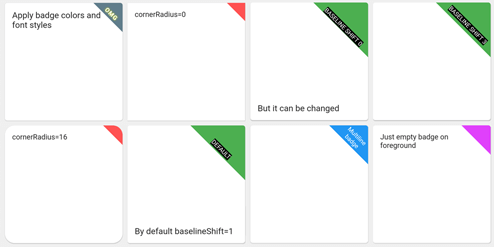
Take a look at the provided example application for how to use the CornerDecoration.
How to use
Container (
foregroundDecoration: RotatedCornerDecoration .withColor (
color: Color (0xffffd700 ),
badgeSize: Size (16 , 16 ),
),
),
Container (
foregroundDecoration: RotatedCornerDecoration .withColor (
color: Colors .red,
spanBaselineShift: 4 ,
badgeSize: Size (64 , 64 ),
badgeCornerRadius: Radius .circular (8 ),
badgePosition: BadgePosition .topStart,
textSpan: TextSpan (
text: 'OMG' ,
style: TextStyle (
color: Colors .white,
fontSize: 12 ,
letterSpacing: 1 ,
fontWeight: FontWeight .bold,
shadows: [
BoxShadow (color: Colors .yellowAccent, blurRadius: 8 ),
],
),
),
),
),
Container (
foregroundDecoration: RotatedCornerDecoration .withColor (
color: Colors .blue,
badgeSize: Size (64 , 64 ),
textSpan: TextSpan (
text: 'Multiline\nbadge' ,
style: TextStyle (fontSize: 10 ),
),
),
),
Container (
foregroundDecoration: RotatedCornerDecoration .withColor (
color: Colors .black87,
badgeSize: Size (64 , 64 ),
spanBaselineShift: 2 ,
textSpan: TextSpan (
children: [
TextSpan (
text: 'LOREM\n' ,
style: TextStyle (
fontSize: 10 ,
fontWeight: FontWeight .bold,
color: Colors .redAccent,
),
),
TextSpan (
text: 'IPSUM' ,
style: TextStyle (
fontSize: 7 ,
fontStyle: FontStyle .italic,
letterSpacing: 5 ,
color: Colors .yellow,
),
),
],
),
),
),
Container (
foregroundDecoration: RotatedCornerDecoration .withColor (
color: Colors .brown,
badgeSize: Size (112 , 56 ),
textSpan: TextSpan (
text: 'WEIRD BADGE' ,
style: TextStyle (fontSize: 10 ),
),
),
),
Container (
foregroundDecoration: RotatedCornerDecoration .withColor (
color: Colors .blueGrey,
badgeSize: Size (64 , 64 ),
textSpan: TextSpan (
text: 'WOW' ,
style: TextStyle (fontSize: 10 ),
),
spanHorizontalOffset: -12 ,
),
),
Container (
foregroundDecoration: RotatedCornerDecoration .withColor (
color: Colors .green,
badgeSize: Size (64 , 64 ),
textSpan: TextSpan (
text: 'SHIFT 1' ,
style: TextStyle (fontSize: 10 , backgroundColor: Colors .black),
),
),
),
Container (
foregroundDecoration: RotatedCornerDecoration .withColor (
color: Colors .green,
badgeSize: Size (64 , 64 ),
spanBaselineShift: 3 ,
textSpan: TextSpan (
text: 'SHIFT 4' ,
style: TextStyle (fontSize: 10 , backgroundColor: Colors .black),
),
),
),
Container (
foregroundDecoration: RotatedCornerDecoration .withGradient (
gradient: LinearGradient (
begin: Alignment .topRight,
end: Alignment .bottomLeft,
colors: [Colors .blue, Colors .lightGreenAccent],
),
badgeSize: Size (64 , 64 ),
),
decoration: RotatedCornerDecoration .withGradient (
badgePosition: BadgePosition .topStart,
gradient: LinearGradient (
begin: Alignment .topLeft,
end: Alignment .topRight,
stops: [0 , 0.5 , 1 ],
colors: [
Colors .purpleAccent,
Colors .amber,
Colors .blue,
],
),
badgeSize: Size (64 , 64 ),
),
),
Container (
foregroundDecoration: RotatedCornerDecoration .withGradient (
gradient: RadialGradient (
center: Alignment .topRight,
radius: 1.5 ,
stops: const [0 , 0.25 , 0.5 ],
colors: [
Colors .redAccent,
Colors .redAccent.withOpacity (0.5 ),
Colors .redAccent.withOpacity (0 ),
],
),
badgeSize: const Size (64 , 64 ),
),
decoration: RotatedCornerDecoration .withGradient (
badgePosition: BadgePosition .topStart,
gradient: SweepGradient (
center: const FractionalOffset (0.27 , -0.65 ),
colors: List .generate (360 , _generator),
),
badgeSize: const Size (64 , 64 ),
),
),
Container (
foregroundDecoration: RotatedCornerDecoration .withColor (
color: Colors .lightBlue,
badgeSize: Size (64 , 64 ),
badgeShadow: BadgeShadow (color: Colors .black, elevation: 4 ),
),
),
Container (
foregroundDecoration: RotatedCornerDecoration .withColor (
color: Colors .indigo,
badgeSize: Size (64 , 64 ),
badgePosition: BadgePosition .bottomStart,
textDirection: TextDirection .ltr,
),
),
Container (
foregroundDecoration: RotatedCornerDecoration .withColor (
color: Colors .indigo,
badgeSize: Size (64 , 64 ),
badgePosition: BadgePosition .bottomStart,
textDirection: TextDirection .rtl,
),
),
EXPERIMENTAL FEATURE!
use isEmoji: true to disable span rotatingspanHorizontalOffset and TextStyle.height parameters
Container (
foregroundDecoration: RotatedCornerDecoration .withColor (
color: Colors .purple,
badgeSize: Size (64 , 64 ),
isEmoji: true ,
textSpan: TextSpan (
text: '🤮' ,
style: TextStyle (fontSize: 20 , height: 1.7 ),
),
),
),