
 v0.1.0
media_query_preview
이 패키지는 사용자 정의 기기, 밝기 및 텍스트 크기를 지원하여 다양한 기기와 조건에서 UI 미리보기를 가능하게 합니다. 개발용이며, 생산 환경에는 적합하지 않습니다.
3좋아요 930일 다운로드140Pub 점수
AndroidiOSWebmacOSWindowsLinux
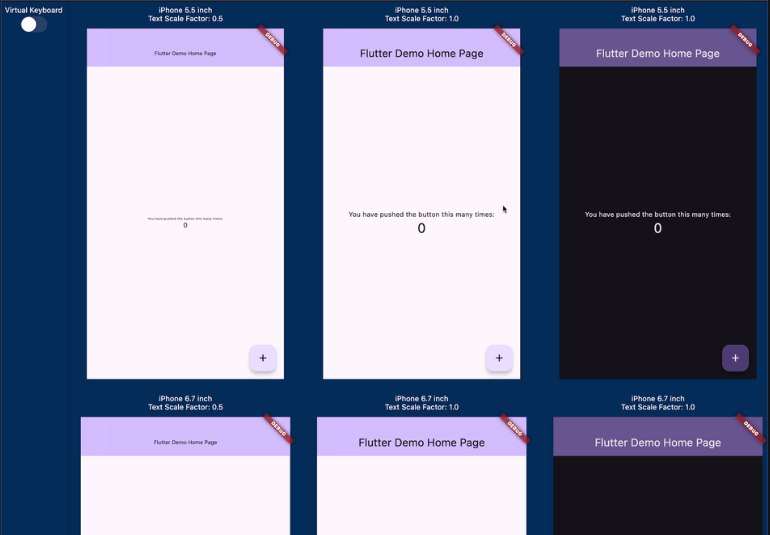
이 패키지는 다양한 기기의 다른 화면 크기, 텍스트 확대 비율 및 밝기에서 구현된 UI가 어떻게 보이는지 미리 확인할 수 있도록 도와줍니다.

{"sdk":"flutter"}^0.3.1^0.6.4{"sdk":"flutter"}^5.1.0아래는 영문 원문 스냅샷입니다. 최신 내용은 GitHub에서 확인하세요.
pub package GitHub deployments
Have you ever experienced your UI breaking when the font size is too large or the screen size of the device is small? Checking for these issues can be a hassle.
This package allows you to preview how your implemented UI will appear on various devices with different screen sizes, text scales, and brightness.
It was inspired by device_preview.
Media Query Preview
This package provides the following features:
PreviewDevice.iPhone5_5inch and PreviewDevice.android6_7inch, you can create custom PreviewDevice instances.Check out the demo at https://kingu-dev.github.io/media_query_preview.
If you are using riverpod, you can do the following.
// Initialize Provider
final container = ProviderContainer();

final previewDevices = [
  [
    PreviewDevice.iPhone5_5inch(
      textScaleFactor: 0.5,
    ),
    PreviewDevice.iPhone5_5inch(),
    PreviewDevice.iPhone5_5inch(
      brightness: Brightness.dark,
    ),
    PreviewDevice.iPhone5_5inch(
      textScaleFactor: 1.5,
    ),
  ],
  [
    PreviewDevice.iPhone6_7inch(
      textScaleFactor: 0.5,
    ),
    PreviewDevice.iPhone6_7inch(),
    PreviewDevice.iPhone6_7inch(
      brightness: Brightness.dark,
    ),
    PreviewDevice.iPhone6_7inch(
      textScaleFactor: 1.5,
    ),
  ],
  [
    PreviewDevice.android6_7inch(
      textScaleFactor: 0.5,
    ),
    PreviewDevice.android6_7inch(),
    PreviewDevice.android6_7inch(
      brightness: Brightness.dark,
    ),
    PreviewDevice.android6_7inch(
      textScaleFactor: 1.5,
    ),
  ]
];

runApp(
  MediaQueryPreview(
    previewDevices: previewDevices,
    builder: (_, previewDevice) {
      // If you want to change the theme based on the targetPlatform,
      // you can get the targetPlatform from [previewDevice.targetPlatform].
      return UncontrolledProviderScope(
        container: container,
        child: const MyApp(),
      );
    },
  ),
);
If you are not using riverpod, it is even simpler.
runApp(
  MediaQueryPreview(
    previewDevices: previewDevices,
    builder: (_, previewDevice) {
      // If you want to change the theme based on the targetPlatform,
      // you can get the targetPlatform from [previewDevice.targetPlatform].
      return const MyApp();
    },
  ),
);
GlobalKey with global variables, they will be shared across each preview, which can lead to errors or unintended behavior. Since the widget trees of each preview are independent, it is recommended to generate a separate GlobalKey for each tree.If you have Apple Vision Pro, you can use it as a "Designed for iPad" app. This is the future!
Vision Pro