
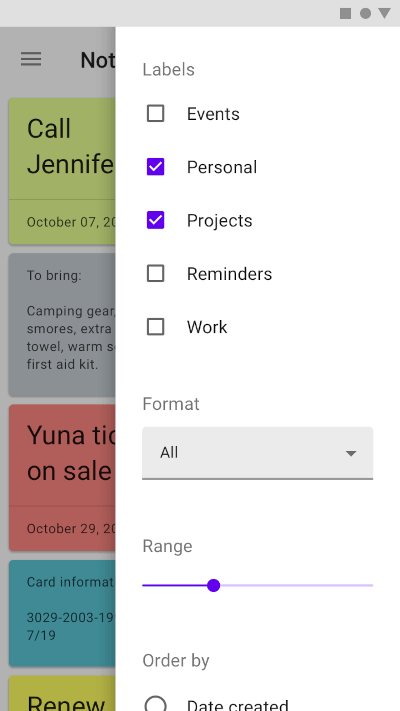
 v0.0.1
modal_side_sheet
Flutter 프로젝트에 Material 사이드 시트를 사용하기 위한 패키지입니다.
70좋아요 3.2천30일 다운로드160Pub 점수
AndroidiOSWebmacOSWindowsLinux
Flutter 프로젝트에 Material 사이드 시트를 사용할 수 있는 패키지입니다. 사이드 시트에 대해 자세히 알아보려면 Material.io를 방문하세요.

{"sdk":"flutter"}{"sdk":"flutter"}아래는 영문 원문 스냅샷입니다. 최신 내용은 GitHub에서 확인하세요.
A package to use Material side sheet into your Flutter project. Learn more about side sheet at Material.io
| Android | iOS | MacOS | Web | Linux | Windows |
|---|---|---|---|---|---|
| ✔️ | ✔️ | ✔️ | ✔️ | ✔️ | ✔️ |
This package comes with two types of side sheets, Standard side sheet and Modal side sheet.
Modal side sheets present content while blocking interaction with the rest of the screen. This side sheet generally used in mobile devices as per recommended by Material Design by Google. See also : Modal Side Sheet
Modal Side Sheet
You can use it by calling showModalSideSheet() function into your Flutter project.
ElevatedButton(
    onPressed: () {
        showModalSideSheet(
            context: context,
            ignoreAppBar: false,
            body: ListView.builder(
                itemBuilder: (context, index) {
                    return ListTile(
                        leading: Icon(Icons.face),
                        title: Text("I am on $index index"),
                        trailing: Icon(Icons.safety_divider),
                    );
                },
            ));
        },
    child: Text("Show Modal Side Sheet")),
Standard side sheets co-exist with the screen’s primary UI region, which allows viewing and interaction with both surfaces. They are used only on tablet and desktop. See also: Standard Side Sheet
Standard Side Sheet
This side sheet can be used with BodyWithSideSheet widget.
Just place this widget into your Scaffold's body property.
@override
Widget build(BuildContext context){
    return Scaffold(
        appBar:AppBar(title:Text("Standard Side Sheet Demo")),
        body:BodyWithSideSheet(
            body:Container(
                child:Text("My App Body"),
            ),
            sheetBody:Container(
                child:Text("My Sheet Body"),
            ),
            show:true
        ),
    );
}
This is fully open source project so you are welcome to sontribute to any features or bug-fixing.
Don't forgot to star and fork the repository and make your first pull request.
Project released under MIT License.