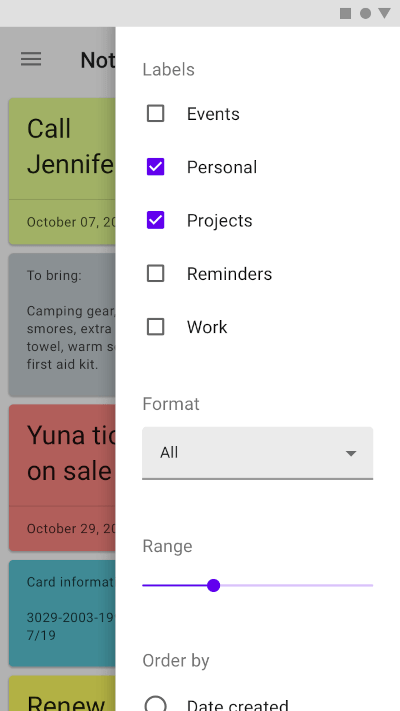
다중 플랫폼에서 Material Design 사이드 시트를 애플리케이션에 통합할 수 있도록 해주는 Flutter 패키지입니다. Android, iOS, 웹, macOS, Windows, Linux와 호환되는 사용자 정의가 가능하고 반응형 사이드 시트 위젯을 제공합니다. 모달 방식으로 보조 콘텐츠나 작업을 표시하여 현재 화면을 떠나지 않고도 사용자 상호작용을 향상시킬 수 있습니다. Material 디자인 원칙에 따라 구현되어 네이티브 플랫폼의 동작과 일관성을 유지합니다.
사용 사례
모달 오버레이에서 세부 정보 표시
작업 메뉴 또는 옵션 표시
임시로 양식 또는 입력 필드 표시
슬라이드 인 패널을 통한 탐색 향상
전체 화면 전환 없이 맥락 기반 컨트롤 제공
주요 기능
Material Design 준수 사이드 시트
크로스 플랫폼 지원 (Android, iOS, Web, macOS, Windows, Linux)
사용자 정의 가능한 외관 및 동작
pub add 명령을 통한 간편한 통합
지속 및 사라지는 모드 모두를 지원합니다
적합한 대상
일관된 UI를 사용하여 크로스 플랫폼 앱을 개발하는 개발자
Material Design 가이드라인을 사용하는 팀
임시 콘텐츠 오버레이가 필요한 앱
경량 모달이 필요한 프로젝트
사용자 경험 중심의 인터페이스에 슬라이딩 패널 포함
고려 사항
비 매터리얼 테마에 대해 추가 스타일링이 필요할 수 있습니다
대규모 콘텐츠 목록에서의 성능 영향
완전히 사용자 지정 가능한 위젯에 비해 사용자 지정이 제한됨
복잡한 탐색 구조에 적합하지 않음
터치 장치에서 제스처를 조심스럽게 다뤄야 합니다
원본 README
연결된 소스 저장소의 README 원문 스냅샷입니다. 최신 내용은 저장소에서 확인하세요.
Side Sheet
A package to use Material side sheet into your Flutter project.
Learn more about side sheet at Material.io
Platform Support
Android
iOS
MacOS
Web
Linux
Windows
✔️
✔️
✔️
✔️
✔️
✔️
Getting Started
This package comes with two types of side sheets, Standard side sheet and Modal side sheet.
Modal Side Sheet
Modal side sheets present content while blocking interaction with the rest of the screen.
This side sheet generally used in mobile devices as per recommended by Material Design by Google.
See also : Modal Side Sheet
You can use it by calling showModalSideSheet() function into your Flutter project.
Standard side sheets co-exist with the screen’s primary UI region, which allows viewing and interaction with both surfaces. They are used only on tablet and desktop.
See also: Standard Side Sheet
This side sheet can be used with BodyWithSideSheet widget.
Just place this widget into your Scaffold's body property.