

 v3.0.0
country_currency_pickers
국가, 코드, 깃발, 화폐 및 여러 가지 선택 방법을 제공합니다... 하나의 위젯만 멀지 않은 곳에...
39좋아요 2.4천30일 다운로드150Pub 점수
AndroidiOSWebmacOSWindowsLinux
국가, 코드, 국기 및 선택하는 여러 방법을 제공합니다… 한 위젯만 멀리…

아래는 영문 원문 스냅샷입니다. 최신 내용은 GitHub에서 확인하세요.
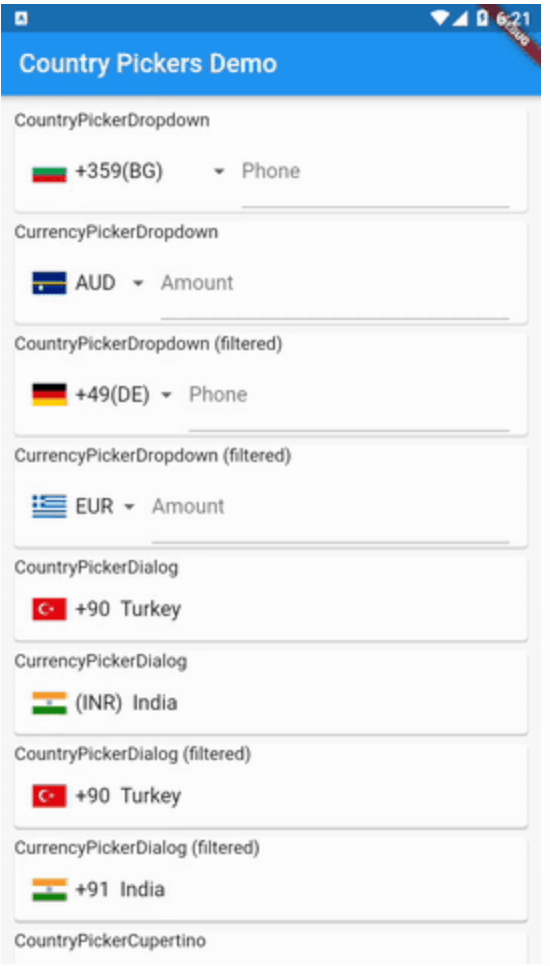
Countries, codes, flags, currency and several way of picking them at your service...one widget away...

 CountryPickerDropdown(
            initialValue: 'tr',
            itemBuilder: _buildDropdownItem,
            onValuePicked: (Country country) {
              print("${country.name}");
            },
          ),
 Widget _buildDropdownItem(Country country) => Container(
        child: Row(
          children: <Widget>[
            CountryPickerUtils.getDefaultFlagImage(country),
            SizedBox(
              width: 8.0,
            ),
            Text("+${country.phoneCode}(${country.isoCode})"),
          ],
        ),
      );
 CurrencyPickerDropdown(
            initialValue: 'INR',
            itemBuilder: _buildCurrencyDropdownItem,
            onValuePicked: (Country country) {
              print("${country.name}");
            },
          ),
 Widget _buildCurrencyDropdownItem(Country country) => Container(
        child: Row(
          children: <Widget>[
            CountryPickerUtils.getDefaultFlagImage(country),
            SizedBox(
              width: 8.0,
            ),
            Text("${country.currencyCode}"),
          ],
        ),
      );
void _openCountryPickerDialog() => showDialog(
        context: context,
        builder: (context) => Theme(
            data: Theme.of(context).copyWith(primaryColor: Colors.pink),
            child: CountryPickerDialog(
                titlePadding: EdgeInsets.all(8.0),
                searchCursorColor: Colors.pinkAccent,
                searchInputDecoration: InputDecoration(hintText: 'Search...'),
                isSearchable: true,
                title: Text('Select your phone code'),
                onValuePicked: (Country country) =>
                    setState(() => _selectedDialogCountry = country),
                itemBuilder: _buildDialogItem)),
      );
void _openCurrencyPickerDialog() => showDialog(
        context: context,
        builder: (context) => Theme(
            data: Theme.of(context).copyWith(primaryColor: Colors.pink),
            child: CurrencyPickerDialog(
                titlePadding: EdgeInsets.all(8.0),
                searchCursorColor: Colors.pinkAccent,
                searchInputDecoration: InputDecoration(hintText: 'Search...'),
                isSearchable: true,
                title: Text('Select your Currency'),
                onValuePicked: (Country country) =>
                    setState(() => _selectedDialogCountry = country),
                itemBuilder: _buildCurrencyDialogItem)),
      );
 void _openCupertinoCountryPicker() => showCupertinoModalPopup<void>(
      context: context,
      builder: (BuildContext context) {
        return CountryPickerCupertino(
          pickerSheetHeight: 300.0,
          onValuePicked: (Country country) =>
              setState(() => _selectedCupertinoCountry = country),
        );
      });
 void _openCupertinoCurrencyPicker() => showCupertinoModalPopup<void>(
      context: context,
      builder: (BuildContext context) {
        return CurrencyPickerCupertino(
          pickerSheetHeight: 300.0,
          onValuePicked: (Country country) =>
              setState(() => _selectedCupertinoCountry = country),
        );
      });
Forked from country_pickers repo. Thanks goes to country-flags repo for the flag image assets. Learn Pain Less | Code Academy (learn to code)
의존성 목록 2 개
{"sdk":"flutter"}{"sdk":"flutter"}사용 목적에 따라 검색하고 개발 활동을 비교한 뒤 원본 저장소에서 요구 사항을 확인하세요.
“A repository is the most basic element of GitHub.”
GitHub Docs — About repositories ↗