

 v3.1.9
flutter_swipe_action_cell
iOS 스타일의 셀 스와이프 액션 효과를 포함한 멋진 UI 패키지입니다. 이 패키지를 사용하여 iOS 스타일의 tableView 셀 스와이프 액션을 구현할 수 있습니다
464좋아요 3.2만30일 다운로드150Pub 점수
AndroidiOSWebmacOSWindowsLinux
Flutter UI 패키지는 앞쪽과 뒤쪽 스와이프 액션 메뉴를 가진 셀 위젯을 제공합니다.

아래는 영문 원문 스냅샷입니다. 최신 내용은 GitHub에서 확인하세요.
A package that can give you a cell that can be swiped, effect is like iOS native
| Alipay | |
|---|---|
 |
 |
flutter_swipe_action_cell: ^3.1.9
| Simple delete | Perform first action when full swipe |
|---|---|
 |
 |
| Delete with animation | More than one action |
|---|---|
 |
 |
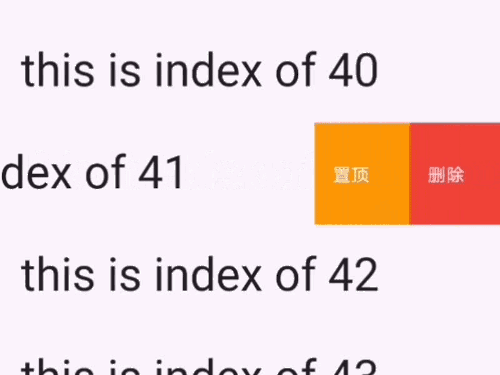
| Effect like WeChat(confirm delete) | Automatically adjust the button width |
|---|---|
 |
 |
| Effect like WeChat collection Page: Customize your button shape |
|---|

| With leading Action and trailing action |
|---|
 |
| Edit mode |
|---|
 |
And you can find full example code in example page
 SwipeActionCell(
      key: ObjectKey(list[index]), /// this key is necessary
      trailingActions: <SwipeAction>[
        SwipeAction(
            title: "delete",
            onTap: (CompletionHandler handler) async {
              list.removeAt(index);
              setState(() {});
            },
            color: Colors.red),
      ],
      child: Padding(
        padding: const EdgeInsets.all(8.0),
        child: Text("this is index of ${list[index]}",
            style: TextStyle(fontSize: 40)),
      ),
    );
SwipeActionCell(
      /// this key is necessary
      key: ObjectKey(list[index]),
      trailingActions: <SwipeAction>[
        SwipeAction(
            /// this is the same as iOS native
            performsFirstActionWithFullSwipe: true,
            title: "delete",
            onTap: (CompletionHandler handler) async {
              list.removeAt(index);
              setState(() {});
            },
            color: Colors.red),
      ],
      child: Padding(
        padding: const EdgeInsets.all(8.0),
        child: Text("this is index of ${list[index]}",
            style: TextStyle(fontSize: 40)),
      ),
    );
SwipeActionCell(
     key: ObjectKey(list[index]),
     trailingActions: <SwipeAction>[
       SwipeAction(
           title: "delete",
           onTap: (CompletionHandler handler) async {

             /// await handler(true) : will delete this row
             /// And after delete animation,setState will called to
             /// sync your data source with your UI

             await handler(true);
             list.removeAt(index);
             setState(() {});
           },
           color: Colors.red),
     ],
     child: Padding(
       padding: const EdgeInsets.all(8.0),
       child: Text("this is index of ${list[index]}",
           style: TextStyle(fontSize: 40)),
     ),
   );
SwipeActionCell(
     key: ObjectKey(list[index]),
     trailingActions: <SwipeAction>[
       SwipeAction(
           title: "delete",
           onTap: (CompletionHandler handler) async {
             await handler(true);
             list.removeAt(index);
             setState(() {});
           },
           color: Colors.red),

       SwipeAction(
           widthSpace: 120,
           title: "popAlert",
           onTap: (CompletionHandler handler) async {
             /// false means that you just do nothing,it will close
             /// action buttons by default
             handler(false);
             showCupertinoDialog(
                 context: context,
                 builder: (c) {
                   return CupertinoAlertDialog(
                     title: Text('ok'),
                     actions: <Widget>[
                       CupertinoDialogAction(
                         child: Text('confirm'),
                         isDestructiveAction: true,
                         onPressed: () {
                           Navigator.pop(context);
                         },
                       ),
                     ],
                   );
                 });
           },
           color: Colors.orange),
     ],
     child: Padding(
       padding: const EdgeInsets.all(8.0),
       child: Text(
           "this is index of ${list[index]}",
           style: TextStyle(fontSize: 40)),
     ),
   );
return SwipeActionCell(
      key: ValueKey(list[index]),
      trailingActions: <SwipeAction>[
        SwipeAction(
          ///
          /// This attr should be passed to first action
          ///
          nestedAction: SwipeNestedAction(title: "确认删除"),
          title: "删除",
          onTap: (CompletionHandler handler) async {
            await handler(true);
            list.removeAt(index);
            setState(() {});
          },
          color: Colors.red,
        ),
        SwipeAction(
            title: "置顶",
            onTap: (CompletionHandler handler) async {
              /// false means that you just do nothing,it will close
              /// action buttons by default
              handler(false);
            },
            color: Colors.grey),
      ],
      child: Padding(
        padding: const EdgeInsets.all(8.0),
        child: Text("this is index of ${list[index]}",
            style: TextStyle(fontSize: 40)),
      ),
    );
/// To controller edit mode
SwipeActionEditController controller;

/// 在initState
@override
  void initState() {
    super.initState();
    controller = SwipeActionController();
  }
/// To get the selected rows index
List<int> selectedIndexes = controller.getSelectedIndexes();


/// open cell
controller.openCellAt(index: 2, trailing: true, animated: true);

/// close cell
controller.closeAllOpenCell();

/// whether any cell is currently open (e.g. to let a back gesture close it first)
bool hasOpen = controller.hasAnyOpenCell;

/// toggleEditingMode
controller.toggleEditingMode()

/// startEditMode
controller.startEditingMode()

/// stopEditMode
controller.stopEditingMode()

/// select cell
controller.selectCellAt(indexPaths:[1,2,3])

controller.deselectCellAt(indexPaths:[1,2,3])

/// pass your data length to selectedAll
controller.selectAll(30
)

/// deselect all cell
controller deselectAll()

ListView.builder(
        itemBuilder: (c, index) {
          return _item(index);
        },
        itemCount: list.length,
      );


 Widget _item(int index) {
     return SwipeActionCell(
       /// controller
       controller: controller,
       /// index is required if you want to enter edit mode
       index: index,
       key: ValueKey(list[index]),
       trailingActions: [
         SwipeAction(
             /// this is the same as iOS native
             performsFirstActionWithFullSwipe: true,
             onTap: (handler) async {
               await handler(true);
               list.removeAt(index);
               setState(() {});
             },
             title: "delete"),
       ],
       child: Padding(
         padding: const EdgeInsets.all(15.0),
         child: Text("This is index of ${list[index]}",
             style: TextStyle(fontSize: 35)),
       ),
     );
   }
Widget _item(int index) {
    return SwipeActionCell(
      key: ValueKey(list[index]),
      trailingActions: [
        SwipeAction(
            nestedAction: SwipeNestedAction(
              /// customize your nested action content
              content: Container(
                decoration: BoxDecoration(
                  borderRadius: BorderRadius.circular(30),
                  color: Colors.red,
                ),
                width: 130,
                height: 60,
                child: OverflowBox(
                  maxWidth: double.infinity,
                  child: Row(
                    mainAxisAlignment: MainAxisAlignment.center,
                    children: [
                      Icon(
                        Icons.delete,
                        color: Colors.white,
                      ),
                      Text('确认删除',
                          style: TextStyle(color: Colors.white, fontSize: 20)),
                    ],
                  ),
                ),
              ),
            ),

            /// you should set the default  bg color to transparent
            color: Colors.transparent,

            /// set content instead of title of icon
            content: _getIconButton(Colors.red, Icons.delete),
            onTap: (handler) async {
              list.removeAt(index);
              setState(() {});
            }),
        SwipeAction(
            content: _getIconButton(Colors.grey, Icons.vertical_align_top),
            color: Colors.transparent,
            onTap: (handler) {}),
      ],
      child: Padding(
        padding: const EdgeInsets.all(15.0),
        child: Text(
            "This is index of ${list[index]},Awesome Swipe Action Cell!! I like it very much!",
            style: TextStyle(fontSize: 25)),
      ),
    );
  }

  Widget _getIconButton(color, icon) {
    return Container(
      width: 50,
      height: 50,
      decoration: BoxDecoration(
        borderRadius: BorderRadius.circular(25),

        /// set you real bg color in your content
        color: color,
      ),
      child: Icon(
        icon,
        color: Colors.white,
      ),
    );
  }
Add a SwipeActionNavigatorObserver in MaterialApp's navigatorObservers
return MaterialApp(
  navigatorObservers: [SwipeActionNavigatorObserver()],
  ....
);
it means how you want control this cell after you tap it. If you don't want any animation, just don't call it and update your data and UI with setState()
If you want some animation:
handler(true) : Means this row will be deleted(You should call setState after it)
await handler(true) : Means that you will await the animation to complete(you should call setState after it so that you will get an animation)
handler(false) : means it will not delete this row.By default, it just close this cell's action buttons.
await handler(false) : means it will wait the close animation to complete.
I wrote them in my code with dart doc comments. You can read them in source code.
의존성 목록 2 개
{"sdk":"flutter"}{"sdk":"flutter"}사용 목적에 따라 검색하고 개발 활동을 비교한 뒤 원본 저장소에서 요구 사항을 확인하세요.
“A repository is the most basic element of GitHub.”
GitHub Docs — About repositories ↗