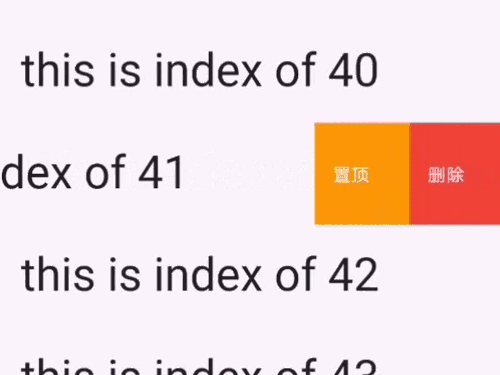
flutter_swipe_action_cell은 리스트 항목에서 iOS 스타일의 스와이프 액션을 가능하게 하는 Flutter 패키지로, 네이티브 iOS 테이블 뷰에서 발견되는 상호작용 행동을 모방합니다. 사용자는 리스트 셀을 수평으로 스와이프함으로써 액션 버튼을 표시할 수 있으며, 직관적인 제스처를 통해 사용자 인터랙션을 향상시킵니다. 이 패키지는 Android, iOS, 웹, macOS, Windows, Linux 등 여러 플랫폼을 지원하여 일관되고 완성도 높은 UI 경험을 원하는 크로스플랫폼 앱에 이상적입니다. 개발자는 앱의 디자인 언어에 맞게 스와이프 액션의 외관과 동작을 커스터마이징할 수 있습니다.
And you can find full example code in example page
Examples
Example 1: Simple delete the item in ListView
Tip: put the code in the itemBuilder of your ListView
SwipeActionCell(
key: ObjectKey(list[index]), /// this key is necessary
trailingActions: <SwipeAction>[
SwipeAction(
title: "delete",
onTap: (CompletionHandler handler) async {
list.removeAt(index);
setState(() {});
},
color: Colors.red),
],
child: Padding(
padding: constEdgeInsets.all(8.0),
child: Text("this is index of ${list[index]}",
style: TextStyle(fontSize: 40)),
),
);
Example 2: Perform first action when full swipe
SwipeActionCell(
/// this key is necessary
key: ObjectKey(list[index]),
trailingActions: <SwipeAction>[
SwipeAction(
/// this is the same as iOS native
performsFirstActionWithFullSwipe: true,
title: "delete",
onTap: (CompletionHandler handler) async {
list.removeAt(index);
setState(() {});
},
color: Colors.red),
],
child: Padding(
padding: constEdgeInsets.all(8.0),
child: Text("this is index of ${list[index]}",
style: TextStyle(fontSize: 40)),
),
);
Example 3: Delete with animation
SwipeActionCell(
key: ObjectKey(list[index]),
trailingActions: <SwipeAction>[
SwipeAction(
title: "delete",
onTap: (CompletionHandler handler) async {
/// await handler(true) : will delete this row/// And after delete animation,setState will called to /// sync your data source with your UIawaithandler(true);
list.removeAt(index);
setState(() {});
},
color: Colors.red),
],
child: Padding(
padding: constEdgeInsets.all(8.0),
child: Text("this is index of ${list[index]}",
style: TextStyle(fontSize: 40)),
),
);
Example 4: More than one action:
SwipeActionCell(
key: ObjectKey(list[index]),
trailingActions: <SwipeAction>[
SwipeAction(
title: "delete",
onTap: (CompletionHandler handler) async {
awaithandler(true);
list.removeAt(index);
setState(() {});
},
color: Colors.red),
SwipeAction(
widthSpace: 120,
title: "popAlert",
onTap: (CompletionHandler handler) async {
/// false means that you just do nothing,it will close/// action buttons by defaulthandler(false);
showCupertinoDialog(
context: context,
builder: (c) {
returnCupertinoAlertDialog(
title: Text('ok'),
actions: <Widget>[
CupertinoDialogAction(
child: Text('confirm'),
isDestructiveAction: true,
onPressed: () {
Navigator.pop(context);
},
),
],
);
});
},
color: Colors.orange),
],
child: Padding(
padding: constEdgeInsets.all(8.0),
child: Text(
"this is index of ${list[index]}",
style: TextStyle(fontSize: 40)),
),
);
Example 5:Delete like WeChat message page(need to confirm it:
returnSwipeActionCell(
key: ValueKey(list[index]),
trailingActions: <SwipeAction>[
SwipeAction(
////// This attr should be passed to first action///
nestedAction: SwipeNestedAction(title: "确认删除"),
title: "删除",
onTap: (CompletionHandler handler) async {
awaithandler(true);
list.removeAt(index);
setState(() {});
},
color: Colors.red,
),
SwipeAction(
title: "置顶",
onTap: (CompletionHandler handler) async {
/// false means that you just do nothing,it will close/// action buttons by defaulthandler(false);
},
color: Colors.grey),
],
child: Padding(
padding: constEdgeInsets.all(8.0),
child: Text("this is index of ${list[index]}",
style: TextStyle(fontSize: 40)),
),
);
Example 6:Edit mode(just like iOS native effect)
/// To controller edit modeSwipeActionEditController controller;
/// 在initState@overridevoidinitState() {
super.initState();
controller = SwipeActionController();
}
/// To get the selected rows indexList<int> selectedIndexes = controller.getSelectedIndexes();
/// open cell
controller.openCellAt(index: 2, trailing: true, animated: true);
/// close cell
controller.closeAllOpenCell();
/// whether any cell is currently open (e.g. to let a back gesture close it first)bool hasOpen = controller.hasAnyOpenCell;
/// toggleEditingMode
controller.toggleEditingMode()
/// startEditMode
controller.startEditingMode()
/// stopEditMode
controller.stopEditingMode()
/// select cell
controller.selectCellAt(indexPaths:[1,2,3])
controller.deselectCellAt(indexPaths:[1,2,3])
/// pass your data length to selectedAll
controller.selectAll(30
)
/// deselect all cell
controller deselectAll()
ListView.builder(
itemBuilder: (c, index) {
return_item(index);
},
itemCount: list.length,
);
Widget_item(int index) {
returnSwipeActionCell(
/// controller
controller: controller,
/// index is required if you want to enter edit mode
index: index,
key: ValueKey(list[index]),
trailingActions: [
SwipeAction(
/// this is the same as iOS native
performsFirstActionWithFullSwipe: true,
onTap: (handler) async {
awaithandler(true);
list.removeAt(index);
setState(() {});
},
title: "delete"),
],
child: Padding(
padding: constEdgeInsets.all(15.0),
child: Text("This is index of ${list[index]}",
style: TextStyle(fontSize: 35)),
),
);
}
Example 7:customize shape
Widget_item(int index) {
returnSwipeActionCell(
key: ValueKey(list[index]),
trailingActions: [
SwipeAction(
nestedAction: SwipeNestedAction(
/// customize your nested action content
content: Container(
decoration: BoxDecoration(
borderRadius: BorderRadius.circular(30),
color: Colors.red,
),
width: 130,
height: 60,
child: OverflowBox(
maxWidth: double.infinity,
child: Row(
mainAxisAlignment: MainAxisAlignment.center,
children: [
Icon(
Icons.delete,
color: Colors.white,
),
Text('确认删除',
style: TextStyle(color: Colors.white, fontSize: 20)),
],
),
),
),
),
/// you should set the default bg color to transparent
color: Colors.transparent,
/// set content instead of title of icon
content: _getIconButton(Colors.red, Icons.delete),
onTap: (handler) async {
list.removeAt(index);
setState(() {});
}),
SwipeAction(
content: _getIconButton(Colors.grey, Icons.vertical_align_top),
color: Colors.transparent,
onTap: (handler) {}),
],
child: Padding(
padding: constEdgeInsets.all(15.0),
child: Text(
"This is index of ${list[index]},Awesome Swipe Action Cell!! I like it very much!",
style: TextStyle(fontSize: 25)),
),
);
}
Widget_getIconButton(color, icon) {
returnContainer(
width: 50,
height: 50,
decoration: BoxDecoration(
borderRadius: BorderRadius.circular(25),
/// set you real bg color in your content
color: color,
),
child: Icon(
icon,
color: Colors.white,
),
);
}
Example 8:Close opening cell when navigator change its routes.
Add a SwipeActionNavigatorObserver in MaterialApp's navigatorObservers
About CompletionHandler in onTap function of SwipeAction
it means how you want control this cell after you tap it. If you don't want any animation, just don't call it and update
your data and UI with setState()
If you want some animation:
handler(true) : Means this row will be deleted(You should call setState after it)
await handler(true) : Means that you will await the animation to complete(you should call setState after it so that
you will get an animation)
handler(false) : means it will not delete this row.By default, it just close this cell's action buttons.
await handler(false) : means it will wait the close animation to complete.
About all parameter:
I wrote them in my code with dart doc comments. You can read them in source code.