

 v0.0.4
dragsheet
물리적이고 튀는 드래그 가능한 시트 및 모달용 플러터. 내 앱에서 겪은 공백을 메우기 위해 제작되었습니다.
4좋아요 5330일 다운로드160Pub 점수
AndroidiOSWebmacOSWindowsLinux
물리적이고 튀는 드래그 가능한 시트 및 모달용 플러터. 내 앱에서 겪은 공백을 메우기 위해 제작되었습니다.

아래는 영문 원문 스냅샷입니다. 최신 내용은 GitHub에서 확인하세요.
Simple Flutter package for creating bouncy, fun, and most importantly draggable sheets.
Developed because I wanted this for my own app, was familiar with the React Native versions of this, but couldn't find a matching one in the Flutter ecosystem.

|

|

|
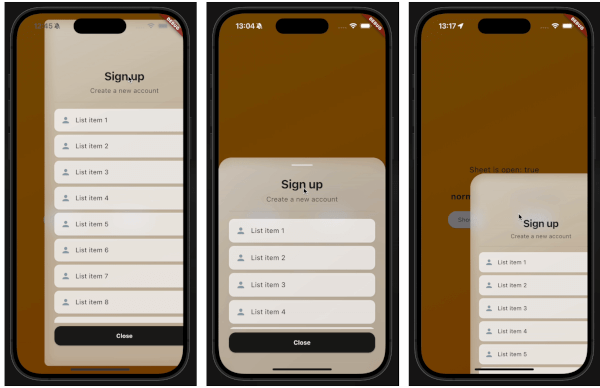
This demo "sign up" blurry sheet is not included with the package. I created it to demonstrate what you are capable of doing with the dragsheet package.
Initialize the controller.
final controller = DragSheetController();
Open YourWidget via the controller.
controller.show(
    context,
    (ctx) => YourWidget(),
),
If you want to close the sheet, use the controller.
controller.close();
If you want to listen to the state of the sheet, use the controller.
controller.addListener(() {
    print(controller.isOpen);
});
Remember to dispose of the controller when you're done with it.
@override
void dispose() {
    super.dispose();
    controller.dispose();
}
If you care about customization, you won't be disapointed. However, the defaults should be solid enough. The main properties to know about are shrinkWrap, which will make the dragsheet shrink to the size of the child you provide it, and if shrinkWrap is true, closeOnShrinkWrapTap, which will close the sheet when you tap outside of the sheet.
void show(
    BuildContext context,
    WidgetBuilder builder, {
    bool shrinkWrap = false,
    bool closeOnShrinkWrapTap = true,
    double minScale = 0.85,
    double maxScale = 1.0,
    double minRadius = 0.0,
    double maxRadius = 30.0,
    double minOpacity = 0.0,
    double maxOpacity = 0.5,
    Duration entranceDuration = const Duration(milliseconds: 200),
    Duration exitDuration = const Duration(milliseconds: 200),
    Duration gestureFadeDuration = const Duration(milliseconds: 200),
    Duration programmaticFadeDuration = const Duration(milliseconds: 200),
    double effectDistance = 220.0,
    BgOpacity? bgOpacity,
    double swipeVelocityMultiplier = 2.5,
    double swipeAccelerationThreshold = 50.0,
    double swipeAccelerationMultiplier = 12.0,
    double swipeMinVelocity = 1000.0,
    double swipeMaxVelocity = 10000.0,
    double swipeFriction = 0.09,
    VoidCallback? onShow,
    VoidCallback? onDismiss,
    Duration opacityDuration = const Duration(milliseconds: 200),
    ApplyBorderRadius applyBorderRadius = ApplyBorderRadius.toTop,
})
의존성 목록 3 개
{"sdk":"flutter"}{"sdk":"flutter"}^5.0.0사용 목적에 따라 검색하고 개발 활동을 비교한 뒤 원본 저장소에서 요구 사항을 확인하세요.
“A repository is the most basic element of GitHub.”
GitHub Docs — About repositories ↗