패키지, 저장소 및 앱 카테고리 검색

dragsheet 표지
패키지 상세v0.0.4

dragsheet

물리적이고 튀는 드래그 가능한 시트 및 모달용 플러터. 내 앱에서 겪은 공백을 메우기 위해 제작되었습니다.

AndroidiOSWebmacOSWindowsLinux
30일 다운로드
71
좋아요
4
Pub 점수
160

패키지 설치

flutter pub add dragsheet

패키지 개요

공개 정보를 바탕으로 생성한 선택 가이드입니다.

Dragsheet은 물리 기반의 탄성 있고 드래그 가능한 하단 시트와 모달을 제공하는 플러터 패키지입니다. 더 동적이고 반응성이 뛰어난 사용자 경험을 제공하도록 설계되었으며, 스프링과 같은 애니메이션을 통해 현실적인 드래그 상호작용을 추가함으로써 표준 플러터 하단 시트 구현에서의 공백을 메웁니다. 인터랙티브하고 제스처 기반의 패널이 필요한 앱에 이상적입니다. 자연스럽고 매력적인 느낌을 줍니다.

사용 사례

  • 상호작용 가능한 하단 패널
  • 제스처 기반 모달
  • 동적 UI 컴포넌트
  • 모바일 우선 디자인 패턴
  • 사용자 정의 가능한 시트 전환
  • 사용자 참여도 향상

주요 기능

  • 물리 기반 드래그 상호작용
  • 바운시 애니메이션 효과
  • 부드러운 제스처 반응
  • 크로스 플랫폼 지원
  • 사용자 정의 가능한 드래그 기준값
  • 기존 Flutter 앱과의 간편한 통합

적합한 대상

  • 고급 바텀 시트 동작을 찾는 개발자
  • 촉각적이고 애니메이션 UI가 필요한 앱
  • 디자이너들은 유동적인 움직임에 집중하고 있습니다
  • 인터랙티브 하단 패널이 있는 플러터 프로젝트
  • 표준 BottomSheet의 즉시 대체를 원하는 사용자

고려 사항

  • 최적의 물리적 동작을 위해 조정이 필요할 수 있습니다
  • 애니메이션으로 인한 추가 성능 오버헤드
  • 간단한 정적 시트에 적합하지 않음
  • 명확한 시각적 피드백과 함께 사용하는 것이 가장 좋습니다
  • 드래그 메커니즘 외의 사용자 정의 제한
  • 물리 시뮬레이션 원칙에 대한 이해가 필요합니다

원본 README

연결된 소스 저장소의 README 원문 스냅샷입니다. 최신 내용은 저장소에서 확인하세요.

Dragsheet: Bouncy, Fun, & Draggable ✨

Simple Flutter package for creating bouncy, fun, and most importantly draggable sheets.

Developed because I wanted this for my own app, was familiar with the React Native versions of this, but couldn't find a matching one in the Flutter ecosystem.

Examples

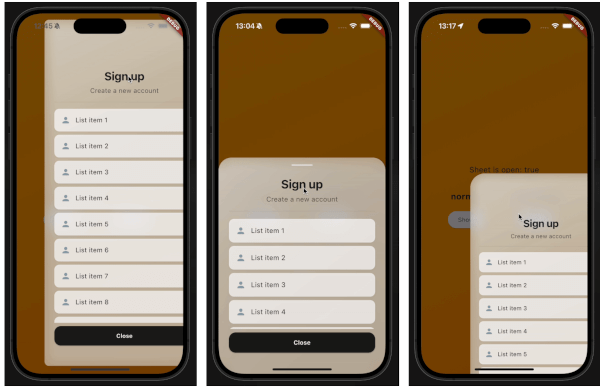
demo gif 1 demo gif 2 demo gif 3

This demo "sign up" blurry sheet is not included with the package. I created it to demonstrate what you are capable of doing with the dragsheet package.

Usage

  1. Initialize the controller.

    final controller = DragSheetController();
    
  2. Open YourWidget via the controller.

    controller.show(
        context,
        (ctx) => YourWidget(),
    ),
    
  3. If you want to close the sheet, use the controller.

    controller.close();
    
  4. If you want to listen to the state of the sheet, use the controller.

    controller.addListener(() {
        print(controller.isOpen);
    });
    
  5. Remember to dispose of the controller when you're done with it.

    @override
    void dispose() {
        super.dispose();
        controller.dispose();
    }
    
  6. If you care about customization, you won't be disapointed. However, the defaults should be solid enough. The main properties to know about are shrinkWrap, which will make the dragsheet shrink to the size of the child you provide it, and if shrinkWrap is true, closeOnShrinkWrapTap, which will close the sheet when you tap outside of the sheet.

    void show(
        BuildContext context,
        WidgetBuilder builder, {
        bool shrinkWrap = false,
        bool closeOnShrinkWrapTap = true, 
        double minScale = 0.85,
        double maxScale = 1.0,
        double minRadius = 0.0,
        double maxRadius = 30.0,
        double minOpacity = 0.0,
        double maxOpacity = 0.5,
        Duration entranceDuration = const Duration(milliseconds: 200),
        Duration exitDuration = const Duration(milliseconds: 200),
        Duration gestureFadeDuration = const Duration(milliseconds: 200),
        Duration programmaticFadeDuration = const Duration(milliseconds: 200),
        double effectDistance = 220.0,
        BgOpacity? bgOpacity,
        double swipeVelocityMultiplier = 2.5,
        double swipeAccelerationThreshold = 50.0,
        double swipeAccelerationMultiplier = 12.0,
        double swipeMinVelocity = 1000.0,
        double swipeMaxVelocity = 10000.0,
        double swipeFriction = 0.09,
        VoidCallback? onShow,
        VoidCallback? onDismiss,
        Duration opacityDuration = const Duration(milliseconds: 200),
        ApplyBorderRadius applyBorderRadius = ApplyBorderRadius.toTop,
    })
    

카테고리

소스 저장소

이 패키지를 사용하는 프로젝트

아직 데이터가 없습니다.