
 v3.3.0
country_codes
국가 코드는 특정 로컬라이제이션에 따라 국가 정보를 제공하는 도우미 패키지입니다. 예: 전화 번호 접두사, ISO 3166 코드(알파-2, 알파-3), 국가 이름 등.
134좋아요 2.4만30일 다운로드150Pub 점수
AndroidiOSmacOS
국가 코드는 특정 로컬라이제이션에 따라 국가 정보를 제공하는 도우미 패키지입니다. 예: 전화 번호 접두사, ISO 3166 코드(알파-2, 알파-3), 국가 이름 등.

{"sdk":"flutter"}{"sdk":"flutter"}아래는 영문 원문 스냅샷입니다. 최신 내용은 GitHub에서 확인하세요.
Country codes package provides an easy to way to access country codes based on a provided Locale.
There are two main ways to use this package.
This will allow you to fetch the region of the underlying platform and display the data accordingly. Very handy if you use along with the DialCodeFormatter to provide integration with dial codes formatter, on phone TextFormFields in a Form, for example.
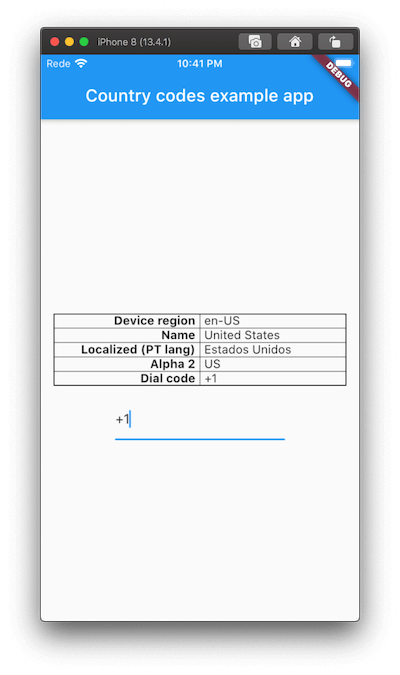
Assuming an en-US region based revice.
await CountryCodes.init(); // Optionally, you may provide a `Locale` to get countrie's localizadName

final Locale deviceLocale = CountryCodes.getDeviceLocale();
print(deviceLocale.languageCode); // Displays en
print(deviceLocale.countryCode); // Displays US

final CountryDetails details = CountryCodes.detailsForLocale();
print(details.alpha2Code); // Displays alpha2Code, for example US.
print(details.dialCode); // Displays the dial code, for example +1.
print(details.name); // Displays the extended name, for example United States.
print(details.localizedName); // Displays the extended name based on device's language (or other, if provided on init)
LocaleThis will use the provided Locale, which may not be related to the device's region but instead to the app supported languages.
For example, if your device is on US region but the app only supports PT, you'll get the following:
final CountryDetails details = CountryCodes.detailsForLocale(Localization.localeOf(context));

print(details.alpha2Code); // Displays alpha2Code, displays PT.
print(details.dialCode); // Displays the dial code for PT, +351.
print(details.name); // Displays the extended name, Portugal.
DialCodeFormatterCurrently there's only available TextInputFormatter which allows you to dynamically set the dial code dynamically on a TextFormField.
TextFormField(
  keyboardType: TextInputType.phone,
  inputFormatters: [DialCodeFormatter()],
);
Example
This project is a starting point for a Dart package, a library module containing code that can be shared easily across multiple Flutter or Dart projects.
For help getting started with Flutter, view our online documentation, which offers tutorials, samples, guidance on mobile development, and a full API reference.