


 v1.0.1
flutter_breadcrumb
Flutter에서 쉽게 베이컨크럼을 생성할 수 있는 Flutter 위젯입니다.
130좋아요 18.4만30일 다운로드140Pub 점수
AndroidiOSWebmacOSWindowsLinux
Flutter에서 쉽게 베이컨크럼을 생성할 수 있는 Flutter 위젯입니다.

아래는 영문 원문 스냅샷입니다. 최신 내용은 GitHub에서 확인하세요.

Flutter Widget that can easily create Breadcrumb in Flutter.
A breadcrumb or breadcrumb trail is a graphical control element frequently used as a navigational aid in user interfaces and on web pages. It allows users to keep track and maintain awareness of their locations within applications, documents, or websites.
| Show Case | Wrap Behavior | Scroll Behavior |
|---|---|---|
 |
 |
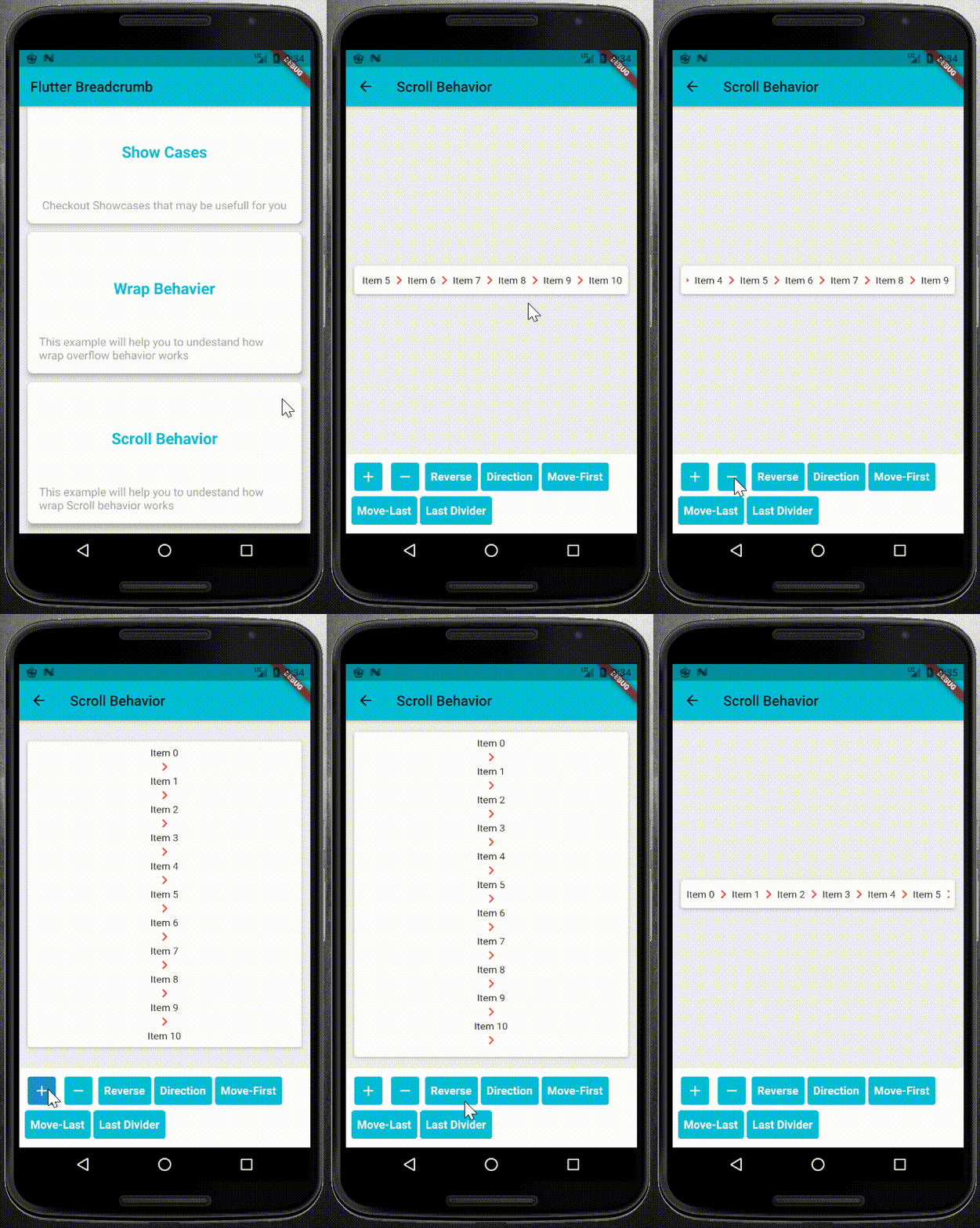 |
pubspec.yaml file as dependency:dependencies:
flutter_breadcrumb: ^1.0.1
flutter pub get
import 'package:flutter_breadcrumb/flutter_breadcrumb.dart';
BreadCrumb(
	items: <BreadCrumbItem>[
	//add your BreadCrumbItem here
	],
	divider: Icon(Icons.chevron_right),
)
primary constructor or builder named constructor.BreadCrumb(
items: <BreadCrumbItem>[
BreadCrumbItem(content: Text('Item1')),
BreadCrumbItem(content: Text('Item2')),
...
],
divider: Icon(Icons.chevron_right),
)
BreadCrumb.builder(
	itemCount: 8,
	builder: (index) {
		return BreadCrumbItem(content: Text('Item$index'));
	},
	divider: Icon(Icons.chevron_right),
)
BreadCrumb widget.BreadCrumb(
items: <BreadCrumbItem>[
//add your BreadCrumbItem here
],
divider: Icon(Icons.chevron_right),
overflow: WrapOverflow(
keepLastDivider: false,
direction: Axis.horizontal,
),
)
BreadCrumb(
	items: <BreadCrumbItem>[
		//add your BreadCrumbItem here
	],
	divider: Icon(Icons.chevron_right),
	overflow: ScrollableOverflow(
		keepLastDivider: false,
		reverse: false,
		direction: Axis.horizontal,
	),
)
class CustomOverflowBehavior extends BreadCrumbOverflow{
	@override
	Widget build(BuildContext context, List<BreadCrumbItem> items, Widget divider) {
		// TODO: implement build
	}

	@override
	// TODO: implement keepLastDivider
	bool get keepLastDivider => _keepLastDivider;

	@override
	List<Widget> widgetItems(List<BreadCrumbItem> items, Widget divider) {
		// TODO: implement widgetItems
	}
}
widgetItems method to create List<Widget> with items and divider parameters.build method to create your own widget behavior. for example wrap behavior uses Wrap widget. and you can use widgetItems method in your build method to create List<Widget> items.
의존성 목록 3 개
{"sdk":"flutter"}^1.11.0{"sdk":"flutter"}사용 목적에 따라 검색하고 개발 활동을 비교한 뒤 원본 저장소에서 요구 사항을 확인하세요.
“A repository is the most basic element of GitHub.”
GitHub Docs — About repositories ↗