브레드크럼 탐색 컴포넌트 생성을 간소화하는 플러터 패키지입니다. 계층적 탐색 경로를 표시하기 위해 깔끔하고 재사용 가능한 위젯을 제공하며, 앱 구조 내 현재 위치를 보여줌으로써 사용자 경험을 향상시킵니다. 깊은 탐색 트리가 있는 앱에 적합하며, 사용자 정의를 지원하고 플러터 라우팅 시스템과 원활하게 통합됩니다. 이 패키지는 크로스플랫폼이며 안드로이드, iOS, 웹, macOS, Windows 및 리눅스에서 작동합니다.
사용 사례
복잡한 앱에서 탐색 계층 구조 표시
다단계 인터페이스에서 사용자 방향성 향상
관리자 대시보드의 사용자 경험 향상
전자상거래 사이트에서 빵 부스러기 트레일 지원
문서 포털 내 탐색 간소화
주요 기능
Flutter 라우팅과의 간편한 통합
사용자 정의 가능한 외관 및 스타일
크로스 플랫폼 호환성
동적 경로 업데이트를 지원합니다
경량이며 종속성 없음
적합한 대상
복잡한 탐색 흐름을 구축하는 개발자
사용자 안내에 중점을 둔 UI/UX 디자이너
계층적 탐색이 필요한 앱
깊은 중첩을 가진 웹 및 모바일 애플리케이션
일관된 탐색 패턴을 우선시하는 팀
고려 사항
동적 경로에 대해 수동 경로 관리가 필요합니다
디스플레이 외에 내장 상호작용이 제한적
나비게이터 스택에서 자동 경로 탐지 없음
정적 또는 예측 가능한 탐색 구조에 가장 적합
인터랙티브한 빵가루를 위해 추가 로직이 필요할 수 있습니다
원본 README
연결된 소스 저장소의 README 원문 스냅샷입니다. 최신 내용은 저장소에서 확인하세요.
flutter_breadcrumb
Flutter Widget that can easily create Breadcrumb in Flutter.
A breadcrumb or breadcrumb trail is a graphical control element frequently used as a navigational aid in user interfaces and on web pages. It allows users to keep track and maintain awareness of their locations within applications, documents, or websites.
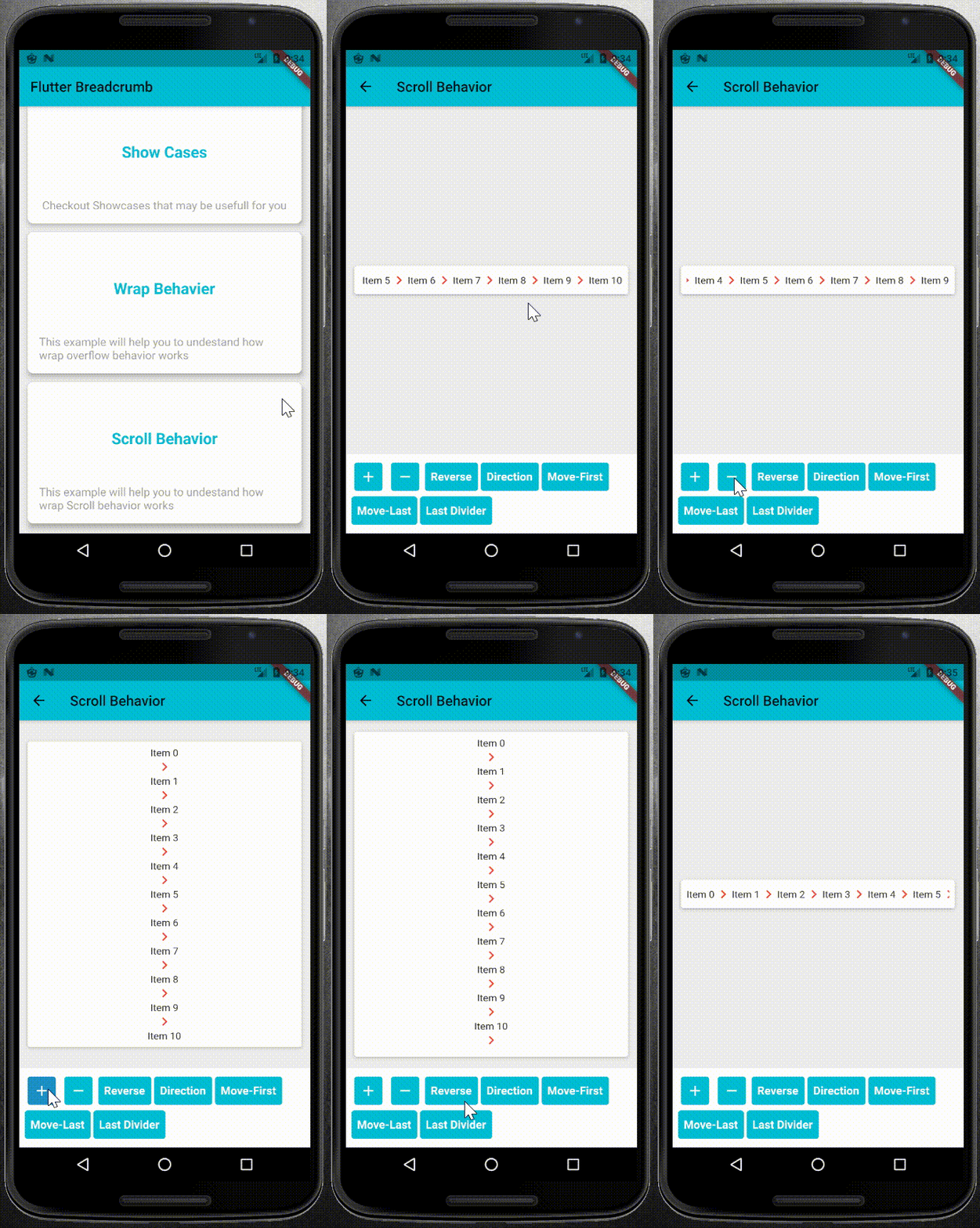
Show Cases
Show Case
Wrap Behavior
Scroll Behavior
Getting Start
1. Add it to Your pubspec.yaml file as dependency:
select a right overflow behavior for your BreadCrumb widget.
1. WrapOverflow behavior: you can use this behavior when you want to your widget, wrap whenever it uses all of the main Side sizes:
BreadCrumb(
	items: <BreadCrumbItem>[
		//add your BreadCrumbItem here
	],
	divider: Icon(Icons.chevron_right),
	overflow: WrapOverflow(
		keepLastDivider: false,
		direction: Axis.horizontal,
	),
)
2. ScrollableOverflow behavior: use it whenever you want to content your widget scroll if it needed.
BreadCrumb(
	items: <BreadCrumbItem>[
		//add your BreadCrumbItem here
	],
	divider: Icon(Icons.chevron_right),
	overflow: ScrollableOverflow(
		keepLastDivider: false,
		reverse: false,
		direction: Axis.horizontal,
	),
)
3. Custom Overflow behavior: you can easily create your own overflow behavior. the only thing you need is to create a class and extends it from the BreadCrumbOverflow class and overwrite its dependencies.
* override widgetItems method to create List<Widget> with items and divider parameters.
* override build method to create your own widget behavior. for example wrap behavior uses Wrap widget. and you can use widgetItems method in your build method to create List<Widget> items.
Contribution and Support
Feel free for Contributing. your Pull Requests are welcome.