

 v1.0.7+2
rich_console
디버깅, 콘솔 프로그램 또는 분석 피드백을 풍부하게 하세요 - 콘솔에 색상과 스타일을 출력하세요.
6좋아요 10930일 다운로드120Pub 점수
AndroidiOSWebmacOSWindowsLinux
polarby/rich_console open-source repository details.

아래는 영문 원문 스냅샷입니다. 최신 내용은 GitHub에서 확인하세요.

A natural way of printing text styles and colors in flutter/dart.
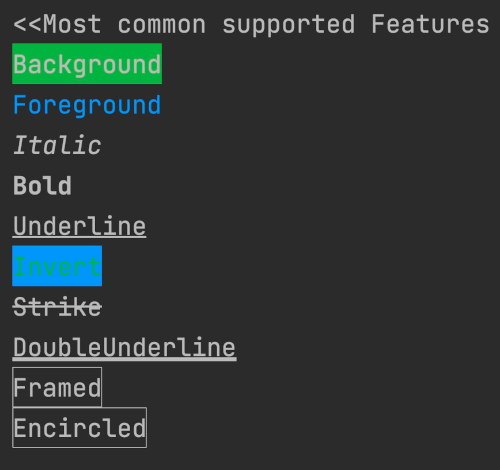
This packages contains a set of configurations that make it easy to differentiate console outputs and print all sort of colors. It's multi-IDE compatible as it is based on the basic ANSI escape codes. Note that there might be parameters and features that your IDE doesn't support. You will notice this simply that no effect is applied to you text.


import 'package:rich_console/rich_console.dart';

void main(){

  // * Reusable styles
  final yourReusableStyle = RichStyle(italic: true, foreground: Colors.pinkAccent);
  printRich("Your Text", style: yourReusableStyle);
  printRich("Another Text", style: yourReusableStyle.copyWith(framed: true));

  // * Simple prints
  printRich("Background", background: Colors.green);
  printRich("Foreground", foreground: Colors.blue);
  printRich("Italic", italic: true);
  printRich("Bold", bold: true);
  printRich("Underline", underline: true);
  printRich("Invert",
      foreground: Colors.blue, background: Colors.green, invert: true);
  printRich("Strike", strike: true);
  printRich("DoubleUnderline", doubleUnderline: true);
  printRich("Framed", framed: true);
  printRich("Encircled", encircled: true);
}
printRich()
printError()
printWarning()
Please feel welcome add anything that is missing. Simply create a pull request. Especially, ff you are familiar with obtaining text input from the console please make sure to add such features to this package.
의존성 목록 4 개
{"sdk":"flutter"}^0.19.0{"sdk":"flutter"}^2.0.2사용 목적에 따라 검색하고 개발 활동을 비교한 뒤 원본 저장소에서 요구 사항을 확인하세요.
“A repository is the most basic element of GitHub.”
GitHub Docs — About repositories ↗