


 v1.10.1
chat_bubbles
WhatsApp와 유사한 Flutter 채팅 버블 위젯 및 다양한 형태. 채팅 버블 사용 및 구현이 쉬움.
578좋아요 2.2만30일 다운로드160Pub 점수
AndroidiOSWebmacOSWindowsLinux
Flutter 채팅 버블/스피치 버블 위젯.

아래는 영문 원문 스냅샷입니다. 최신 내용은 GitHub에서 확인하세요.





Flutter chat bubble widgets, similar to the Whatsapp and more shapes. Audio and Image chat bubble widgets are also included. Easy to use and implement chat bubbles.
Add this to your package's pubspec.yaml file:
dependencies:
  chat_bubbles: ^1.10.1
Then you just have to import the package with
import 'package:chat_bubbles/chat_bubbles.dart'
Now you can use this plugin to implement various types of Chat Bubbles, Audio Chat Bubbles and Date chips.

BubbleSpecialThree(
  text: 'Added iMessage shape bubbles',
  color: Color(0xFF1B97F3),
  tail: false,
  textStyle: TextStyle(
      color: Colors.white,
      fontSize: 16
  ),
),
BubbleSpecialThree(
  text: 'Please try and give some feedback on it!',
  color: Color(0xFF1B97F3),
  tail: true,
  textStyle: TextStyle(
    color: Colors.white,
    fontSize: 16
  ),
),
BubbleSpecialThree(
  text: 'Sure',
  color: Color(0xFFE8E8EE),
  tail: false,
  isSender: false,
),
BubbleSpecialThree(
  text: "I tried. It's awesome!!!",
  color: Color(0xFFE8E8EE),
  tail: false,
  isSender: false,
),
BubbleSpecialThree(
  text: "Thanks",
  color: Color(0xFFE8E8EE),
  tail: true,
  isSender: false,
)

  BubbleSpecialOne(
    text: 'Hi, How are you? ',
    isSender: false,
    color: Colors.purple.shade100,
    textStyle: TextStyle(
      fontSize: 20,
      color: Colors.purple,
      fontStyle: FontStyle.italic,
      fontWeight: FontWeight.bold,
    ),
  ),

  Duration duration = new Duration();
  Duration position = new Duration();
  bool isPlaying = false;
  bool isLoading = false;
  bool isPause = false;

  BubbleNormalAudio(
    color: Color(0xFFE8E8EE),
    duration: duration.inSeconds.toDouble(),
    position: position.inSeconds.toDouble(),
    isPlaying: isPlaying,
    isLoading: isLoading,
    isPause: isPause,
    onSeekChanged: _changeSeek,
    onPlayPauseButtonClick: _playAudio,
    sent: true,
  ),

  BubbleNormalImage(
    id: 'id001',
    image: _image(),
    color: Colors.purpleAccent,
    tail: true,
    delivered: true,
  ),

  DateChip(
    date: new DateTime(2021, 5, 7),
    color: Color(0x558AD3D5),
  ),

MessageBar(
    onSend: (_) => print(_),
    actions: [
      InkWell(
        child: Icon(
          Icons.add,
          color: Colors.black,
          size: 24,
        ),
        onTap: () {},
      ),
      Padding(
        padding: EdgeInsets.only(left: 8, right: 8),
        child: InkWell(
          child: Icon(
            Icons.camera_alt,
            color: Colors.green,
            size: 24,
          ),
          onTap: () {},
        ),
      ),
    ],
  ),
BubbleReply(
  repliedMessage: 'This is the original message',
  repliedMessageSender: 'John Doe',
  text: 'This is my reply!',
  isSender: false,
  color: Color(0xFF1B97F3),
  replyBorderColor: Colors.white,
  textStyle: TextStyle(color: Colors.white, fontSize: 16),
  sent: true,
),
TypingIndicator(
  showIndicator: true,
  bubbleColor: Color(0xFFE8E8EE),
  dotColor: Colors.black54,
),

// Alternative wave animation style
TypingIndicatorWave(
  showIndicator: true,
  bubbleColor: Color(0xFFE8E8EE),
  dotColor: Colors.black54,
),
BubbleLinkPreview(
  url: 'https://flutter.dev',
  title: 'Flutter - Build apps for any screen',
  description: 'Flutter transforms the app development process.',
  imageUrl: 'https://storage.googleapis.com/cms-storage-bucket/70760bf1e88b184bb1bc.png',
  text: 'Check out this awesome framework!',
  isSender: false,
  color: Color(0xFF1B97F3),
  textStyle: TextStyle(color: Colors.white, fontSize: 16),
),
Column(
  crossAxisAlignment: CrossAxisAlignment.start,
  children: [
    BubbleNormal(
      text: 'Great work! 🎉',
      isSender: false,
      color: Color(0xFF1B97F3),
    ),
    BubbleReaction(
      reactions: [
        Reaction(emoji: '👍', count: 3, isUserReacted: true),
        Reaction(emoji: '❤️', count: 2),
        Reaction(emoji: '🎉', count: 1),
      ],
      onReactionTap: (reaction) {
        print('Tapped on ${reaction.emoji}');
      },
      onAddReactionTap: () {
        print('Add reaction tapped');
      },
    ),
  ],
),
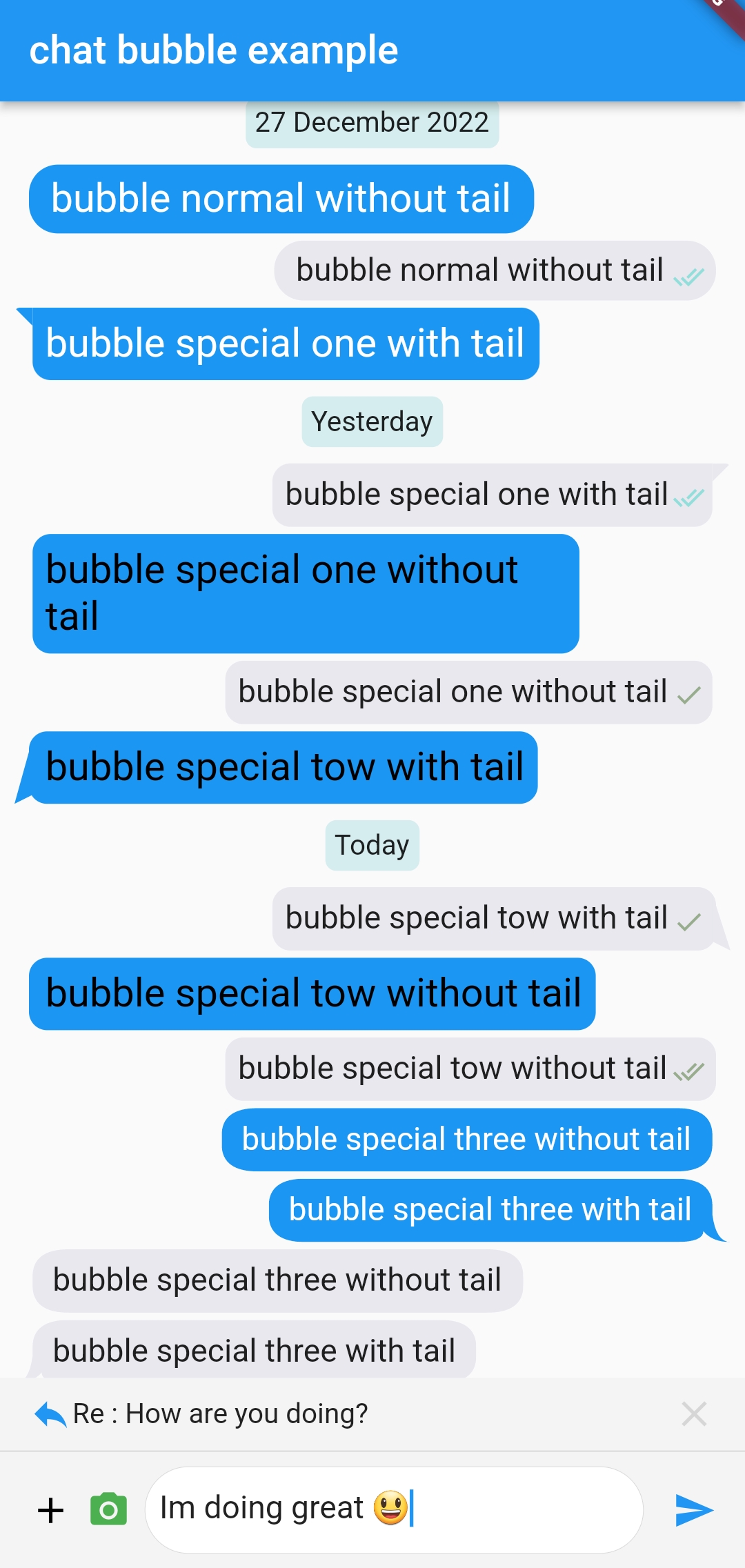

Checkout the plugin example to figure out more.
Duration duration = new Duration();
Duration position = new Duration();
bool isPlaying = false;
bool isLoading = false;
bool isPause = false;

@override
Widget build(BuildContext context) {
  final now = new DateTime.now();
  return Scaffold(
    appBar: AppBar(
      title: Text(widget.title),
    ),
    body: Stack(
      children: [
        SingleChildScrollView(
          child: Column(
            children: <Widget>[
              BubbleNormalImage(
                  id: 'id001',
                  image: _image(),
                  color: Colors.purpleAccent,
                  tail: true,
                  delivered: true,
              ),
              BubbleNormalAudio(
                color: Color(0xFFE8E8EE),
                duration: duration.inSeconds.toDouble(),
                position: position.inSeconds.toDouble(),
                isPlaying: isPlaying,
                isLoading: isLoading,
                isPause: isPause,
                onSeekChanged: _changeSeek,
                onPlayPauseButtonClick: _playAudio,
                sent: true,
              ),
              BubbleNormal(
                text: 'bubble normal with tail',
                isSender: false,
                color: Color(0xFF1B97F3),
                tail: true,
                textStyle: TextStyle(
                  fontSize: 20,
                  color: Colors.white,
                ),
              ),
              BubbleNormal(
                text: 'bubble normal with tail',
                isSender: true,
                color: Color(0xFFE8E8EE),
                tail: true,
                sent: true,
              ),
              DateChip(
                date: new DateTime(now.year, now.month, now.day - 2),
              ),
              BubbleNormal(
                text: 'bubble normal without tail',
                isSender: false,
                color: Color(0xFF1B97F3),
                tail: false,
                textStyle: TextStyle(
                  fontSize: 20,
                  color: Colors.white,
                ),
              ),
              BubbleNormal(
                text: 'bubble normal without tail',
                color: Color(0xFFE8E8EE),
                tail: false,
                sent: true,
                seen: true,
                delivered: true,
              ),
              BubbleSpecialOne(
                text: 'bubble special one with tail',
                isSender: false,
                color: Color(0xFF1B97F3),
                textStyle: TextStyle(
                  fontSize: 20,
                  color: Colors.white,
                ),
              ),
              DateChip(
                date: new DateTime(now.year, now.month, now.day - 1),
              ),
              BubbleSpecialOne(
                text: 'bubble special one with tail',
                color: Color(0xFFE8E8EE),
                seen: true,
              ),
              BubbleSpecialOne(
                text: 'bubble special one without tail',
                isSender: false,
                tail: false,
                color: Color(0xFF1B97F3),
                textStyle: TextStyle(
                  fontSize: 20,
                  color: Colors.black,
                ),
              ),
              BubbleSpecialOne(
                text: 'bubble special one without tail',
                tail: false,
                color: Color(0xFFE8E8EE),
                sent: true,
              ),
              BubbleSpecialTwo(
                text: 'bubble special tow with tail',
                isSender: false,
                color: Color(0xFF1B97F3),
                textStyle: TextStyle(
                  fontSize: 20,
                  color: Colors.black,
                ),
              ),
              DateChip(
                date: now,
              ),
              BubbleSpecialTwo(
                text: 'bubble special tow with tail',
                isSender: true,
                color: Color(0xFFE8E8EE),
                sent: true,
              ),
              BubbleSpecialTwo(
                text: 'bubble special tow without tail',
                isSender: false,
                tail: false,
                color: Color(0xFF1B97F3),
                textStyle: TextStyle(
                  fontSize: 20,
                  color: Colors.black,
                ),
              ),
              BubbleSpecialTwo(
                text: 'bubble special tow without tail',
                tail: false,
                color: Color(0xFFE8E8EE),
                delivered: true,
              ),
              BubbleSpecialThree(
                text: 'bubble special three without tail',
                color: Color(0xFF1B97F3),
                tail: false,
                textStyle: TextStyle(color: Colors.white, fontSize: 16),
              ),
              BubbleSpecialThree(
                text: 'bubble special three with tail',
                color: Color(0xFF1B97F3),
                tail: true,
                textStyle: TextStyle(color: Colors.white, fontSize: 16),
              ),
              BubbleSpecialThree(
                text: "bubble special three without tail",
                color: Color(0xFFE8E8EE),
                tail: false,
                isSender: false,
              ),
              BubbleSpecialThree(
                text: "bubble special three with tail",
                color: Color(0xFFE8E8EE),
                tail: true,
                isSender: false,
              ),
              SizedBox(
                height: 100,
              )
            ],
          ),
        ),
        MessageBar(
          onSend: (_) => print(_),
          actions: [
            InkWell(
              child: Icon(
                Icons.add,
                color: Colors.black,
                size: 24,
              ),
              onTap: () {},
            ),
            Padding(
              padding: EdgeInsets.only(left: 8, right: 8),
              child: InkWell(
                child: Icon(
                  Icons.camera_alt,
                  color: Colors.green,
                  size: 24,
                ),
                onTap: () {},
              ),
            ),
          ],
        ),
      ],
    ),
    // This trailing comma makes auto-formatting nicer for build methods.
  );
}
All bubble widgets now accept timestamp, isEdited, isForwarded, and messageId parameters.
BubbleNormal(
  text: 'This message was edited',
  isSender: true,
  color: Color(0xFFE8E8EE),
  tail: true,
  seen: true,
  timestamp: '12:34 PM',
  isEdited: true,
),

BubbleNormal(
  text: 'Forwarded from another chat',
  isSender: false,
  color: Color(0xFF1B97F3),
  tail: true,
  textStyle: TextStyle(color: Colors.white, fontSize: 16),
  isForwarded: true,
  timestamp: '12:35 PM',
),
Wrap any bubble with SwipeableBubble to add swipe-to-reply and swipe-to-delete gestures.
SwipeableBubble(
  onSwipeRight: () => print('Reply triggered'),
  onSwipeLeft: () => print('Delete triggered'),
  swipeThreshold: 64.0,
  enableHaptics: true,
  child: BubbleNormal(
    text: 'Swipe me!',
    isSender: false,
    color: Color(0xFF1B97F3),
    tail: true,
    textStyle: TextStyle(color: Colors.white, fontSize: 16),
  ),
),
| Parameter | Type | Default | Description |
|---|---|---|---|
child |
Widget |
required | The bubble to wrap |
onSwipeRight |
VoidCallback? |
null | Called on swipe-right (reply) |
onSwipeLeft |
VoidCallback? |
null | Called on swipe-left (delete) |
swipeThreshold |
double |
64.0 | Drag distance to trigger |
enableHaptics |
bool |
true | Haptic feedback on threshold |
rightActionColor |
Color |
Colors.blue | Background for right swipe |
leftActionColor |
Color |
Colors.red | Background for left swipe |
rightActionIcon |
Icon |
Icons.reply | Icon for right swipe |
leftActionIcon |
Icon |
Icons.delete | Icon for left swipe |
Use BubbleGroupBuilder to automatically group consecutive messages from the same sender. Only the last message in each group shows a tail.
final messages = ['Hello!', 'How are you?', 'Good, thanks!'];
final senders  = ['alice', 'alice', 'bob'];

BubbleGroupBuilder(
  itemCount: messages.length,
  senderIdOf: (i) => senders[i],
  itemBuilder: (context, i, info) => BubbleNormal(
    text: messages[i],
    isSender: senders[i] == 'bob',
    tail: info.showTail,
    color: senders[i] == 'bob'
        ? const Color(0xFFE8E8EE)
        : const Color(0xFF1B97F3),
  ),
)
For advanced control, use MessageGroupHelper.compute() directly to get GroupInfo for each message:
final List<GroupInfo> groups = MessageGroupHelper.compute(
  senderIds: senders,
  timestamps: timestamps,  // optional
  threshold: const Duration(minutes: 2),
);

// groups[i].showTail  — whether to show the tail
// groups[i].showAvatar — whether to show the avatar
// groups[i].isGroupStart — first message in group (add extra top spacing)
BubbleNormalAudio now supports waveform visualization and playback speed control.
BubbleNormalAudio(
  color: Color(0xFFE8E8EE),
  duration: duration.inSeconds.toDouble(),
  position: position.inSeconds.toDouble(),
  isPlaying: isPlaying,
  isLoading: isLoading,
  isPause: isPause,
  onSeekChanged: _changeSeek,
  onPlayPauseButtonClick: _playAudio,
  sent: true,
  // Waveform visualization
  waveformData: [0.2, 0.8, 0.5, 0.9, 0.4, 0.7, 0.6, 0.3, 0.8, 0.5],
  waveformActiveColor: Color(0xFF1B97F3),
  waveformInactiveColor: Colors.grey,
  // Playback speed
  showPlaybackSpeed: true,
  playbackSpeed: _playbackSpeed,
  onPlaybackSpeedChanged: (speed) => setState(() => _playbackSpeed = speed),
),
waveformData is a List<double> of normalized bar heights (0.0–1.0). Tapping or dragging on the waveform seeks to that position. The speed button cycles 1x → 1.5x → 2x → 1x.
Please feel free to let me know any issue regarding to this plugin.
의존성 목록 4 개
{"sdk":"flutter"}^0.20.1{"sdk":"flutter"}^5.0.0사용 목적에 따라 검색하고 개발 활동을 비교한 뒤 원본 저장소에서 요구 사항을 확인하세요.
“A repository is the most basic element of GitHub.”
GitHub Docs — About repositories ↗