

 v2.0.2
circular_reveal_animation
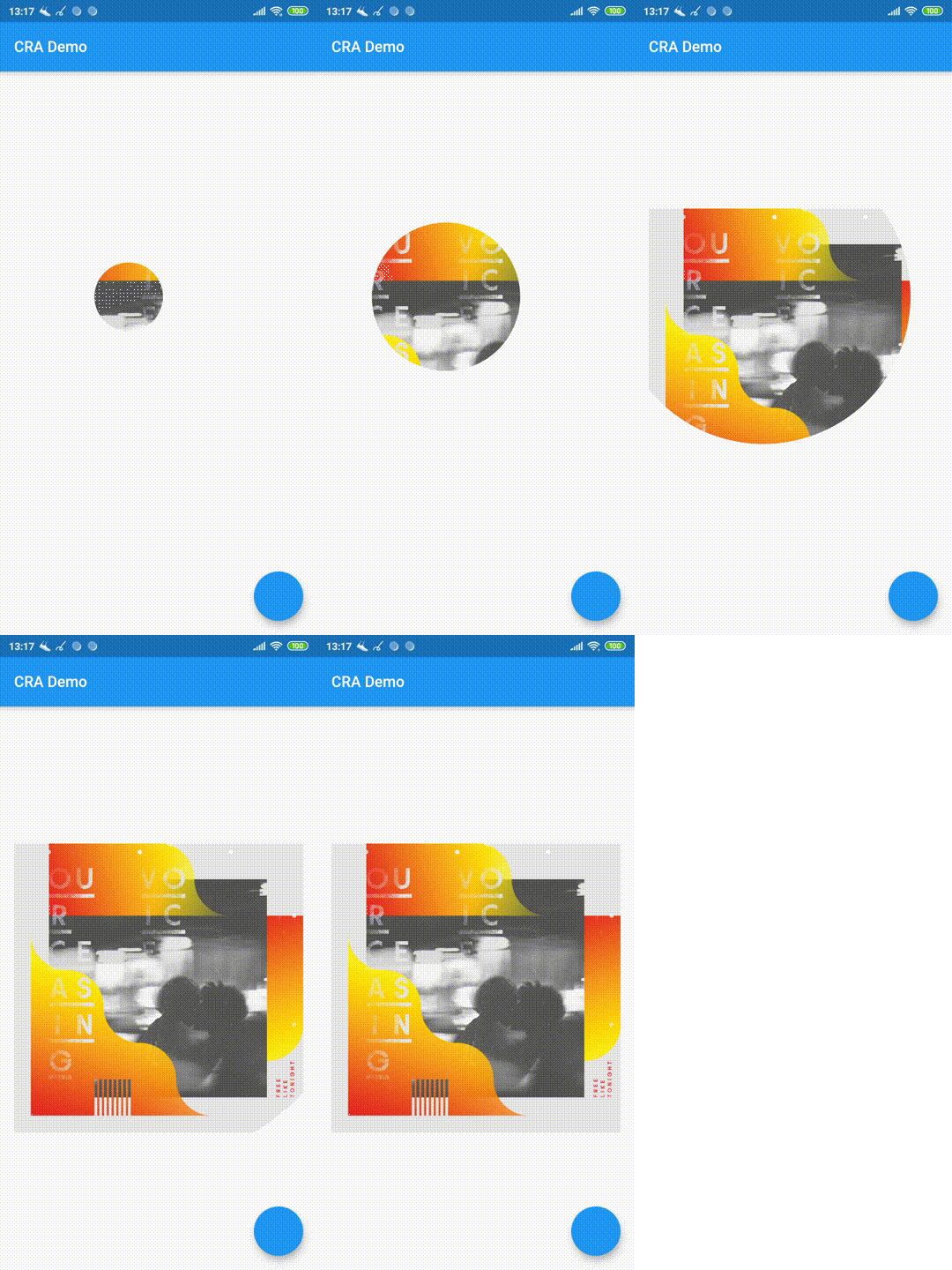
원형 리벨 애니메이션을 플러터 위젯으로! Android의 ViewAnimationUtils.createCircularReveal(...)에 영감을 받았습니다.
271좋아요 4.3천30일 다운로드160Pub 점수
AndroidiOSWebmacOSWindowsLinux
원형 리벨 애니메이션을 플러터 위젯으로!

아래는 영문 원문 스냅샷입니다. 최신 내용은 GitHub에서 확인하세요.

Circular Reveal Animation as Flutter widget!
Inspired by Android's ViewAnimationUtils.createCircularReveal(...).
Статья с описанием (русский).
Article with description (english).

CircularRevealAnimation(
  // @required
  child: Container(color: Colors.red),
  // @required [Animation<double>]
  animation: animation,
  // child's center if not specified
  centerAlignment: Alignment.centerRight,
  // 0 if not specified
  minRadius: 12,
  // distance from center to further child's corner if not specified
  maxRadius: 200,
);
import 'package:circular_reveal_animation/circular_reveal_animation.dart';
import 'package:flutter/material.dart';

void main() => runApp(MyApp());

class MyApp extends StatelessWidget {
  @override
  Widget build(BuildContext context) {
    return MaterialApp(
      title: 'CRA Demo',
      theme: ThemeData(
        primarySwatch: Colors.blue,
      ),
      home: MyHomePage(),
    );
  }
}

class MyHomePage extends StatefulWidget {
  @override
  _MyHomePageState createState() => _MyHomePageState();
}

class _MyHomePageState extends State<MyHomePage>
    with SingleTickerProviderStateMixin {
  AnimationController animationController;
  Animation<double> animation;

  @override
  void initState() {
    super.initState();
    animationController = AnimationController(
      vsync: this,
      duration: Duration(milliseconds: 1000),
    );
    animation = CurvedAnimation(
      parent: animationController,
      curve: Curves.easeIn,
    );
  }

  @override
  Widget build(BuildContext context) {
    return Scaffold(
      appBar: AppBar(
        title: Text("CRA Demo"),
      ),
      body: Padding(
        padding: const EdgeInsets.all(16.0),
        child: Center(
          child: Column(
            mainAxisSize: MainAxisSize.min,
            children: <Widget>[
              MaterialButton(
                child: Text("show reveal dialog"),
                onPressed: () => showRevealDialog(context),
                color: Colors.amber,
              ),
              SizedBox(height: 16),
              CircularRevealAnimation(
                child: Image.asset('assets/ocv.jpg'),
                animation: animation,
//                centerAlignment: Alignment.centerRight,
                centerOffset: Offset(130, 100),
//                minRadius: 12,
//                maxRadius: 200,
              ),
            ],
          ),
        ),
      ),
      floatingActionButton: FloatingActionButton(onPressed: () {
        if (animationController.status == AnimationStatus.forward ||
            animationController.status == AnimationStatus.completed) {
          animationController.reverse();
        } else {
          animationController.forward();
        }
      }),
    );
  }

  Future<void> showRevealDialog(BuildContext context) async {
    showGeneralDialog(
      barrierLabel: "Label",
      barrierDismissible: true,
      barrierColor: Colors.black.withOpacity(0.5),
      transitionDuration: Duration(milliseconds: 700),
      context: context,
      pageBuilder: (context, anim1, anim2) {
        return Align(
          alignment: Alignment.bottomCenter,
          child: Container(
            child: Padding(
              padding: const EdgeInsets.all(12.0),
              child: Image.asset('assets/klimt.png'),
            ),
            margin: EdgeInsets.only(top: 50, left: 12, right: 12, bottom: 0),
            decoration: BoxDecoration(
              color: Colors.white,
              borderRadius: BorderRadius.circular(5),
            ),
          ),
        );
      },
      transitionBuilder: (context, anim1, anim2, child) {
        return CircularRevealAnimation(
          child: child,
          animation: anim1,
          centerAlignment: Alignment.bottomCenter,
        );
      },
    );
  }
}
의존성 목록 2 개
{"sdk":"flutter"}{"sdk":"flutter"}사용 목적에 따라 검색하고 개발 활동을 비교한 뒤 원본 저장소에서 요구 사항을 확인하세요.
“A repository is the most basic element of GitHub.”
GitHub Docs — About repositories ↗