
 v0.0.3
flutter_device_emulator
실시간으로 여러 기기 화면에서 Flutter 위젯을 미리 봅니다.
0좋아요 3630일 다운로드150Pub 점수
AndroidiOSWebmacOSWindowsLinux
ravi84184/flutter_device_emulator open-source repository details.

{"sdk":"flutter"}^1.4.0^1.1.1^2.1.5{"sdk":"flutter"}^5.0.0아래는 영문 원문 스냅샷입니다. 최신 내용은 GitHub에서 확인하세요.
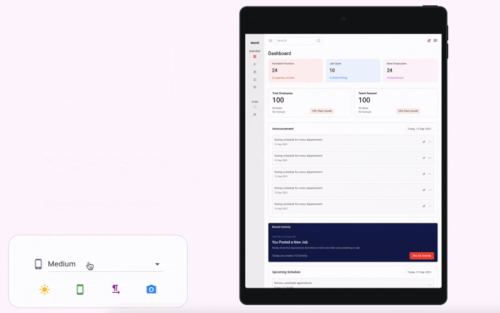
A Flutter package to emulate different device screens and layouts, making it easier to preview and test your app on various device types and resolutions directly within your Flutter app or development environment.
flutter_device_emulator demo
Add the following to your pubspec.yaml:
dependencies:
  flutter_device_emulator: latest_version
Then run:
flutter pub get
Import the package and wrap your app or widget with the emulator:
import 'package:flutter_device_emulator/flutter_device_emulator.dart';

DeviceEmulator(
  builder: (context) => SafeArea(child: HomePage()),
)
See the example/ directory for a complete sample app demonstrating usage and available features.
DeviceEmulatorThe main widget to wrap your app for device emulation. Provides controls for device type, orientation, theme, and text direction.
Constructor:
DeviceEmulator({
  required WidgetBuilder builder,
  bool enableThemeToggle = true,
  bool enableOrientationToggle = true,
  bool enableLanguageToggle = true,
  Key? key,
})
Parameters:
builder (required): A function that builds the widget tree to be emulated inside the device frame.enableThemeToggle (default: true): If true, shows a button to toggle between light and dark themes.enableOrientationToggle (default: true): If true, shows a button to toggle between portrait and landscape orientations.enableLanguageToggle (default: true): If true, shows a button to toggle between left-to-right and right-to-left text directions.key: Optional widget key.Features:
Example:
DeviceEmulator(
  builder: (context) => SafeArea(child: HomePage()),
)
For detailed API documentation, see the source code in lib/.
Contributions are welcome! Please open issues or submit pull requests for bug fixes, features, or improvements.
git checkout -b feature/my-feature)git commit -am 'Add new feature')git push origin feature/my-feature)This project is licensed under the MIT License.