
 v6.0.0
fast_contacts
기기의 연락처 목록에 더 빠르게 접근하는 방법입니다. 합리적인 시간 내에 전체 연락처 목록을 가져올 수 있습니다.
120좋아요 5.8만30일 다운로드150Pub 점수
AndroidiOS
Flutter에서 장치의 연락처 목록에 더 빠르게 접근하는 방법

{"sdk":"flutter"}{"sdk":"flutter"}아래는 영문 원문 스냅샷입니다. 최신 내용은 GitHub에서 확인하세요.
Version Likes Points Downloads
A much faster alternative to contacts_service and flutter_contact for reading the device's contact book.
This plugin was tuned to achieve optimal performance for fetching the whole list of contacts. Loading 1000 contacts with this plugin should take ~200ms or less depending on the device.
To use this plugin, add fast_contacts as a dependency in your pubspec.yaml file.
Add the following permission to your AndroidManifest.xml:
<uses-permission android:name="android.permission.READ_CONTACTS" />
Set the NSContactsUsageDescription in your Info.plist file
<key>NSContactsUsageDescription</key>
<string>Description of why you need the contacts permission.</string>
Note
fast_contacts doesn't handle permissions. Use special plugins (like permission_handler) to ask for the permission before accessing contacts.
// Import package
import 'package:fast_contacts/fast_contacts.dart';

// Get all contacts
final contacts = await FastContacts.getAllContacts();

// Get single contact by ID
final contact = await FastContacts.getContact(contactId);

// Get contact's image (thumbnail)
final thumbnail = await FastContacts.getContactImage(contact.id);

// Get contact's image (full size)
final thumbnail = await FastContacts.getContactImage(contact.id, size: ContactImageSize.fullSize);
For a more complete usage example, see example project.
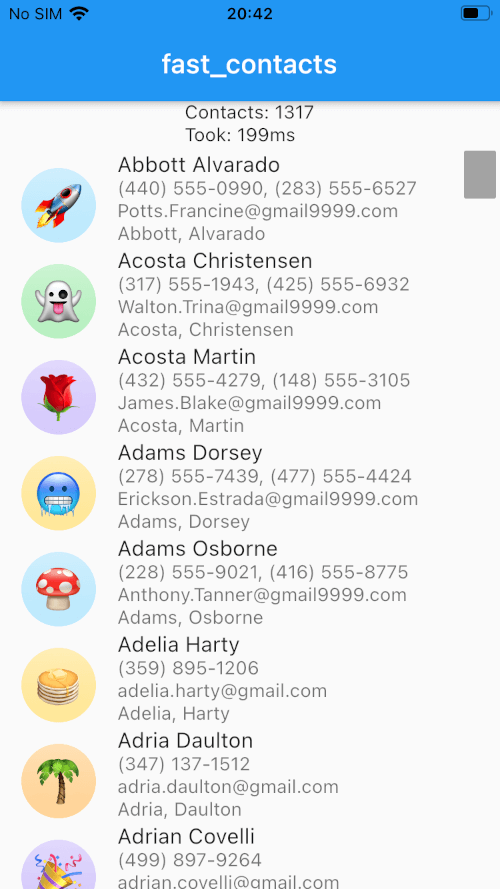
Loading 1000+ contacts (display name, structured name, phones, emails) at once takes ~200ms on both Android (Samsung Galaxy S8) and iOS (iPhone 8).
Android: Samsung Galaxy S8
iOS: iPhone 8