
 v0.9.0
cell_calendar
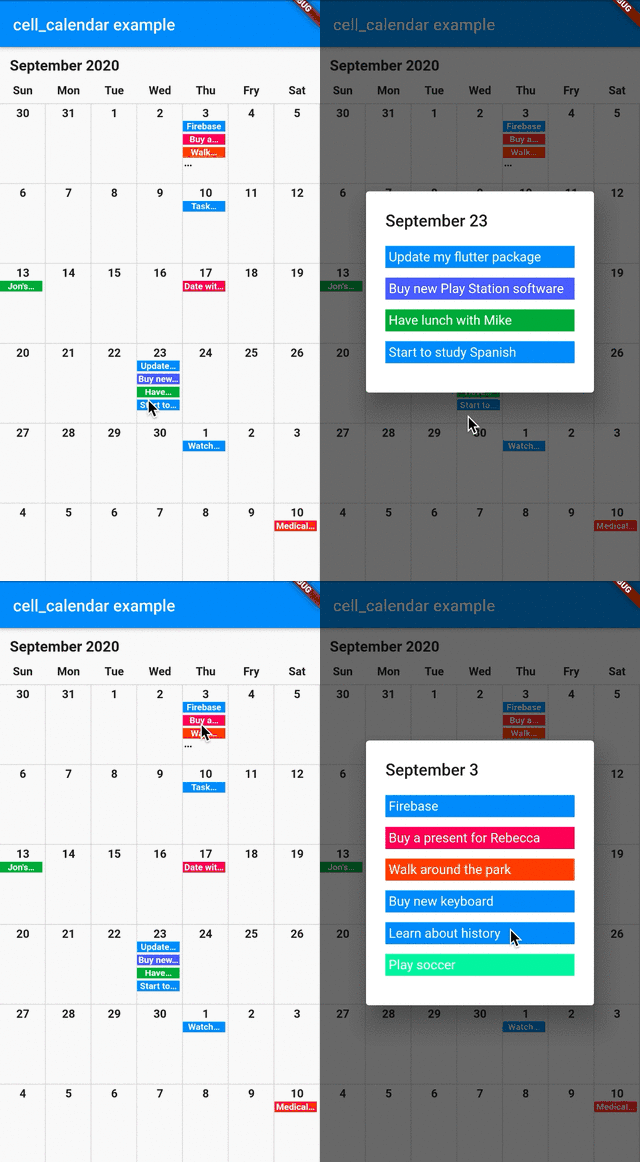
유용한 기능을 갖춘 현대적인 캘린더 위젯입니다. 즉시 잘 디자인된 캘린더를 개발할 수 있습니다. Google 캘린더의 UI에서 영감을 받았습니다.
104좋아요 77730일 다운로드140Pub 점수
AndroidiOSWebmacOSWindowsLinux
유용한 기능을 갖춘 현대적인 캘린더 위젯입니다. 순간적으로 잘 디자인된 캘린더를 개발할 수 있습니다.

{"sdk":"flutter"}^2.3.6{"sdk":"flutter"}아래는 영문 원문 스냅샷입니다. 최신 내용은 GitHub에서 확인하세요.
Modern calendar widget with useful features. Enables to develop well designed calendar in a moment.
Inspired by the UI of Google Calendar
cell_calendar
You can show the events in the calendar by inserting the list of CalendarEvent as events
    CellCalendar(
      events: [
        CalendarEvent(eventName: "Event 1",eventDate: DateTime1),
        CalendarEvent(eventName: "Event 2",eventDate: DateTime2),
      ]
    );
If you need to customize the calendar more, the additional parameters like eventBackGroundColor, eventTextColor and eventID are helpful.
The callback onPageChanged is literally called when the current page is changed.
    CellCalendar(
      onPageChanged: (firstDate, lastDate) {
        print("This is the first date of the new page: $firstDate");
        print("This is the last date of the new page: $lastDate");
      }
    );
In this sample code, firstDate is the date in the very first cell of the new page, and its logic is same as lastDate.
The callback onCellTapped is called when user tapped a cell.
    CellCalendar(
      onCellTapped: (date) {
        print("$date is tapped !");
      }
    );
It is called with tapped DateTime, so you can get the events on the date if you want.
    CellCalendar(
      onCellTapped: (date){
        print("$date is tapped !");
        final eventsOnTheDate = sampleEvents().where((event) {
          final eventDate = event.eventDate;
          return eventDate.year == date.year &&
              eventDate.month == date.month &&
              eventDate.day == date.day;
        }).toList();
        /// ex) Show dialog or navigate to new page with [eventsOnTheDate]
      }
    );
If you don't want to use default labels on the calendar, you can use callbacks for customization.
    CellCalendar(
      daysOfTheWeekBuilder: (dayIndex) {
        /// dayIndex: 0 for Sunday, 6 for Saturday.
        final labels = ["S", "M", "T", "W", "T", "F", "S"];
        return Padding(
          padding: const EdgeInsets.only(bottom: 4.0),
          child: Text(
            labels[dayIndex],
            style: TextStyle(
              fontWeight: FontWeight.bold,
            ),
            textAlign: TextAlign.center,
          ),
        );
      },
      monthYearLabelBuilder: (datetime) {
        final year = datetime.year.toString();
        final month = datetime.month.toString();
        return Padding(
          padding: const EdgeInsets.all(16.0),
          child: Text(
            "$month, $year",
            style: TextStyle(
              fontSize: 24,
              fontWeight: FontWeight.bold,
            ),
          ),
        );
      },
    )
If you have any requests or questions, please feel free to ask on github.
Thanks goes to these wonderful people (emoji key):
| Santa Takahashi Santa Takahashi 💻 |
Denis Filonov Denis Filonov 💻 |
HPanda HPanda 💻 |
This project follows the all-contributors specification. Contributions of any kind welcome!