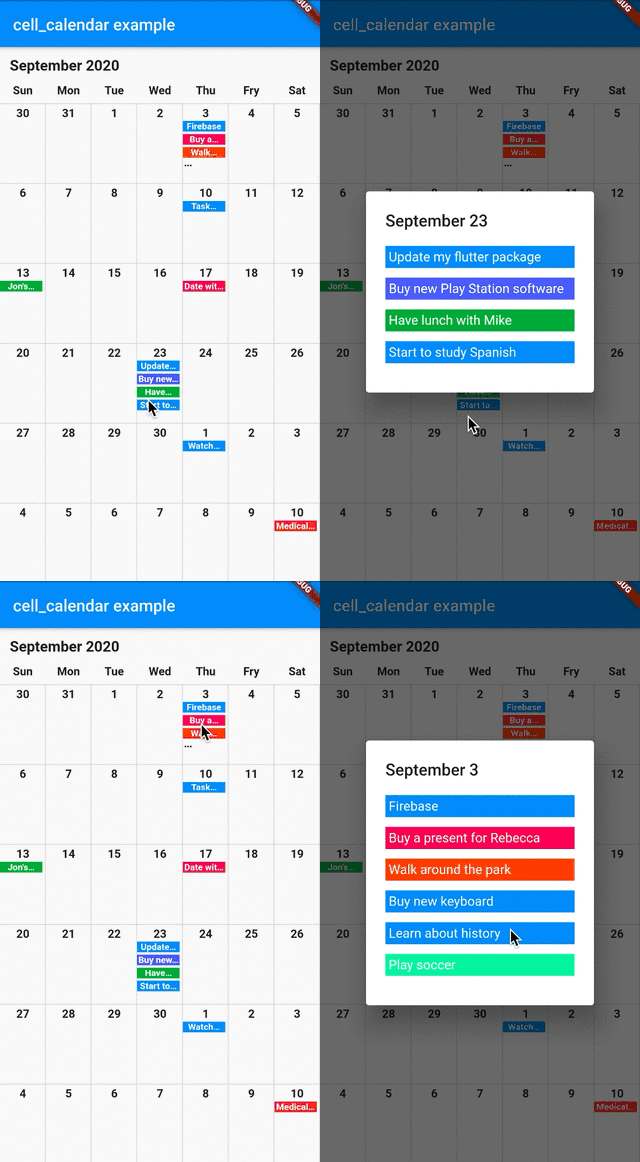
Google 캘린더의 UI를 영감으로 한 현대적이고 사용자 정의 가능한 캘린더 위젯입니다. 최소한의 설정으로 시각적으로 매력적인 캘린더를 빠르게 개발할 수 있습니다. 여러 플랫폼을 지원하며 날짜 선택, 탐색, 이벤트 통합과 같은 직관적인 기능을 포함합니다. 광범위한 커스터마이징 코드 없이 깔끔하고 반응성 있는 캘린더 솔루션을 원하는 개발자를 위한 것입니다. 완성도 높은 디자인을 갖춘 날짜 관리가 필요한 앱에 이상적입니다.
사용 사례
스케줄링 애플리케이션
이벤트 기획 도구
작업 관리 인터페이스
예약 시스템
일일 플래너 앱
캘린더 기반 대시보드
주요 기능
깔끔하고 구글 캘린더를 영감으로 한 디자인
크로스 플랫폼 지원
날짜 선택이 쉬움
내장된 탐색 컨트롤
사용자 정의 가능한 외관
이벤트 통합 기능
적합한 대상
캘린더 중심 앱을 개발하는 개발자
빠른 UI 구현을 원하는 팀
반응형 캘린더 위젯이 필요한 프로젝트
여러 운영 체제를 대상으로 하는 앱
디자인 중심의 모바일 및 웹 애플리케이션
고려 사항
제한된 내장 이벤트 관리
복잡한 스케줄링 로직을 수동으로 처리해야 합니다
고유한 테마를 위해 추가 스타일링이 필요할 수 있습니다
오래된 기기에서 Flutter의 렌더링 성능에 따라 달라집니다
매우 전문화된 캘린더 워크플로우에는 적합하지 않음
원본 README
연결된 소스 저장소의 README 원문 스냅샷입니다. 최신 내용은 저장소에서 확인하세요.
cell_calendar
Modern calendar widget with useful features. Enables to develop well designed calendar in a moment.
Inspired by the UI of Google Calendar
Usage
Events
You can show the events in the calendar by inserting the list of CalendarEvent as events
If you need to customize the calendar more, the additional parameters like eventBackGroundColor, eventTextColor and eventID are helpful.
onPageChanged
The callback onPageChanged is literally called when the current page is changed.
    CellCalendar(
      onPageChanged: (firstDate, lastDate) {
        print("This is the first date of the new page: $firstDate");
        print("This is the last date of the new page: $lastDate");
      }
    );
In this sample code, firstDate is the date in the very first cell of the new page, and its logic is same as lastDate.
onCellTapped
The callback onCellTapped is called when user tapped a cell.
    CellCalendar(
      onCellTapped: (date) {
        print("$date is tapped !");
      }
    );
It is called with tapped DateTime, so you can get the events on the date if you want.
    CellCalendar(
      onCellTapped: (date){
        print("$date is tapped !");
        final eventsOnTheDate = sampleEvents().where((event) {
          final eventDate = event.eventDate;
          return eventDate.year == date.year &&
              eventDate.month == date.month &&
              eventDate.day == date.day;
        }).toList();
        /// ex) Show dialog or navigate to new page with [eventsOnTheDate]
      }
    );
daysOfTheWeekBuilder and monthYearLabelBuilder
If you don't want to use default labels on the calendar, you can use callbacks for customization.