
순환 검색 막대
사용자 정의 애니메이션, 점선 및 그라데이션을 지원하는 플러터용 원형 프로그레스/서크 바 패키지입니다.

- 스타
- 13
- 포크
- 4
- 최근 푸시(UTC)
- 2023. 9. 24.
- 프로젝트 상태
- 활성
원본 README
아래는 영문 원문 스냅샷입니다. 최신 내용은 GitHub에서 확인하세요.
Circular Seek Bar



Circular progress/seek bar package for flutter that supports customizable animations, dashes, and gradients.
Getting Started
Youtube Demo Video
An example project can be found in the example directory of this repository.
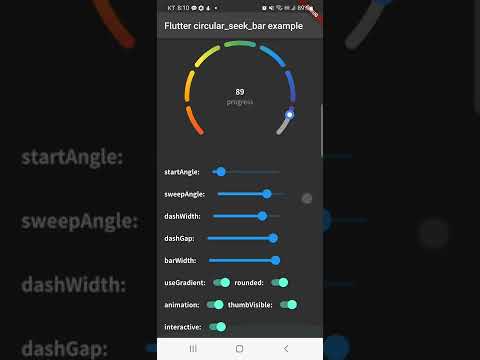
Basic Examples
1. Basic SeekBar

Dart code:
If you want to use thumb, set the thumb property values.
CircularSeekBar(
  width: double.infinity,
  height: 250,
  progress: _progress,
  barWidth: 8,
  startAngle: 90,
  sweepAngle: 360,
  strokeCap: StrokeCap.butt,
  progressColor: Colors.blue,
  innerThumbRadius: 5,
  innerThumbStrokeWidth: 3,
  innerThumbColor: Colors.white,
  outerThumbRadius: 5,
  outerThumbStrokeWidth: 10,
  outerThumbColor: Colors.blueAccent,
  animation: true,
)
2. Gradient SeekBar

CircularSeekBar(
  width: double.infinity,
  height: 250,
  progress: _progress,
  barWidth: 8,
  startAngle: 45,
  sweepAngle: 270,
  strokeCap: StrokeCap.round,
  progressGradientColors: const [Colors.red, Colors.orange, Colors.yellow, Colors.green, Colors.blue, Colors.indigo, Colors.purple],
  innerThumbRadius: 5,
  innerThumbStrokeWidth: 3,
  innerThumbColor: Colors.white,
  outerThumbRadius: 5,
  outerThumbStrokeWidth: 10,
  outerThumbColor: Colors.blueAccent,
  animation: true,
)
3. Dashed SeekBar

Dart code:
CircularSeekBar(
  width: double.infinity,
  height: 250,
  progress: _progress,
  barWidth: 8,
  startAngle: 90,
  sweepAngle: 180,
  strokeCap: StrokeCap.round,
  progressGradientColors: const [Colors.blue, Colors.indigo, Colors.purple],
  dashWidth: 50,
  dashGap: 15,
  animation: true,
)

Dart code:
CircularSeekBar(
  width: double.infinity,
  height: 250,
  progress: _progress,
  barWidth: 8,
  startAngle: 45,
  sweepAngle: 270,
  strokeCap: StrokeCap.round,
  progressGradientColors: const [Colors.blue, Colors.indigo, Colors.purple],
  dashWidth: 80,
  dashGap: 15,
  animation: true,
)

Dart code:
CircularSeekBar(
  width: double.infinity,
  height: 250,
  progress: _progress,
  barWidth: 8,
  startAngle: 45,
  sweepAngle: 270,
  strokeCap: StrokeCap.butt,
  progressGradientColors: const [Colors.blue, Colors.indigo, Colors.purple],
  dashWidth: 1,
  dashGap: 2,
  animation: true,
)
4. Add ValueNotifier

Dart code:
final ValueNotifier<double> _valueNotifier = ValueNotifier(0);
If you want to listen to the value of progress, create a valueNotifier and add it to the constructor.
CircularSeekBar(
  width: double.infinity,
  height: 250,
  progress: _progress,
  barWidth: 8,
  startAngle: 45,
  sweepAngle: 270,
  strokeCap: StrokeCap.butt,
  progressGradientColors: const [Colors.red, Colors.orange, Colors.yellow, Colors.green, Colors.blue, Colors.indigo, Colors.purple],
  innerThumbRadius: 5,
  innerThumbStrokeWidth: 3,
  innerThumbColor: Colors.white,
  outerThumbRadius: 5,
  outerThumbStrokeWidth: 10,
  outerThumbColor: Colors.blueAccent,
  dashWidth: 1,
  dashGap: 2,
  animation: true,
  valueNotifier: _valueNotifier,
  child: Center(
    child: ValueListenableBuilder(
        valueListenable: _valueNotifier,
        builder: (_, double value, __) => Column(
              mainAxisSize: MainAxisSize.min,
              children: [
                Text('${value.round()}', style: kNotoSansBold16.copyWith(color: Colors.white)),
                Text('progress', style: kNotoSansRegular14.copyWith(color: Colors.grey)),
              ],
            )),
  ),
)
5. Animations

Dart code:
Various animations can be applied to the SeekBar by changing the curves property.
CircularSeekBar(
  width: double.infinity,
  height: 250,
  progress: _progress,
  barWidth: 8,
  startAngle: 45,
  sweepAngle: 270,
  strokeCap: StrokeCap.butt,
  progressGradientColors: const [Colors.red, Colors.orange, Colors.yellow, Colors.green, Colors.blue, Colors.indigo, Colors.purple],
  innerThumbRadius: 5,
  innerThumbStrokeWidth: 3,
  innerThumbColor: Colors.white,
  outerThumbRadius: 5,
  outerThumbStrokeWidth: 10,
  outerThumbColor: Colors.blueAccent,
  dashWidth: 1,
  dashGap: 2,
  animation: true,
  curves: Curves.bounceOut,
  valueNotifier: _valueNotifier,
  child: Center(
    child: ValueListenableBuilder(
        valueListenable: _valueNotifier,
        builder: (_, double value, __) => Column(
          mainAxisSize: MainAxisSize.min,
          children: [
            Text('${value.round()}', style: kNotoSansBold16.copyWith(color: Colors.white)),
            Text('progress', style: kNotoSansRegular14.copyWith(color: Colors.grey)),
          ],
        )),
  ),
)
Installing
1. Depend on it
Add this to your package's pubspec.yaml file:
dependencies:
  circular_seek_bar: ^1.1.0
or
$ flutter pub add circular_seek_bar
2. Install it
You can install packages from the command line:
$ flutter pub get
3. Import it
Now in your Dart code, you can use:
import 'package:circular_seek_bar/circular_seek_bar.dart';
Properties
You can customize the CircularSeekBar using the following properties:
| Property | Type | Default | Description |
|---|---|---|---|
| width | double |
required | CircularSeekBar width. |
| height | double |
required | CircularSeekBar height. |
| progress | double |
0 | Current value of seek bar. |
| minProgress | double |
0 | Minimum value of seek bar. |
| maxProgress | double |
100 | Maximum value of seek bar. |
| startAngle | double |
0 | The Angle to start drawing this seek bar from. |
| sweepAngle | double |
360 | The Angle through which to draw the seek bar. |
| barWidth | double |
10 | The thickness of the seek bar. |
| trackColor | Color |
Colors.white54 | Background track color of seek bar. |
| trackGradientColors | List<Color> |
[] | Background track gradient colors of seek bar. If [trackGradientColors] is not empty, [trackColor] is not applied. |
| progressColor | Color |
Colors.blue | Foreground progress color of seek bar. |
| progressGradientColors | List<Color> |
[] | Foreground progressGradientColors of seek bar. If [progressGradientColors] is not empty, [progressColor] is not applied. |
| strokeCap | StrokeCap |
StrokeCap.round | Styles to use for arcs endings. |
| animation | bool |
true | Active seek bar animation. |
| animDurationMillis | int |
1000 | Animation duration milliseconds. |
| curves | Curve |
Curves.linear | Animation curve. |
| innerThumbRadius | double |
0 | The radius of the seekbar inner thumb. |
| innerThumbStrokeWidth | double |
0 | The stroke width of the seekbar inner thumb. |
| innerThumbColor | Color |
Colors.white | Color of the seekbar inner thumb. |
| outerThumbRadius | double |
0 | The radius of the seekbar outer thumb. |
| outerThumbStrokeWidth | double |
0 | The stroke width of the seekbar outer thumb. |
| outerThumbColor | Color |
Colors.white | Color of the seekbar outer thumb. |
| dashWidth | double |
0 | Dash width of seek bar. |
| dashGap | double |
0 | Dash gap of seek bar. |
| valueNotifier | ValueNotifier<double>? |
null | This ValueNotifier notifies the listener that the seekbar's progress value has changed. |
| onEnd | VoidCallback? |
null | This callback function will execute when Animation is finished. |
| interactive | bool |
true | Set to true if you want to interact with TapDown to change the seekbar's progress. |
| child | Widget? |
null | This widget is placed on the seek bar. |
License
MIT License

Copyright (c) 2022 seosh817

Permission is hereby granted, free of charge, to any person obtaining a copy
of this software and associated documentation files (the "Software"), to deal
in the Software without restriction, including without limitation the rights
to use, copy, modify, merge, publish, distribute, sublicense, and/or sell
copies of the Software, and to permit persons to whom the Software is
furnished to do so, subject to the following conditions:

The above copyright notice and this permission notice shall be included in
all copies or substantial portions of the Software.

THE SOFTWARE IS PROVIDED "AS IS", WITHOUT WARRANTY OF ANY KIND, EXPRESS OR
IMPLIED, INCLUDING BUT NOT LIMITED TO THE WARRANTIES OF MERCHANTABILITY,
FITNESS FOR A PARTICULAR PURPOSE AND NONINFRINGEMENT. IN NO EVENT SHALL THE
AUTHORS OR COPYRIGHT HOLDERS BE LIABLE FOR ANY CLAIM, DAMAGES OR OTHER
LIABILITY, WHETHER IN AN ACTION OF CONTRACT, TORT OR OTHERWISE, ARISING FROM,
OUT OF OR IN CONNECTION WITH THE SOFTWARE OR THE USE OR OTHER DEALINGS IN
THE SOFTWARE.
Contribution
Feel free to file an issue if you find a problem or make pull requests.
All contributions are welcome 😁

Seunghwan Seo ↗
분류
사용 중인 의존성
의존성 목록 3 개
- flutter
{"sdk":"flutter"} - flutter_test개발 의존성
{"sdk":"flutter"} - flutter_lints개발 의존성
^2.0.0
프로젝트에 맞는 저장소를 선택하려면?
사용 목적에 따라 검색하고 개발 활동을 비교한 뒤 원본 저장소에서 요구 사항을 확인하세요.
- 이름, 작성자 또는 설명으로 검색하고 기술 주제로 범위를 좁힙니다.
- 스타, 포크, 최근 푸시를 함께 비교하세요. 스타는 관심의 지표이며 품질을 보장하지 않습니다.
- 사용하기 전에 GitHub에서 README, 라이선스, Issues를 확인하세요.
출처 및 관리
“A repository is the most basic element of GitHub.”
GitHub Docs — About repositories ↗