

 v2.1.1
flutter_gradient_colors
100개 이상의 사전 정의된 그라데이션 색상을 제공합니다.
97좋아요 15430일 다운로드140Pub 점수
AndroidiOSWebmacOSWindowsLinux
flutter_gradient_colors는 수많은 그라데이션 색상을 제공합니다

아래는 영문 원문 스냅샷입니다. 최신 내용은 GitHub에서 확인하세요.
A new Flutter package project.
| # ScreenShots | # Screenshot | # ScreenShots |
|---|---|---|
 |
 |
 |
 |
 |
 |
 |
 |
 |
 |
 |
 |
 |
 |
 |
 |
 |
 |
 |
 |
 |
 |
| # ScreenShots | # Screenshot | # ScreenShots |
|---|---|---|
 |
 |
 |
 |
 |
 |
 |
 |
 |
 |
 |
 |
 |
 |
 |
 |
 |
      1. GradientColor class: In this Gradient color class we use two colors for gradient color, so use only two value for stop otherwise you will face error.
        eg. Container(
            margin: EdgeInsets.only(top: 10.0),
            width: MediaQuery.of(context).size.width - 10,
            height: 140,
            decoration: BoxDecoration(
                gradient: LinearGradient(
              begin: Alignment.topLeft,
              end: Alignment.bottomRight,
              colors: GradientColors.blue,
              stop:[
              0.6,
              0.7
              ]
            )),
          ),

      2. MoreGradientColor class: In this Gradient color class we use three colors for gradient color, so use only three value for stop otherwise you will face error.

      eg. Container(
            margin: EdgeInsets.only(top: 10.0),
            width: MediaQuery.of(context).size.width - 10,
            height: 140,
            decoration: BoxDecoration(
                gradient: LinearGradient(
              begin: Alignment.topLeft,
              end: Alignment.bottomRight,
              colors: MoreGradientColors.instagram,
              stop:[
              0.3,
              0.6,
              0.9
              ]
            )),
          ),
| # Color Name | # Color Name | # Color Name |
|---|---|---|
| warmFlame | nightFade | springWarmt |
| juicyPeach | ladyLips | sunnyMorning |
| rainyAshville | frozenDreams | winterNeva |
| dustyGrass | temptingAzure | heavyRain |
| amyCrisp | meanFruit | lightBluee |
| ripeMalinka | cloudyKnoxville | malibuBeach |
| newLife | trueSunset | morpheusDen |
| rareWind | wildApple | plumPlate |
| everlastingSky | happyFisher | blessingGet |
| sharpeyeEagle | liadogaBottom | lemonGate |
| itmeoBranding | zeusMiracle | deepBlue |
| happyAcid | awesomePine | newYork |
| mixedHopes | flyHigh | freshMilk |
| snowAgain | februaryInk | kindSteel |
| softGrass | grownEarly | sharpBlues |
| shadyWater | dirtyBeauty | greatWhale |
| teenNotebook | politeRumors | redSalvation |
| nightParty | skyGlider | heavenPeach |
| purpleDivision | aquaSplash | redLove |
| cleanMirror | premiumDark | cochitiLake |
| summerGames | passionateRed | mountainRock |
| desertHump | jungleDay | phoenixStart |
| octoberSilence | farawayRiver | alchemistLab |
| overSun | marsParty | eternalConstance |
| japanBlush | summerGames | smilingRain |
| cloudy | bigMango | healthyWater |
| amour | strongStick | blackGray |
| paloAlto | happyMemories | midnightBloom |
| crystalline | partyBliss | confidentCloud |
| leCocktail | riverCity | rozenBerry |
| childCare | flyingLemon | hiddenJaguar |
| nega | seashore | marbleWall |
| cheerfulCaramel | nightSky | youngGrass |
| nega | seashore | marbleWall |
| colorfulPeach | gentleCare | plumBath |
| happyUnicorn | glassWater |
| # Color Name | # Color Name | # Color Name |
|---|---|---|
| blue | pink | orange |
| indigo | white | black |
| piggyPink | coolBlues | eveningSunshine |
| darkOcean | gradeGrey | dimBlue |
| ver | lightBlue | lightGreen |
| mango | royalBlue | skyLine |
| darkPink | purplePink | purplePink |
| skyBlue | seaBlue | noontoDusk |
| red | lightBrown | harmonicEnergy |
| radish | sunny | teal |
| purple | green | yellow |
| orangePink | aqua | sunrise |
| cherry | mojito | juicyOrange |
| mirage | violet | lightBlack |
| facebookMessenger | winter | cloud |
| grey | beautifulGreen |
| # Color Name | # Color Name | # Color Name |
|---|---|---|
| hazel | darkSkyBlue | |
| jShine | coolSky | azureLane |
| orangePinkBlue | lunada |
class ContainerWidget extends StatelessWidget {
  final List<Color> colors;
  final String colorName;

  const ContainerWidget(
      {Key key, @required this.colors, @required this.colorName})
      : super(key: key);
  @override
  Widget build(BuildContext context) {
    return Center(
      child: Stack(
        children: <Widget>[
          Container(
            margin: EdgeInsets.only(top: 10.0),
            width: MediaQuery.of(context).size.width - 10,
            height: 140,
            decoration: BoxDecoration(
                gradient: LinearGradient(
              begin: Alignment.topLeft,
              end: Alignment.bottomRight,
              colors: colors,
            )),
          ),
          Positioned(
            bottom: 0,
            left: 0,
            right: 0,
            child: Container(
              height: 30.0,
              child: Center(
                child: Text(
                  "$colorName",
                  style: TextStyle(color: Colors.white, fontSize: 20.0),
                ),
              ),
              color: Color.fromRGBO(0, 0, 0, 0.3),
            ),
          )
        ],
      ),
    );
  }
}

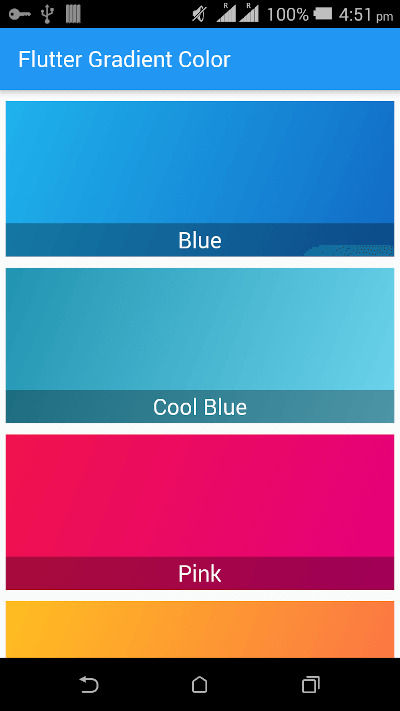
class MyApp extends StatelessWidget {
  @override
  Widget build(BuildContext context) {
    return MaterialApp(
      title: "Flutter Gradient Color",
      debugShowCheckedModeBanner: false,
      home: Scaffold(
        appBar: AppBar(
          title: Text("Flutter Gradient Color"),
        ),
        body: BodyPart(),
      ),
    );
  }
}

class BodyPart extends StatelessWidget {
  @override
  Widget build(BuildContext context) {
    return CupertinoScrollbar(
      child: ListView(
        children: <Widget>[
          ContainerWidget(
            colorName: "Blue",
            colors: GradientColors.blue,
          ),
          ContainerWidget(
            colorName: "Cool Blue",
            colors: GradientColors.coolBlues,
          ),
          ContainerWidget(
            colorName: "Pink",
            colors: GradientColors.pink,
          ),
          ContainerWidget(
            colorName: "Orange",
            colors: GradientColors.orange,
          ),
          ContainerWidget(
            colorName: "Indigo",
            colors: GradientColors.indigo,
          ),
          ContainerWidget(
            colorName: "White",
            colors: GradientColors.white,
          ),
          ContainerWidget(
            colorName: "Black",
            colors: GradientColors.black,
          ),
          ContainerWidget(
            colorName: "Piggy Pink",
            colors: GradientColors.piggyPink,
          ),
          ContainerWidget(
            colorName: "Evening Sunshine",
            colors: GradientColors.eveningSunshine,
          ),
          ContainerWidget(
            colorName: "Dark Ocean",
            colors: GradientColors.darkOcean,
          ),
          ContainerWidget(
            colorName: "Grade Grey",
            colors: GradientColors.gradeGrey,
          ),
          ContainerWidget(
            colorName: "Dim Blue",
            colors: GradientColors.dimBlue,
          ),
          ContainerWidget(
            colorName: "Ver",
            colors: GradientColors.ver,
          ),
          ContainerWidget(
            colorName: "LightBlue",
            colors: GradientColors.lightBlue,
          ),
          ContainerWidget(
            colorName: "Lunada",
            colors: MoreGradientColors.lunada,
          ),
          ContainerWidget(
            colorName: "Light Green",
            colors: GradientColors.lightGreen,
          ),
          ContainerWidget(
            colorName: "Violet",
            colors: GradientColors.violet,
          ),
          ContainerWidget(
            colorName: "Light Black",
            colors: GradientColors.lightBlack,
          ),
          ContainerWidget(
            colorName: "Facebook Messenger",
            colors: GradientColors.facebookMessenger,
          ),
          ContainerWidget(
            colorName: "Winter",
            colors: GradientColors.winter,
          ),
          ContainerWidget(
            colorName: "Cloud",
            colors: GradientColors.cloud,
          ),
          ContainerWidget(
            colorName: "Grey",
            colors: GradientColors.grey,
          ),
          ContainerWidget(
            colorName: "Beautiful Green",
            colors: GradientColors.beautifulGreen,
          ),
          ContainerWidget(
            colorName: "Mango",
            colors: GradientColors.mango,
          ),
          ContainerWidget(
            colorName: "Royal Blue",
            colors: GradientColors.royalBlue,
          ),
          ContainerWidget(
            colorName: "Sky Line",
            colors: GradientColors.skyLine,
          ),
          ContainerWidget(
            colorName: "Dark Pink",
            colors: GradientColors.darkPink,
          ),
          ContainerWidget(
            colorName: "Purple Pink",
            colors: GradientColors.purplePink,
          ),
          ContainerWidget(
            colorName: "Sky Blue",
            colors: GradientColors.skyBlue,
          ),
          ContainerWidget(
            colorName: "Sea Blue",
            colors: GradientColors.seaBlue,
          ),
          ContainerWidget(
            colorName: "Hazel",
            colors: MoreGradientColors.hazel,
          ),
          ContainerWidget(
            colorName: "Noon To Dusk",
            colors: GradientColors.noontoDusk,
          ),
          ContainerWidget(
            colorName: "Red",
            colors: GradientColors.red,
          ),
          ContainerWidget(
            colorName: "Light Brown",
            colors: GradientColors.lightBrown,
          ),
          ContainerWidget(
            colorName: "Harmonic Energy",
            colors: GradientColors.harmonicEnergy,
          ),
          ContainerWidget(
            colorName: "Radish",
            colors: GradientColors.radish,
          ),
          ContainerWidget(
            colorName: "Sunny",
            colors: GradientColors.sunny,
          ),
          ContainerWidget(
            colorName: "Teal",
            colors: GradientColors.teal,
          ),
          ContainerWidget(
            colorName: "Purple",
            colors: GradientColors.purple,
          ),
          ContainerWidget(
            colorName: "Green",
            colors: GradientColors.green,
          ),
          ContainerWidget(
            colorName: "Yellow",
            colors: GradientColors.yellow,
          ),
          ContainerWidget(
            colorName: "Orange Pink",
            colors: GradientColors.orangePink,
          ),
          ContainerWidget(
            colorName: "Aqua",
            colors: GradientColors.aqua,
          ),
          ContainerWidget(
            colorName: "Sunrise",
            colors: GradientColors.sunrise,
          ),
          ContainerWidget(
            colorName: "Cherry",
            colors: GradientColors.cherry,
          ),
          ContainerWidget(
            colorName: "Mojito",
            colors: GradientColors.mojito,
          ),
          ContainerWidget(
            colorName: "juicy Orange",
            colors: GradientColors.juicyOrange,
          ),
          ContainerWidget(
            colorName: "Mirage",
            colors: GradientColors.mirage,
          ),
          Divider(),
          Center(child: Text("More Gradient Color")),
          ContainerWidget(
            colorName: "Dark Sky Blue",
            colors: MoreGradientColors.darkSkyBlue,
          ),
          ContainerWidget(
            colorName: "Instagram",
            colors: MoreGradientColors.instagram,
          ),
          ContainerWidget(
            colorName: "JShine",
            colors: MoreGradientColors.jShine,
          ),
          ContainerWidget(
            colorName: "Cool Sky",
            colors: MoreGradientColors.coolSky,
          ),
          ContainerWidget(
            colorName: "Azure Lane",
            colors: MoreGradientColors.azureLane,
          ),
          ContainerWidget(
            colorName: "Orange Pink Teal",
            colors: MoreGradientColors.orangePinkTeal,
          ),
          Divider()
        ],
      ),
    );
  }
}
의존성 목록 2 개
{"sdk":"flutter"}{"sdk":"flutter"}사용 목적에 따라 검색하고 개발 활동을 비교한 뒤 원본 저장소에서 요구 사항을 확인하세요.
“A repository is the most basic element of GitHub.”
GitHub Docs — About repositories ↗