

 v0.0.1
animated_radial_menu
보일러플레이트 코드 없이 매우 사용자 정의 가능한 복잡한 반지름 애니메이션.
34좋아요 8130일 다운로드130Pub 점수
AndroidiOSWebmacOSWindowsLinux
보일러플레이트 코드 없이 매우 사용자 정의 가능한 복잡한 반지름 애니메이션.

아래는 영문 원문 스냅샷입니다. 최신 내용은 GitHub에서 확인하세요.
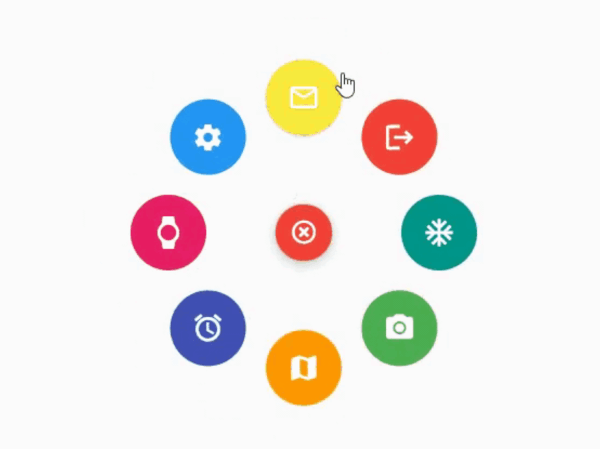
The package provides an easy way to work with radial menu along with animations.

You can check out the example here
To use this package : add the dependency to your pubspec.yaml file
   dependencies:
     flutter:
       sdk: flutter
     animated_radial_menu:
Import it to your project file
import 'package:animated_radial_menu/animated_radial_menu.dart';
Similar to column or row widget, simply pass in buttons as children and you are done
  RadialMenu(
     children: [
         RadialButton(
           icon: Icon(Icons.ac_unit),
           onPress: () => print("ac unit"),
         )
     ]
 ),
Eventhough you can use this widget anywhere, it's recommended to use RadialMenu with Stack Widget if your page contains tons of UI elements
     body: Stack(
          children: [
            RadialMenu(
              children: [
                RadialButton(
                  icon: Icon(Icons.ac_unit),
                  buttonColor: Colors.teal,
                  onPress: () => Get.to(TargetScreen())),
                RadialButton(
                    icon: Icon(Icons.camera_alt),
                    buttonColor: Colors.green,
                    onPress: () => Get.to(TargetScreen())),
                RadialButton(
                    icon: Icon(Icons.map),
                    buttonColor: Colors.orange,
                    onPress: () => Get.to(TargetScreen())),

                /* you can add any number of buttons, although it's
                  not recommended to insert beyond 8-9 buttons. */
              ],
            ),

            // rest of the widgets....

          ],
        ),
You can manually position the widget wherever you wish
   RadialMenu(
    centerButtonAlignment: Alignment(0.3,0.5) // by default alignment is set to Alignment.center
   )
You can also customize the main centered button(more customizations will be made available soon)
   RadialMenu(
        centerButtonSize: 0.5, // size ranging from 0.0 to 1.0
   )
의존성 목록 4 개
{"sdk":"flutter"}^9.1.0^2.1.0{"sdk":"flutter"}사용 목적에 따라 검색하고 개발 활동을 비교한 뒤 원본 저장소에서 요구 사항을 확인하세요.
“A repository is the most basic element of GitHub.”
GitHub Docs — About repositories ↗