패키지, 저장소 및 앱 카테고리 검색

animated_radial_menu 표지
패키지 상세v0.0.1

animated_radial_menu

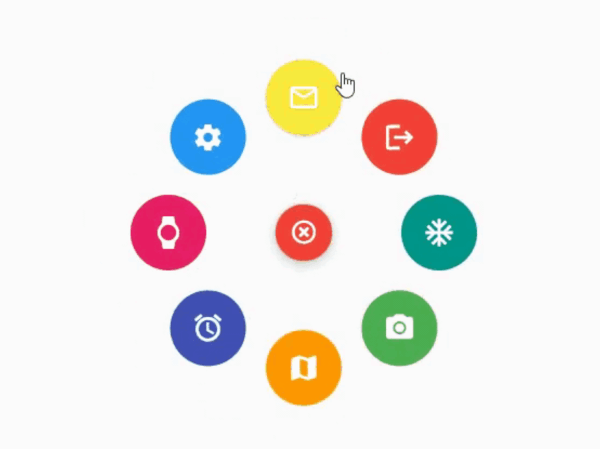
보일러플레이트 코드 없이 매우 사용자 정의 가능한 복잡한 반지름 애니메이션.

AndroidiOSWebmacOSWindowsLinux
30일 다운로드
81
좋아요
34
Pub 점수
130

패키지 설치

flutter pub add animated_radial_menu

패키지 개요

공개 정보를 바탕으로 생성한 선택 가이드입니다.

Flutter용으로 고도로 사용자 정의 가능한 레이디얼 메뉴 패키지로, 보일러플레이트 코드 없이 복잡하고 부드러운 애니메이션을 제공합니다. 개발자가 여러 플랫폼에서 우아한 레이디얼 레이아웃을 갖춘 인터랙티브한 플로팅 액션 메뉴를 만들 수 있게 해줍니다. 최소한의 설정으로 동적이고 제스처 반응형 메뉴를 쉽게 구현할 수 있어 직관적인 탐색이나 사용자 상호작용을 강화해야 하는 앱에 이상적입니다. 성능과 유연성을 고려해 설계되었으며, 애니메이션 속도, 항목 위치, 시각적 스타일 등 다양한 커스터마이징을 지원합니다.

사용 사례

  • 인터랙티브 앱 탐색
  • 제스처 기반 메뉴 트리거
  • 플로팅 액션 인터페이스 디자인
  • 향상된 사용자 참여
  • 사용자 정의 UI 컴포넌트
  • 모바일 및 데스크톱 앱 인터페이스

주요 기능

  • 보일러플레이트가 필요하지 않습니다
  • 매우 사용자 정의 가능
  • 부드러운 라디얼 애니메이션
  • 크로스 플랫폼 지원
  • 제스처 반응형 디자인
  • 간편한 통합

적합한 대상

  • 클린 UI 패턴을 찾는 개발자
  • 복잡한 탐색 요구 사항이 있는 앱
  • 디자인 중심의 플러터 프로젝트
  • 다중 플랫폼 애플리케이션
  • UI/UX 개선 노력

고려 사항

  • 저사양 기기에서는 성능 조정이 필요할 수 있습니다
  • 기본 사용법을 넘어서는 문서가 제한적
  • 사용자 정의는 초보자에게 복잡성을 증가시킬 수 있습니다
  • 매우 큰 메뉴 항목에 최적화되지 않음
  • Flutter의 애니메이션 프레임워크 안정성에 의존

원본 README

연결된 소스 저장소의 README 원문 스냅샷입니다. 최신 내용은 저장소에서 확인하세요.

animated_radial_menu

The package provides an easy way to work with radial menu along with animations.

example

You can check out the example here

Installation

To use this package : add the dependency to your pubspec.yaml file

   dependencies:
     flutter:
       sdk: flutter
     animated_radial_menu:

Basic Usage

Import it to your project file

  import 'package:animated_radial_menu/animated_radial_menu.dart';

Similar to column or row widget, simply pass in buttons as children and you are done

  RadialMenu(
     children: [
         RadialButton(
           icon: Icon(Icons.ac_unit),
           onPress: () => print("ac unit"),
         )
     ]
 ),

Eventhough you can use this widget anywhere, it's recommended to use RadialMenu with Stack Widget if your page contains tons of UI elements

     body: Stack(
          children: [
            RadialMenu(
              children: [
                RadialButton(
                  icon: Icon(Icons.ac_unit),
                  buttonColor: Colors.teal,
                  onPress: () => Get.to(TargetScreen())),
                RadialButton(
                    icon: Icon(Icons.camera_alt),
                    buttonColor: Colors.green,
                    onPress: () => Get.to(TargetScreen())),
                RadialButton(
                    icon: Icon(Icons.map),
                    buttonColor: Colors.orange,
                    onPress: () => Get.to(TargetScreen())),
                                 
                /* you can add any number of buttons, although it's 
                  not recommended to insert beyond 8-9 buttons. */
              ],
            ),
            
            // rest of the widgets....

          ],
        ),

You can manually position the widget wherever you wish

   RadialMenu(
    centerButtonAlignment: Alignment(0.3,0.5) // by default alignment is set to Alignment.center
   )

You can also customize the main centered button(more customizations will be made available soon)

   RadialMenu(
        centerButtonSize: 0.5, // size ranging from 0.0 to 1.0
   )

카테고리

의존성

의존성 목록 2 개

소스 저장소

이 패키지를 사용하는 프로젝트

아직 데이터가 없습니다.