
 v1.1.1
cropperx
Flutter로 제작된 이미지 자르기 패키지입니다. 이미지의 자르기 및 회전에 사용할 수 있습니다.
90좋아요 7.1천30일 다운로드160Pub 점수
AndroidiOSWebmacOSWindowsLinux
speedkodi/flutter_cropperx open-source repository details.

{"sdk":"flutter"}{"sdk":"flutter"}아래는 영문 원문 스냅샷입니다. 최신 내용은 GitHub에서 확인하세요.
A cropper package made fully in Flutter.
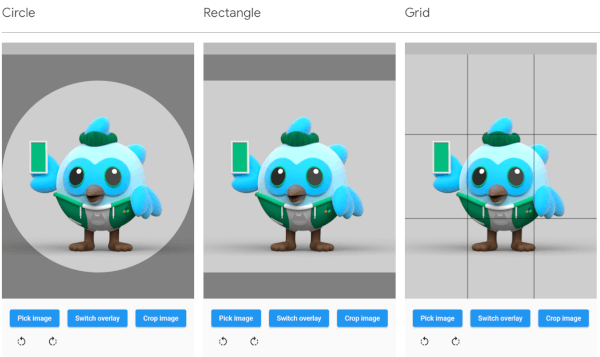
| Circle | Rectangle | Grid |
|---|---|---|
| Screenshot circle | Screenshot rectangle | Screenshot grid |
The overlay can be defined by adding an overlay type through the overlayType parameter. The following types are currently supported:
The image rotation can be defined through the rotationTurns parameter. The default value is 0, corresponding to 0 degrees of rotation. Making the value larger by 1 will rotate the image 90 degrees clockwise, making it smaller will rotate the image 90 degrees counterclockwise. 0 to 4 is not a limit, so going above or below these values will keep rotating the image.
// Import package
import 'package:cropperx/cropper.dart';

// Define a key
final _cropperKey = GlobalKey(debugLabel: 'cropperKey');

// Add the Cropper widget to your tree, using the above key and adding the image to crop
Cropper(
    cropperKey: _cropperKey, // Use your key here
    image: Image.network(
        'https://i.pinimg.com/originals/6b/4d/18/6b4d18c0b756ab20c3591490dfc10090.jpg',
    ),
)

// Get the cropped image as bytes
final imageBytes = await Cropper.crop(
    cropperKey: _cropperKey, // Reference it through the key
)