
InnerEcho
InnerEcho(정신 건강 앱)은 플러터와 스프링 부트 기반의 애플리케이션으로, 접근 가능한 정신 건강 도구를 제공하는 데 중점을 두고 있습니다. 이 앱은 일일 기분 추적, 안내된 명상, 호흡 운동, 일기 작성 및 AI 채팅 지원을 통해 사용자가 개인적이고 사적인 환경에서 스트레스와 불안을 관리하고 전반적인 정신 건강을 향상시키는 데 도움을 줍니다.

- 스타
- 2
- 포크
- 2
- 최근 푸시(UTC)
- 2025. 7. 16.
- 프로젝트 상태
- 활성
원본 README
아래는 영문 원문 스냅샷입니다. 최신 내용은 GitHub에서 확인하세요.
(INNERECHO) Mental Health App
A comprehensive mental health application designed to help users manage their mental wellbeing through various features including mood tracking, journaling, meditation exercises, breathing techniques, and AI-powered support.
Table of Contents
- Overview
- Features
- Screenshots
- Tech Stack
- Project Structure
- Installation & Setup
- Usage
- API Documentation
- Contributing
- License
- Contact
Overview
The Mental Health App is designed to provide users with a comprehensive set of tools to support their mental wellbeing journey. The application combines modern UI/UX design principles with evidence-based mental health practices to deliver a seamless and effective user experience.
Our goal is to make mental health support accessible to everyone through technology, providing users with self-help tools that can be used anytime, anywhere.
Features
User Profile Management
- Create and manage personalized user profiles
- Track progress and achievements
- Customize app settings and preferences
Mood Tracking
- Daily mood check-ins and tracking
- Visualization of mood patterns over time
- Identification of triggers and patterns
Journaling
- Private and secure digital journal
- Guided journal prompts for reflection
- Search and review past entries
- Express thoughts and emotions in a safe space
Meditation Exercises
- Guided meditation sessions for various needs
- Timer and tracking for meditation practice
- Background ambient sounds
- Progress tracking for meditation habits
Breathing Exercises
- Guided breathing techniques for stress relief
- Visual breathing guides with animations
- Different techniques for different needs (relaxation, focus, energy)
- Customizable session durations
Daily Affirmations
- Positive daily affirmations
- Customizable affirmation categories
- Option to create personal affirmations
- Scheduled affirmation reminders
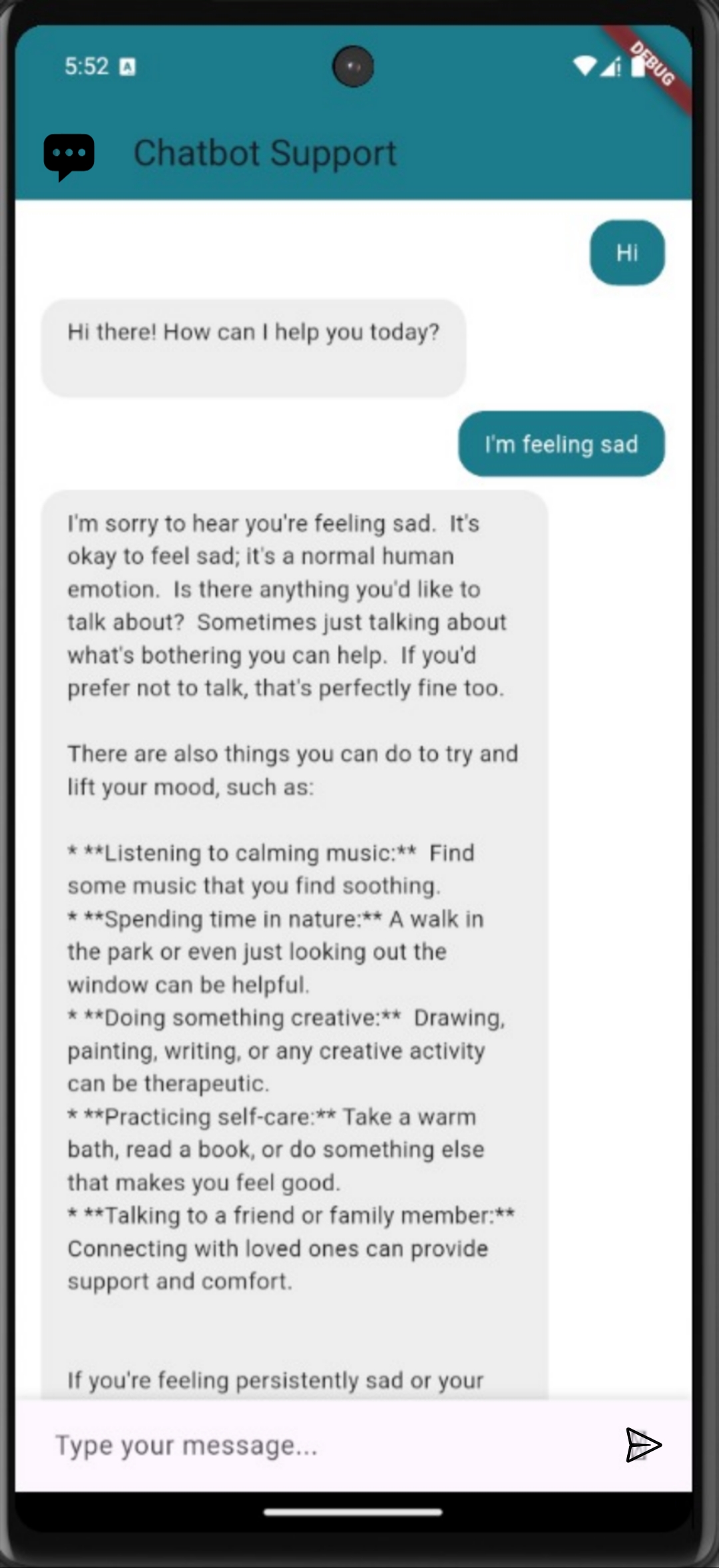
AI-Powered Chat Support
- 24/7 AI chatbot for immediate support
- Guided conversations for various mental health concerns
- Resource recommendations based on user needs
- Crisis support information and referrals
Screenshots
Tech Stack
Frontend
- Framework: Flutter for cross-platform mobile development
- Language: Dart
- State Management: Provider pattern
- UI Components: Material Design
- Navigation: Flutter Navigation 2.0
- Local Storage: SharedPreferences, SQLite
- HTTP Client: Dio
Backend
- Framework: Spring Boot
- Language: Java
- Database: MongoDB for flexible data storage
- API: RESTful API with JSON
- Authentication: JWT (JSON Web Tokens)
- Build Tool: Maven
- Deployment: Docker containerization
- Testing: JUnit, Mockito
Project Structure
The project is organized into two main components:
Frontend (Flutter)
frontend/
├── assets/             # Images, fonts, and other static files
├── lib/
│   ├── main.dart       # Application entry point
│   ├── screens/        # UI screens
│   ├── src/            # Core application code
│   │   ├── app.dart    # App configuration
│   │   ├── localization/  # Internationalization
│   │   ├── settings/   # App settings
│   │   └── sample_feature/ # Feature components
└── test/               # Unit and widget tests
Backend (Spring Boot)
backend/
├── src/
│   ├── main/
│   │   ├── java/com/inecho/
│   │   │   ├── controller/  # REST API controllers
│   │   │   ├── model/       # Data models
│   │   │   ├── repository/  # Database access
│   │   │   └── service/     # Business logic
│   │   └── resources/       # Configuration files
│   └── test/               # Unit and integration tests
└── pom.xml                 # Maven configuration
Installation & Setup
Prerequisites
- Flutter SDK (latest stable version)
- Java Development Kit (JDK) 17 or higher
- Maven
- MongoDB
- Git
Frontend Setup
-
Clone the repository:
git clone https://github.com/yourusername/Mental-Health-App.git cd Mental-Health-App -
Navigate to the frontend directory:
cd frontend -
Install dependencies:
flutter pub get -
Run the application:
flutter run
Backend Setup
-
Navigate to the backend directory:
cd backend -
Configure MongoDB connection in
src/main/resources/application.properties -
Build the project:
./mvnw clean install -
Run the server:
./mvnw spring-boot:run
Docker Setup (Optional)
The backend includes a Dockerfile for containerized deployment:
-
Build the Docker image:
docker build -t mental-health-app-backend . -
Run the container:
docker run -p 8080:8080 mental-health-app-backend
Usage
- User Registration/Login: Create an account or log in to access personalized features
- Profile Setup: Complete your profile to get personalized recommendations
- Daily Check-in: Track your mood and journal daily for best results
- Explore Features: Try different meditation and breathing exercises
- Chat Support: Use the AI chatbot when you need immediate guidance
API Documentation
The backend API documentation is available at http://localhost:8080/swagger-ui.html when the server is running. This provides a complete reference of all available endpoints, request parameters, and response formats.
Key API endpoints include:
/api/users- User management/api/journal- Journal entries/api/mood- Mood tracking
Contributing
We welcome contributions to the Mental Health App! Please follow these steps:
- Fork the repository
- Create your feature branch (
git checkout -b feature/amazing-feature) - Commit your changes (
git commit -m 'Add some amazing feature') - Push to the branch (
git push origin feature/amazing-feature) - Open a Pull Request
Please ensure your code follows the existing style guidelines and includes appropriate tests.
License
This project is licensed under the MIT License - see the LICENSE file for details.
Contact
Project Link: [(https://github.com/sv6095/InnerEcho)]
This application is designed for self-help and is not a replacement for professional mental health care. If you're experiencing a mental health crisis, please contact your local emergency services or a mental health professional.

Shantanu ↗
분류
프로젝트에 맞는 저장소를 선택하려면?
사용 목적에 따라 검색하고 개발 활동을 비교한 뒤 원본 저장소에서 요구 사항을 확인하세요.
- 이름, 작성자 또는 설명으로 검색하고 기술 주제로 범위를 좁힙니다.
- 스타, 포크, 최근 푸시를 함께 비교하세요. 스타는 관심의 지표이며 품질을 보장하지 않습니다.
- 사용하기 전에 GitHub에서 README, 라이선스, Issues를 확인하세요.
출처 및 관리
“A repository is the most basic element of GitHub.”
GitHub Docs — About repositories ↗