


 v1.3.0
loading_animation_widget
로딩 애니메이션 또는 로딩 스피너 또는 로더. 앱이 로딩 상태이거나 특정 작업이 예측할 수 없는 시간 동안 처리되는 동안 로딩 애니메이션을 표시하는 데 사용됩니다.
2천좋아요 17.1만30일 다운로드150Pub 점수
AndroidiOSWebmacOSWindowsLinux
Flutter 로딩 애니메이션 위젯.

아래는 영문 원문 스냅샷입니다. 최신 내용은 GitHub에서 확인하세요.




Add loading_animation_widget: to your pubspec.yaml dependencies then run flutter pub get
 dependencies:
  loading_animation_widget:
Add this line to import the package.
import 'package:loading_animation_widget/loading_animation_widget.dart';
All loading animation APIs are same straight forward. There is a static method for each animation inside LoadingAnimationWidget class, which returns the Object of that animation. Both size and color are required some animations need more than one color.
Loading animation with one color
Scaffold(
    body: Center(
      child: LoadingAnimationWidget.staggeredDotsWave(
        color: Colors.white,
        size: 200,
      ),
    ),
Loading animation with more than one color. You have to provide both required colors.
Scaffold(
    body: Center(
        child: LoadingAnimationWidget.twistingDots(
          leftDotColor: const Color(0xFF1A1A3F),
          rightDotColor: const Color(0xFFEA3799),
          size: 200,
        ),
      ),
|
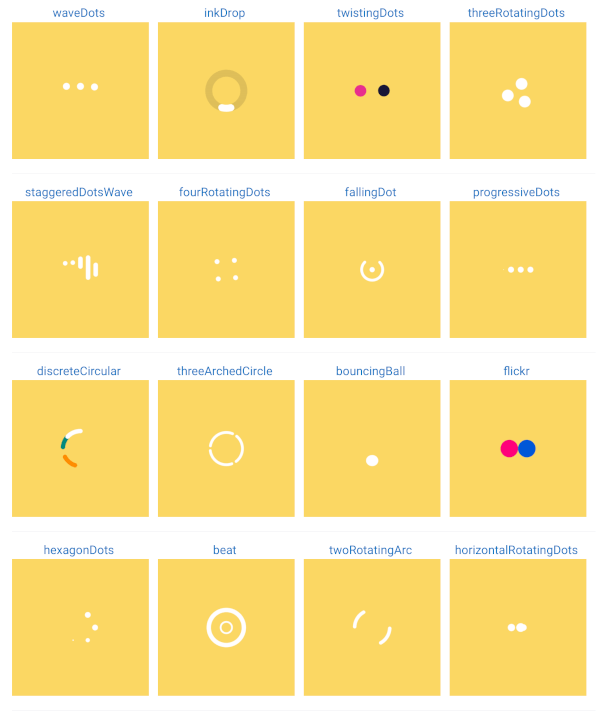
waveDots 
|
inkDrop 
|
twistingDots 
|
threeRotatingDots 
|
staggeredDotsWave 
|
fourRotatingDots 
|
fallingDot 
|
progressiveDots 
|
discreteCircular 
|
threeArchedCircle 
|
bouncingBall 
|
flickr 
|
hexagonDots 
|
beat 
|
twoRotatingArc 
|
horizontalRotatingDots 
|
newtonCradle 
|
stretchedDots 
|
halfTriangleDot 
|
dotsTriangle 
|
● Sliding Clipped Nav Bar
● Water Drop Nav Bar
● Swipeable Tile
➜ Loading Animation Widget
의존성 목록 3 개
{"sdk":"flutter"}{"sdk":"flutter"}^1.0.0사용 목적에 따라 검색하고 개발 활동을 비교한 뒤 원본 저장소에서 요구 사항을 확인하세요.
“A repository is the most basic element of GitHub.”
GitHub Docs — About repositories ↗