
 v3.1.1
full_screen_menu
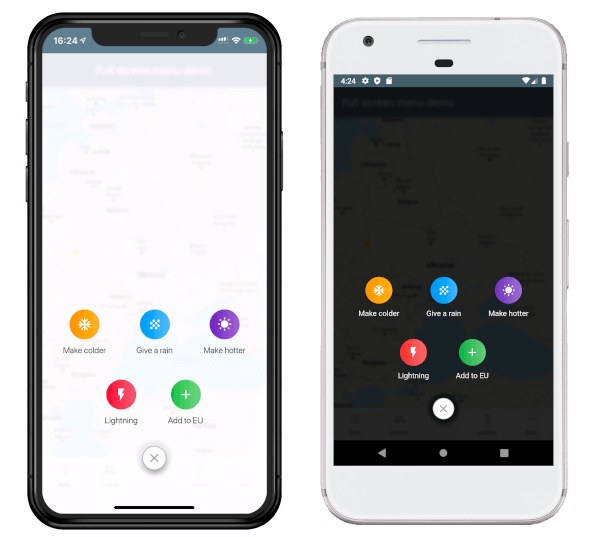
Flutter 앱용 전체 화면 메뉴로 사용자가 아름답게 다양한 옵션을 제공받을 수 있도록 합니다
89좋아요 41530일 다운로드160Pub 점수
AndroidiOSWebmacOSWindowsLinux
Flutter 앱용 전체 화면 메뉴로 사용자가 아름답게 다양한 옵션을 제공받을 수 있도록 합니다

{"sdk":"flutter"}{"sdk":"flutter"}^2.0.1아래는 영문 원문 스냅샷입니다. 최신 내용은 GitHub에서 확인하세요.
https://raw.githubusercontent.com/yako-dev/flutter-full-screen-menu/master/assets/full_screen_menu_logo.png
pubspec.yaml file.dependencies:
full_screen_menu: ^2.0.0
settings_ui package.import 'package:full_screen_menu/full_screen_menu.dart';
    FullScreenMenu.show(
      context,
      items: [
        Image.asset('assets/image.png'),
        FSMenuItem(
          icon: Icon(Icons.ac_unit, color: Colors.white),
          text: Text('Make colder'),
          gradient: orangeGradient,
          onTap: () => print('The weather is colder now');
        ),
        FSMenuItem(
          icon: Icon(Icons.wb_sunny, color: Colors.white),
          text: Text('Make hotter'),
          gradient: blueGradient,
          onTap: () => print('The weather is hotter now');
        ),
      ],
    );
The Full Screen Menu Base Widget is the block of your menu items located in your screen
| Parameter | Description | Required |
|---|---|---|
| Color backgroundColor | Set a background color of your FullScreenMenu | + |
| VoidCallback onHide | Set a function which is called by pressing FAB | - |
| List items | Set a menu items which you want to display | - |
| BuildContext context | Set the context of your parent widget | - |
| Function(AnimationController) animationController | Setup your animation when open full screen menu | + |
The Full Screen Menu Base Widget is the block of your menu items located in your screen
| Parameter | Description | Required |
|---|---|---|
| Text text | Set the text that will be displayed on the item | - |
| Icon icon | Set the icon that will be displayed on the item | - |
| Function onTap | Set The function that will be called when you click on item | + |
| Gradient gradient | Set a gradient that will fill the background of your icon | + |
This project is licensed under the Apache License 2.0 - see the LICENSE file for details