
 v0.2.2
glassmorphism_widgets
Flutter 앱에서 사용할 수 있는 위젯 세트입니다. 쉽게 커스터마이즈하고 글래스 모르포시즘 위젯을 개발할 수 있습니다.
79좋아요 29430일 다운로드150Pub 점수
AndroidiOSWebmacOSWindowsLinux
yama-yeah/glassmorphism_widgets open-source repository details.

{"sdk":"flutter"}{"sdk":"flutter"}^1.15.0^2.0.1^0.15.0아래는 영문 원문 스냅샷입니다. 최신 내용은 GitHub에서 확인하세요.
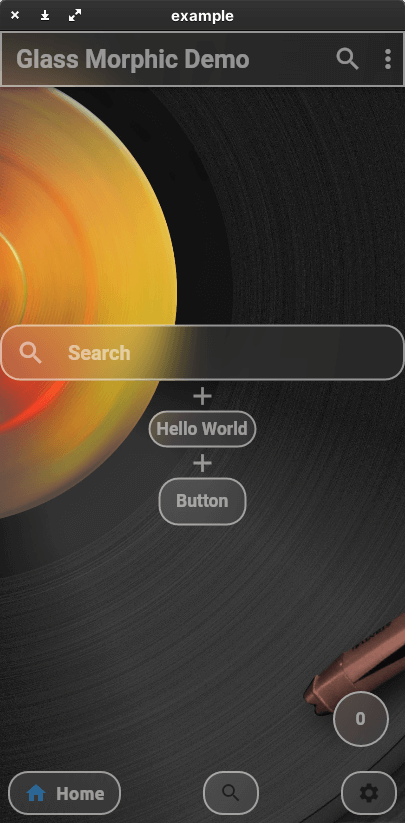
https://user-images.githubusercontent.com/82094614/147371522-76db6662-3945-4470-bad3-1dfec306ccd1.png
This package allows you to easily create a Glassmorphism UI.
The AppBar, ListTile, and even the BottomNavigationBar work like Material Design widgets.
The color, shape, and size of the glass are all up to you.
Create your ideal Glassmorphism App!
This package currently supports only stable channel.
You should add the following to the pubspec.yaml file:
dependencies:
  glassmorphism_widgets:
You should then run flutter packages get in your terminal so as to get the package.
Now import the package in the dart file:
import 'package:glassmorphism_widgets/glassmorphism_widgets.dart';
Here is an example of how to use Glassmorphism Widgets.
Many of the parameters are based on the original Material Design widget.
If you want to know glass specific parameter.
You should look here.
a simple glass container.
GlassContainer(
    child: Padding(
      padding: EdgeInsets.all(8),
      child: GlassText("Hello World"),
    ),
),
Container(
    height:200,
    width:200,
    GlassFlexContainer(
        child: Padding(
        padding: EdgeInsets.all(8),
        child: GlassText("Hello World"),
        ),
    ),
),
If you want to change glass widgets look all together.
You should use GlassApp and GlassThemeData.
GlassApp(
  theme: GlassThemeData(
    blur: 10,
  ),
  home: MaterialApp(
    title: 'Flutter Demo',
    theme: ThemeData(
      primarySwatch: Colors.blue,
    ),
    home: const MyHomePage(title: 'Flutter Demo Home Page'),
  ),
)
If you want to access GlassThemeData.
You should use GlassTheme.
GlassThemeData data = GlassTheme.of(context);
It is a thin white text.
GlassText("Hello World"),
a simple glass app bar.
appBar: GlassAppBar(
    title: GlassText(
        'Glass Morphic Demo',
        fontWeight: FontWeight.bold,
        color: Colors.white,
    ),
),
a simple glass list tile
GlassListTile(
    leading: GlassIcon(Icons.search),
    title: TextField(
        decoration: InputDecoration(
        hintText: 'Search',
        border: InputBorder.none,
        hintStyle: glassTextStyle,
        ),
        style: glassTextStyle,
    ),
    onTap: () {},
),
a simple glass button
GlassButton(
    onPressed: () {
    showGlassBottomSheet(
        context: context,
        child: Center(
            child: GlassText("Hello World", fontSize: 20)));
    },
    child: GlassText("Button"),
),
Display bottom sheet like glass
showGlassBottomSheet(
    context: context,
    child: Center(
        child: GlassText("Hello World", fontSize: 20)));
floatingActionButton: GlassFloatingActionButton(
    onPressed: () {
        setState(() {
            index++;
        });
    },
    child: GlassText("$index"),
),
bottomNavigationBar: GlassBottomBar(
            items: [
              GlassBottomBarItem(
                icon: Icon(Icons.home),
                title: GlassText("Home"),
              ),
              GlassBottomBarItem(
                icon: Icon(Icons.search),
                title: GlassText("Search"),
              ),
              GlassBottomBarItem(
                icon: Icon(Icons.settings),
                title: GlassText("Settings"),
              ),
            ],
            onTap: (i) {
              setState(() {
                index = i;
              });
            },
            currentIndex: index,
          ),
IconButton(
    icon: GlassIcon(Icons.search),
    onPressed: () {},
),
You should add parameter linearGradient.
You should add parameter radius or borderRadius.
borderRadius takes precedence over radius.
You should add parameter blur.
If you set blur lower value. GlassWidgets will become clear.
Master Channel cannot use GlassFloatingActionButton.
If you have anything you want to inform me (@yama-yeah), such as suggestions to enhance this package or functionalities you want etc, feel free to make issues on GitHub