패키지, 저장소 및 앱 카테고리 검색

glassmorphism_widgets 표지
패키지 상세v0.2.2

glassmorphism_widgets

Flutter 앱에서 사용할 수 있는 위젯 세트입니다. 쉽게 커스터마이즈하고 글래스 모르포시즘 위젯을 개발할 수 있습니다.

AndroidiOSWebmacOSWindowsLinux
30일 다운로드
601
좋아요
79
Pub 점수
150

패키지 설치

flutter pub add glassmorphism_widgets

패키지 개요

공개 정보를 바탕으로 생성한 선택 가이드입니다.

앱에서 유리 형태 효과를 만들기 위해 사용할 수 있는 사용자 정의 가능한 위젯 모음을 제공하는 플러터 패키지입니다. 현대적이고 얼음처럼 뿌옇게 보이는 디자인을 가진 흐릿하고 반투명한 UI 요소 구현을 간편하게 만들어 줍니다. 개발자는 다양한 디자인 요구에 맞게 이 위젯들을 쉽게 통합하고 조정할 수 있습니다. 이 패키지는 안드로이드, iOS, 웹, 맥OS, 윈도우, 리눅스를 지원하여 크로스플랫폼 프로젝트에 적합하며 세련되고 현대적인 외관을 원하는 경우에 이상적입니다.

사용 사례

  • 현대적인 앱 인터페이스 만들기
  • 블러 효과가 있는 부유 카드 디자인
  • 시각적으로 매력적인 오버레이 구축
  • 깊이를 통해 사용자 경험 향상
  • 반투명 UI 컴포넌트 구현

주요 기능

  • 사용하기 쉬운 글래스 모르피즘 위젯
  • 사용자 지정 가능한 흐림 및 투명도 수준
  • 크로스 플랫폼 호환성
  • 다중 테마 지원
  • 내장 애니메이션 지원
  • pub add를 통한 간단한 통합

적합한 대상

  • 현대적인 미학을 추구하는 UI 디자이너
  • 크로스 플랫폼 앱을 개발하는 개발자
  • 매트 글라스 효과가 필요한 프로젝트
  • 시각적 매력에 중점을 둔 앱
  • Flutter를 사용하여 빠른 프로토타이핑을 수행하는 팀

고려 사항

  • 강한 블러 효과로 인한 성능 영향
  • 다크 모드를 위해 추가 스타일링이 필요할 수 있습니다
  • 기본 속성 외의 사용자 정의는 제한적입니다
  • 저사양 기기에는 적합하지 않습니다
  • 일부 플랫폼에서 렌더링 일관성 문제가 발생할 수 있습니다

원본 README

연결된 소스 저장소의 README 원문 스냅샷입니다. 최신 내용은 저장소에서 확인하세요.

Glassmorphism Widgets

About

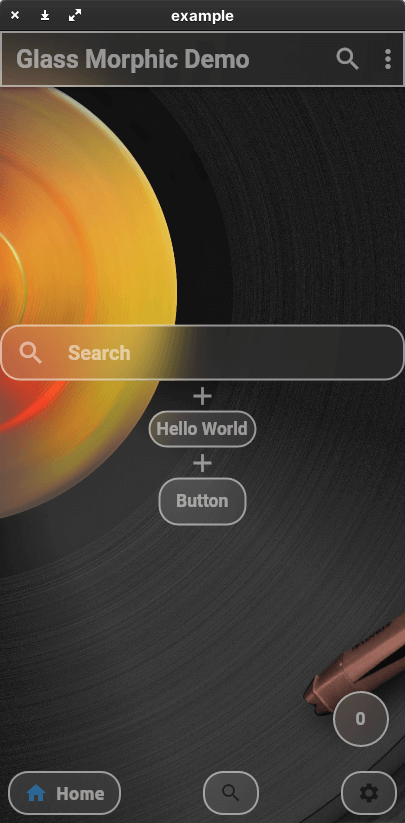
This package allows you to easily create a Glassmorphism UI.
The AppBar, ListTile, and even the BottomNavigationBar work like Material Design widgets.
The color, shape, and size of the glass are all up to you.
Create your ideal Glassmorphism App!
This package currently supports only stable channel.

Getting started

You should add the following to the pubspec.yaml file:

dependencies:
  glassmorphism_widgets:

You should then run flutter packages get in your terminal so as to get the package.

Now import the package in the dart file:

import 'package:glassmorphism_widgets/glassmorphism_widgets.dart';

Usage

Here is an example of how to use Glassmorphism Widgets.
Many of the parameters are based on the original Material Design widget.
If you want to know glass specific parameter.
You should look here.

GlassContainer

a simple glass container.

GlassContainer(
    child: Padding(
      padding: EdgeInsets.all(8),
      child: GlassText("Hello World"),
    ),
),
GlassFlexContainer
Container(
    height:200,
    width:200,
    GlassFlexContainer(
        child: Padding(
        padding: EdgeInsets.all(8),
        child: GlassText("Hello World"),
        ),
    ),
),
GlassApp & GlassThemeData

If you want to change glass widgets look all together.
You should use GlassApp and GlassThemeData.

GlassApp(
  theme: GlassThemeData(
    blur: 10,
  ),
  home: MaterialApp(
    title: 'Flutter Demo',
    theme: ThemeData(
      primarySwatch: Colors.blue,
    ),
    home: const MyHomePage(title: 'Flutter Demo Home Page'),
  ),
)
GlassTheme

If you want to access GlassThemeData.
You should use GlassTheme.

GlassThemeData data = GlassTheme.of(context);
GlassText

It is a thin white text.

GlassText("Hello World"),
GlassAppBar

a simple glass app bar.

appBar: GlassAppBar(
    title: GlassText(
        'Glass Morphic Demo',
        fontWeight: FontWeight.bold,
        color: Colors.white,
    ),
),
GlassListTile

a simple glass list tile

GlassListTile(
    leading: GlassIcon(Icons.search),
    title: TextField(
        decoration: InputDecoration(
        hintText: 'Search',
        border: InputBorder.none,
        hintStyle: glassTextStyle,
        ),
        style: glassTextStyle,
    ),
    onTap: () {},
),
GlassButton

a simple glass button

GlassButton(
    onPressed: () {
    showGlassBottomSheet(
        context: context,
        child: Center(
            child: GlassText("Hello World", fontSize: 20)));
    },
    child: GlassText("Button"),
),
showGlassBottomSheet

Display bottom sheet like glass

showGlassBottomSheet(
    context: context,
    child: Center(
        child: GlassText("Hello World", fontSize: 20)));
GlassFloatingActionButton
floatingActionButton: GlassFloatingActionButton(
    onPressed: () {
        setState(() {
            index++;
        });
    },
    child: GlassText("$index"),
),
GlassBottomBar
bottomNavigationBar: GlassBottomBar(
            items: [
              GlassBottomBarItem(
                icon: Icon(Icons.home),
                title: GlassText("Home"),
              ),
              GlassBottomBarItem(
                icon: Icon(Icons.search),
                title: GlassText("Search"),
              ),
              GlassBottomBarItem(
                icon: Icon(Icons.settings),
                title: GlassText("Settings"),
              ),
            ],
            onTap: (i) {
              setState(() {
                index = i;
              });
            },
            currentIndex: index,
          ),
GlassIcon
IconButton(
    icon: GlassIcon(Icons.search),
    onPressed: () {},
),

a specific Glass widget parameter

How to change widgets gradient?

You should add parameter linearGradient.

How to change widgets shape?

You should add parameter radius or borderRadius.
borderRadius takes precedence over radius.

I want to create more clear glass or more frosted glass

You should add parameter blur.
If you set blur lower value. GlassWidgets will become clear.

Problem

Master Channel cannot use GlassFloatingActionButton.

Contact

If you have anything you want to inform me (@yama-yeah), such as suggestions to enhance this package or functionalities you want etc, feel free to make issues on GitHub

카테고리

소스 저장소

이 패키지를 사용하는 프로젝트

아직 데이터가 없습니다.