
 v1.0.0
animated_image_list
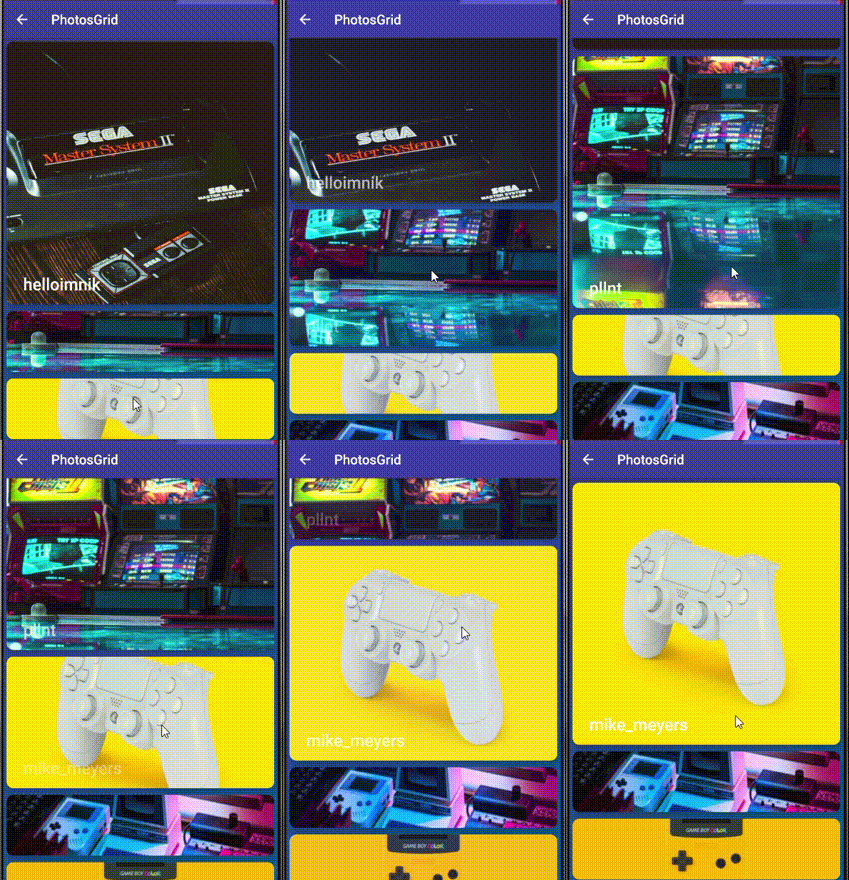
파라럭스 효과와 이미지 라이트박스가 있는 플러터 애니메이션 이미지 목록.
94좋아요 7730일 다운로드140Pub 점수
AndroidiOSWebmacOSWindowsLinux
Flutter 애니메이션 파라락스 이미지 목록

의존성 목록 3 개
{"sdk":"flutter"}^1.0.0-nullsafety.1{"sdk":"flutter"}아래는 영문 원문 스냅샷입니다. 최신 내용은 GitHub에서 확인하세요.
Flutter Animated image list with parallax effect and image lightbox .
gif
https://img.youtube.com/vi/MGTt9eqJioc/0.jpg https://img.youtube.com/vi/gTqUJB75Scc/0.jpg
https://img.youtube.com/vi/iLn3OgV07KY/0.jpg https://img.youtube.com/vi/FLpzHNzCSQ8/0.jpg
Add the package to your pubspec.yaml:
animated_image_list: ^0.5.0
In your dart file, import the library:
import 'package:animated_image_list/AnimatedImageList.dart';
Instead of using a ListView create a AnimatedImageList Widget:
 AnimatedImageList(
               images: arr.map((e) => e.urls.small).toList(),
               builder: (context, index, progress) {
                 return Positioned.directional(
                     textDirection: TextDirection.ltr,
                     bottom: 15,
                     start: 25,
                     child: Opacity(
                       opacity: progress > 1 ? (2 - progress) : progress,
                       child: Text(
                         arr[index].user.username ?? 'Anonymous',
                         style: TextStyle(
                             color: Colors.white,
                             fontSize: 25,
                             fontWeight: FontWeight.w500),
                       ),
                     ));
               },
               scrollDirection: Axis.vertical,
               itemExtent: 100,
               maxExtent: 400,
             ),
| Name | Description | Required | Default value |
|---|---|---|---|
images |
A list of images url to display in the list by default it accepts urls if custom image needed use provider paramter | required | - |
provider |
Function which maps an url or image string to an image provider | - | - |
itemExtent |
not selected item size required to calculate animations | required | 150 |
maxExtent |
selected item size required to calculate animations | required | 400 |
scrollDirection |
List scroll direction horizontal or vertical | - | Axis.vertical |
builder |
Builder function that returns a widget to display over the image / progress from 0...1 item selection progress from 1...2 item leaving view could be usefull if you want to animate something like text opacity above / index current item index |
- | - |
placeHolder |
Optional function which returns default placeholder for lightbox and error widget if image fails to load | - | kTransparentImage |