
 v2.0.0
grouped_checkbox
Flutter 프로젝트에서 다양한 스타일로 체크박스를 쉽게 그룹화할 수 있는 패키지입니다.
11좋아요 7830일 다운로드140Pub 점수
AndroidiOSWebmacOSWindowsLinux
Flutter 프로젝트에서 다양한 스타일로 체크박스를 쉽게 그룹화할 수 있는 플러터 패키지입니다.

{"sdk":"flutter"}{"sdk":"flutter"}아래는 영문 원문 스냅샷입니다. 최신 내용은 GitHub에서 확인하세요.
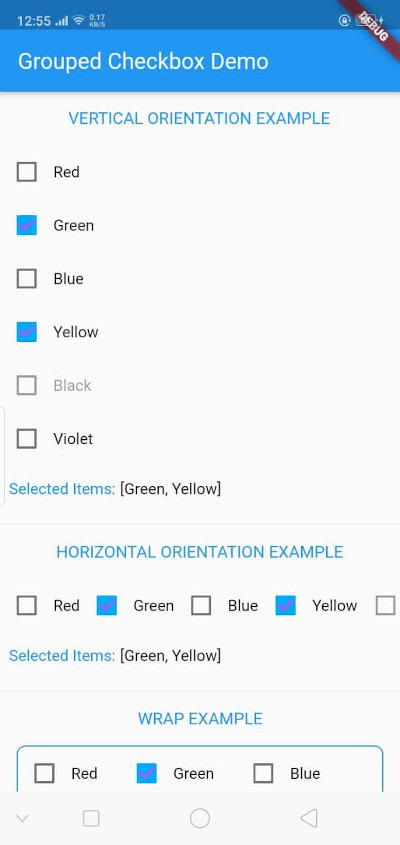
The GroupedCheckbox widget enables displaying a list of checkboxes in various orientations and styles. It's designed for flexibility, supporting generic types, and offers customizable options.
Add grouped_checkbox to your Flutter project's dependencies.
https://raw.githubusercontent.com/zfnadia/grouped-checkbox/master/screenshots/one.jpg https://media.giphy.com/media/v1.Y2lkPTc5MGI3NjExMHE3dTJxeTY4MjFyOWNxODYxazZoYzBueGJsNWVqbXk0Yjlicmd0aSZlcD12MV9pbnRlcm5hbF9naWZfYnlfaWQmY3Q9Zw/rCxjnhgA34BFo76lxt/giphy.gif
To use this plugin, add grouped_checkbox as a dependency in your pubspec.yaml file.
dependencies: grouped_checkbox: 2.0.0
import 'package:grouped_checkbox/grouped_checkbox.dart';
    final List<ColorItem> allItemList = [
      ColorItem('Red', Colors.red),
      ColorItem('Green', Colors.green),
      ColorItem('Blue', Colors.blue),
      ColorItem('Yellow', Colors.yellow),
      ColorItem('Black', Colors.black),
      ColorItem('Violet', Colors.purple)
    ];

    class ColorItem {
      String name;
      Color color;

      ColorItem(this.name, this.color);
    }

    GroupedCheckbox<ColorItem>(
      itemList: allItemList,
      checkedItemList: selectedItems,
      disabled: disabledItems,
      onChanged: (itemList) {
        updateFunction(itemList!);
      },
      orientation: orientation,
      checkColor: Colors.purpleAccent,
      activeColor: Colors.lightBlue,
      itemWidgetBuilder: (item) => Text(item.name, style: TextStyle(color: item.color)),
    )