패키지, 저장소 및 앱 카테고리 검색

catcher 표지
패키지 상세v0.8.0

catcher

개발자가 오류를 잡지 못했을 때 오류를 처리하기 위한 여러 핸들러를 제공하는 오류 캐칭용 플러그인입니다.

AndroidiOSWebmacOSWindowsLinux
30일 다운로드
1천
좋아요
602
Pub 점수
120

패키지 설치

flutter pub add catcher

패키지 개요

공개 정보를 바탕으로 생성한 선택 가이드입니다.

Catcher는 Android, iOS, Web, macOS, Windows, Linux를 포함한 여러 플랫폼에서 처리되지 않은 오류와 예외를 캐치하도록 설계된 Flutter/Dart 패키지입니다. 로깅, 대화상자 표시, 외부 서비스로 보고서 전송 또는 오류를 로컬에 저장하는 등의 사용자 정의 가능한 오류 핸들러를 제공합니다. 디버깅 및 앱 안정성 향상에 이상적이며, 오류가 명시적으로 처리되지 않더라도 개발자가 충돌을 알 수 있도록 보장합니다. 최소한의 설정으로 기존 앱에 원활하게 통합 가능하며 개발 및 프로덕션 환경 모두를 지원합니다.

사용 사례

  • 생산 앱에서 처리되지 않은 예외 처리
  • 디버깅 목적의 오류 기록
  • 외부 서비스로 크래시 보고서 전송
  • 사용자 친화적인 오류 대화 상자 표시
  • 다중 플랫폼에서 앱 안정성 모니터링

주요 기능

  • 여러 오류 핸들러(로그, 다이얼로그, 보고서)
  • 크로스 플랫폼 지원
  • 사용자 정의 가능한 오류 보고
  • 최소한의 코드로 간편한 통합
  • 디버그 및 릴리스 모드를 모두 지원합니다

적합한 대상

  • 강력한 오류 처리를 원하는 개발자
  • 앱 신뢰성에 집중하는 팀
  • 크래시 분석이 필요한 앱
  • 엄격한 품질 보증 기준을 갖춘 프로젝트
  • 다중 플랫폼을 대상으로 하는 Flutter 앱

고려 사항

  • 외부 보고 서비스를 위해 추가 구성이 필요할 수 있습니다
  • 포함된 기능으로 인해 앱 크기가 약간 증가할 수 있습니다
  • 민감한 데이터 시나리오에서는 주의 깊은 처리가 필요합니다
  • 의도적으로 예상되는 런타임 오류를 잡기 위한 것이 아님

원본 README

연결된 소스 저장소의 README 원문 스냅샷입니다. 최신 내용은 저장소에서 확인하세요.

Catcher

pub package pub package pub package pub package

Catcher is Flutter plugin which automatically catches error/exceptions and handle them. Catcher offers multiple way to handle errors. Catcher is heavily inspired from ACRA: https://github.com/ACRA/acra. Catcher supports Android, iOS, Web, Linux, Windows and MacOS platforms.

Install

Add this line to your pubspec.yaml:

dependencies:
  catcher: ^1.0.0-dev1

Then run this command:

$ flutter packages get

Then add this import:

import 'package:catcher/catcher.dart';

Table of contents

Platform support
Basic example
Catcher usage Adding navigator key
Catcher configuration
Report catched exception
Localization

Report modes

Handlers

Test Exception
Explicit exception report handler map
Explicit exception report mode map
Error widget
Current config
Update config
Screenshots

Platform support

To check which features of Catcher are available in given platform visit this page: Platform support

Basic example

Basic example utilizes debug config with Dialog Report Mode and Console Handler and release config with Dialog Report Mode and Email Manual Handler.

To start using Catcher, you have to:

  1. Create Catcher configuration (you can use only debug config at start)
  2. Create Catcher instance and pass your root widget along with catcher configuration
  3. Add navigator key to MaterialApp or CupertinoApp

Here is complete example:

import 'package:flutter/material.dart';
import 'package:catcher/catcher.dart';

main() {
  /// STEP 1. Create catcher configuration. 
  /// Debug configuration with dialog report mode and console handler. It will show dialog and once user accepts it, error will be shown   /// in console.
  CatcherOptions debugOptions =
      CatcherOptions(DialogReportMode(), [ConsoleHandler()]);
      
  /// Release configuration. Same as above, but once user accepts dialog, user will be prompted to send email with crash to support.
  CatcherOptions releaseOptions = CatcherOptions(DialogReportMode(), [
    EmailManualHandler(["support@email.com"])
  ]);

  /// STEP 2. Pass your root widget (MyApp) along with Catcher configuration:
  Catcher(rootWidget: MyApp(), debugConfig: debugOptions, releaseConfig: releaseOptions);
}

class MyApp extends StatefulWidget {
  @override
  _MyAppState createState() => _MyAppState();
}

class _MyAppState extends State<MyApp> {
  @override
  void initState() {
    super.initState();
  }

  @override
  Widget build(BuildContext context) {
    return MaterialApp(
      /// STEP 3. Add navigator key from Catcher. It will be used to navigate user to report page or to show dialog.
      navigatorKey: Catcher.navigatorKey,
      home: Scaffold(
          appBar: AppBar(
            title: const Text('Plugin example app'),
          ),
          body: ChildWidget()),
    );
  }
}

class ChildWidget extends StatelessWidget {
  @override
  Widget build(BuildContext context) {
    return Container(
            child: TextButton(
                child: Text("Generate error"),
                onPressed: () => generateError()));
  }

  generateError() async {
    throw "Test exception";
  }
}

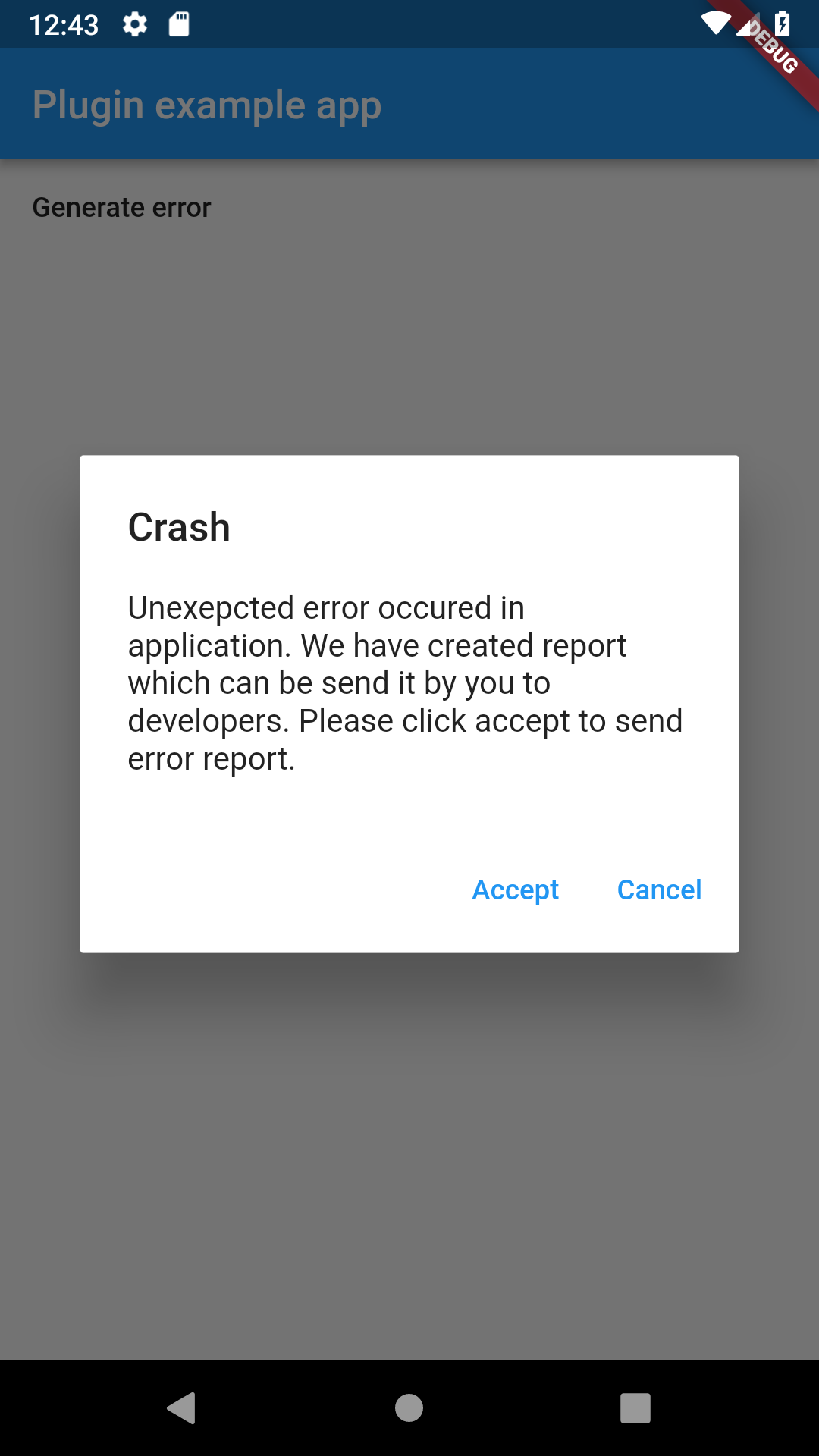
If you run this code you will see screen with "Generate error" button on the screen. After clicking on it, it will generate test exception, which will be handled by Catcher. Before Catcher process exception to handler, it will show dialog with information for user. This dialog is shown because we have used DialogReportHandler. Once user confirms action in this dialog, report will be send to console handler which will log to console error informations.


Dialog with default confirmation message

I/flutter ( 7457): [2019-02-09 12:40:21.527271 | ConsoleHandler | INFO] ============================== CATCHER LOG ==============================
I/flutter ( 7457): [2019-02-09 12:40:21.527742 | ConsoleHandler | INFO] Crash occured on 2019-02-09 12:40:20.424286
I/flutter ( 7457): [2019-02-09 12:40:21.527827 | ConsoleHandler | INFO] 
I/flutter ( 7457): [2019-02-09 12:40:21.527908 | ConsoleHandler | INFO] ------- DEVICE INFO -------
I/flutter ( 7457): [2019-02-09 12:40:21.528233 | ConsoleHandler | INFO] id: PSR1.180720.061
I/flutter ( 7457): [2019-02-09 12:40:21.528337 | ConsoleHandler | INFO] androidId: 726e4abc58dde277
I/flutter ( 7457): [2019-02-09 12:40:21.528431 | ConsoleHandler | INFO] board: goldfish_x86
I/flutter ( 7457): [2019-02-09 12:40:21.528512 | ConsoleHandler | INFO] bootloader: unknown
I/flutter ( 7457): [2019-02-09 12:40:21.528595 | ConsoleHandler | INFO] brand: google
I/flutter ( 7457): [2019-02-09 12:40:21.528694 | ConsoleHandler | INFO] device: generic_x86
I/flutter ( 7457): [2019-02-09 12:40:21.528774 | ConsoleHandler | INFO] display: sdk_gphone_x86-userdebug 9 PSR1.180720.061 5075414 dev-keys
I/flutter ( 7457): [2019-02-09 12:40:21.528855 | ConsoleHandler | INFO] fingerprint: google/sdk_gphone_x86/generic_x86:9/PSR1.180720.061/5075414:userdebug/dev-keys
I/flutter ( 7457): [2019-02-09 12:40:21.528939 | ConsoleHandler | INFO] hardware: ranchu
I/flutter ( 7457): [2019-02-09 12:40:21.529023 | ConsoleHandler | INFO] host: vped9.mtv.corp.google.com
I/flutter ( 7457): [2019-02-09 12:40:21.529813 | ConsoleHandler | INFO] isPsychicalDevice: false
I/flutter ( 7457): [2019-02-09 12:40:21.530178 | ConsoleHandler | INFO] manufacturer: Google
I/flutter ( 7457): [2019-02-09 12:40:21.530345 | ConsoleHandler | INFO] model: Android SDK built for x86
I/flutter ( 7457): [2019-02-09 12:40:21.530443 | ConsoleHandler | INFO] product: sdk_gphone_x86
I/flutter ( 7457): [2019-02-09 12:40:21.530610 | ConsoleHandler | INFO] tags: dev-keys
I/flutter ( 7457): [2019-02-09 12:40:21.530713 | ConsoleHandler | INFO] type: userdebug
I/flutter ( 7457): [2019-02-09 12:40:21.530825 | ConsoleHandler | INFO] versionBaseOs: 
I/flutter ( 7457): [2019-02-09 12:40:21.530922 | ConsoleHandler | INFO] versionCodename: REL
I/flutter ( 7457): [2019-02-09 12:40:21.531074 | ConsoleHandler | INFO] versionIncremental: 5075414
I/flutter ( 7457): [2019-02-09 12:40:21.531573 | ConsoleHandler | INFO] versionPreviewSdk: 0
I/flutter ( 7457): [2019-02-09 12:40:21.531659 | ConsoleHandler | INFO] versionRelase: 9
I/flutter ( 7457): [2019-02-09 12:40:21.531740 | ConsoleHandler | INFO] versionSdk: 28
I/flutter ( 7457): [2019-02-09 12:40:21.531870 | ConsoleHandler | INFO] versionSecurityPatch: 2018-08-05
I/flutter ( 7457): [2019-02-09 12:40:21.532002 | ConsoleHandler | INFO] 
I/flutter ( 7457): [2019-02-09 12:40:21.532078 | ConsoleHandler | INFO] ------- APP INFO -------
I/flutter ( 7457): [2019-02-09 12:40:21.532167 | ConsoleHandler | INFO] version: 1.0
I/flutter ( 7457): [2019-02-09 12:40:21.532250 | ConsoleHandler | INFO] appName: catcher_example
I/flutter ( 7457): [2019-02-09 12:40:21.532345 | ConsoleHandler | INFO] buildNumber: 1
I/flutter ( 7457): [2019-02-09 12:40:21.532426 | ConsoleHandler | INFO] packageName: com.jhomlala.catcherexample
I/flutter ( 7457): [2019-02-09 12:40:21.532667 | ConsoleHandler | INFO] 
I/flutter ( 7457): [2019-02-09 12:40:21.532944 | ConsoleHandler | INFO] ---------- ERROR ----------
I/flutter ( 7457): [2019-02-09 12:40:21.533096 | ConsoleHandler | INFO] Test exception
I/flutter ( 7457): [2019-02-09 12:40:21.533179 | ConsoleHandler | INFO] 
I/flutter ( 7457): [2019-02-09 12:40:21.533257 | ConsoleHandler | INFO] ------- STACK TRACE -------
I/flutter ( 7457): [2019-02-09 12:40:21.533695 | ConsoleHandler | INFO] #0      ChildWidget.generateError (package:catcher_example/file_example.dart:62:5)
I/flutter ( 7457): [2019-02-09 12:40:21.533799 | ConsoleHandler | INFO] <asynchronous suspension>
I/flutter ( 7457): [2019-02-09 12:40:21.533879 | ConsoleHandler | INFO] #1      ChildWidget.build.<anonymous closure> (package:catcher_example/file_example.dart:53:61)
I/flutter ( 7457): [2019-02-09 12:40:21.534149 | ConsoleHandler | INFO] #2      _InkResponseState._handleTap (package:flutter/src/material/ink_well.dart:507:14)
I/flutter ( 7457): [2019-02-09 12:40:21.534230 | ConsoleHandler | INFO] #3      _InkResponseState.build.<anonymous closure> (package:flutter/src/material/ink_well.dart:562:30)
I/flutter ( 7457): [2019-02-09 12:40:21.534321 | ConsoleHandler | INFO] #4      GestureRecognizer.invokeCallback (package:flutter/src/gestures/recognizer.dart:102:24)
I/flutter ( 7457): [2019-02-09 12:40:21.534419 | ConsoleHandler | INFO] #5      TapGestureRecognizer._checkUp (package:flutter/src/gestures/tap.dart:242:9)
I/flutter ( 7457): [2019-02-09 12:40:21.534524 | ConsoleHandler | INFO] #6      TapGestureRecognizer.handlePrimaryPointer (package:flutter/src/gestures/tap.dart:175:7)
I/flutter ( 7457): [2019-02-09 12:40:21.534608 | ConsoleHandler | INFO] #7      PrimaryPointerGestureRecognizer.handleEvent (package:flutter/src/gestures/recognizer.dart:315:9)
I/flutter ( 7457): [2019-02-09 12:40:21.534686 | ConsoleHandler | INFO] #8      PointerRouter._dispatch (package:flutter/src/gestures/pointer_router.dart:73:12)
I/flutter ( 7457): [2019-02-09 12:40:21.534765 | ConsoleHandler | INFO] #9      PointerRouter.route (package:flutter/src/gestures/pointer_router.dart:101:11)
I/flutter ( 7457): [2019-02-09 12:40:21.534843 | ConsoleHandler | INFO] #10     _WidgetsFlutterBinding&BindingBase&GestureBinding.handleEvent (package:flutter/src/gestures/binding.dart:180:19)
I/flutter ( 7457): [2019-02-09 12:40:21.534973 | ConsoleHandler | INFO] #11     _WidgetsFlutterBinding&BindingBase&GestureBinding.dispatchEvent (package:flutter/src/gestures/binding.dart:158:22)
I/flutter ( 7457): [2019-02-09 12:40:21.535052 | ConsoleHandler | INFO] #12     _WidgetsFlutterBinding&BindingBase&GestureBinding._handlePointerEvent (package:flutter/src/gestures/binding.dart:138:7)
I/flutter ( 7457): [2019-02-09 12:40:21.535136 | ConsoleHandler | INFO] #13     _WidgetsFlutterBinding&BindingBase&GestureBinding._flushPointerEventQueue (package:flutter/src/gestures/binding.dart:101:7)
I/flutter ( 7457): [2019-02-09 12:40:21.535216 | ConsoleHandler | INFO] #14     _WidgetsFlutterBinding&BindingBase&GestureBinding._handlePointerDataPacket (package:flutter/src/gestures/binding.dart:85:7)
I/flutter ( 7457): [2019-02-09 12:40:21.535600 | ConsoleHandler | INFO] #15     _rootRunUnary (dart:async/zone.dart:1136:13)
I/flutter ( 7457): [2019-02-09 12:40:21.535753 | ConsoleHandler | INFO] #16     _CustomZone.runUnary (dart:async/zone.dart:1029:19)
I/flutter ( 7457): [2019-02-09 12:40:21.536008 | ConsoleHandler | INFO] #17     _CustomZone.runUnaryGuarded (dart:async/zone.dart:931:7)
I/flutter ( 7457): [2019-02-09 12:40:21.536138 | ConsoleHandler | INFO] #18     _invoke1 (dart:ui/hooks.dart:170:10)
I/flutter ( 7457): [2019-02-09 12:40:21.536271 | ConsoleHandler | INFO] #19     _dispatchPointerDataPacket (dart:ui/hooks.dart:122:5)
I/flutter ( 7457): [2019-02-09 12:40:21.536375 | ConsoleHandler | INFO] 
I/flutter ( 7457): [2019-02-09 12:40:21.536539 | ConsoleHandler | INFO] ======================================================================

Console handler output

Catcher usage

Adding navigator key

In order to make work Page Report Mode and Dialog Report Mode, you must include navigator key. Catcher plugin exposes key which must be included in your MaterialApp or WidgetApp:

  @override
  Widget build(BuildContext context) {
    return MaterialApp(
      //********************************************
      navigatorKey: Catcher.navigatorKey,
      //********************************************
      home: Scaffold(
          appBar: AppBar(
            title: const Text('Plugin example app'),
          ),
          body: ChildWidget()),
    );
  }

You need to provide this key, because Catcher needs context of navigator to show dialogs/pages. There is no need to include this navigator key if you won't use Page/Dialog Report Mode. You can also provide your own navigator key if need to. You can provide it with Catcher constructor (see below). Please check custom navigator key example to see basic example.

Catcher configuration

Catcher instance needs rootWidget or runAppFunction in setup time. Please provide one of it.

  • rootWidget (optional) - instance of your root application widget
  • runAppFunction (optional) - function where runApp() will be called
  • debugConfig (optional) - config used when Catcher detects that application runs in debug mode
  • releaseConfig (optional) - config used when Catcher detects that application runs in release mode
  • profileConfig (optional) - config used when Catcher detects that application runs in profile mode
  • enableLogger (optional) - enable/disable internal Catcher logs
  • navigatorKey (optional) - provide optional navigator key from outside of Catcher
  • ensureInitialized (optional) - should Catcher run WidgetsFlutterBinding.ensureInitialized() during initialization
main() {
  CatcherOptions debugOptions =
  CatcherOptions(DialogReportMode(), [ConsoleHandler()]);
  CatcherOptions releaseOptions = CatcherOptions(DialogReportMode(), [
    EmailManualHandler(["recipient@email.com"])
  ]);
  CatcherOptions profileOptions = CatcherOptions(
    NotificationReportMode(), [ConsoleHandler(), ToastHandler()],
    handlerTimeout: 10000, customParameters: {"example"c: "example_parameter"},);
  Catcher(rootWidget: MyApp(), debugConfig: debugOptions, releaseConfig: releaseOptions, profileConfig: profileOptions, enableLogger: false, navigatorKey: navigatorKey);
}

CatcherOptions parameters: handlers - list of handlers, which will process report, see handlers to get more information.
handlerTimeout - timeout in milliseconds, this parameter describes max time of handling report by handler.
reportMode - describes how error report will be shown to user, see report modes to get more information.
localizationOptions - translations used by report modes nad report handlers.
explicitExceptionReportModesMap - explicit report modes map which will be used to trigger specific report mode for specific error.
explicitExceptionHandlersMap - Explicit report handler map which will be used to trigger specific report report handler for specific error.
customParameters - map of additional parameters that will be included in report (for example user id or user name).
handleSilentError - should handle silent errors reported, see FlutterErrorDetails.silent for more details.
screenshotsPath - path where screenshots will be saved.
excludedParameters - parameters which will be excluded from report.
filterFunction - function used to filter errors which shouldn't be handled.

Report catched exception

Catcher won't process exceptions catched in try/catch block. You can send exception from try catch block to Catcher:

try {
  ...
} catch (error,stackTrace) {
  Catcher.reportCheckedError(error, stackTrace);
}
Localization

Catcher allows to create localizations for Report modes. To add localization support, you need setup few things:

Add navigatorKey in your MaterialApp:

 navigatorKey: Catcher.navigatorKey,

Add flutter localizations delegates and locales in your MaterialApp:

 localizationsDelegates: [
        GlobalMaterialLocalizations.delegate,
        GlobalWidgetsLocalizations.delegate,
      ],
      supportedLocales: [
        const Locale('en', 'US'),
        const Locale('pl', 'PL'),
      ],

Add localizationOptions in catcherOptions:

CatcherOptions(
...
    localizationOptions: [
        LocalizationOptions("pl", notificationReportModeTitle: "My translation" ...),
        LocalizationOptions("de", notificationReportModeTitle: "My translation" ...),
    ]
)

You can add translate for given parameters:

  • notificationReportModeTitle - notification report mode title
  • notificationReportModeContent - notification report mode subtitle
  • dialogReportModeTitle - dialog report mode title
  • dialogReportModeDescription - dialog report mode description
  • dialogReportModeAccept - dialog report mode accept button
  • dialogReportModeCancel - dialog report mode cancel button
  • pageReportModeTitle - page report mode toolbar title
  • pageReportModeDescription - page report mode description
  • pageReportModeAccept - page report mode accept button
  • pageReportModeCancel - page report mode cancel button
  • toastHandlerDescription - toast handler message

If you want to override default english texts, just add simply localization options for "en" language.

There are build in support for languages:

  • english
LocalizationOptions.buildDefaultEnglishOptions();
  • chinese
LocalizationOptions.buildDefaultChineseOptions();
  • hindi
LocalizationOptions.buildDefaultHindiOptions();
  • spanish
LocalizationOptions.buildDefaultSpanishOptions();
  • malay
LocalizationOptions.buildDefaultMalayOptions();
  • russian
LocalizationOptions.buildDefaultRussianOptions();
  • portuguese
LocalizationOptions.buildDefaultPortugueseOptions();
  • french
LocalizationOptions.buildDefaultFrenchOptions();
  • polish
LocalizationOptions.buildDefaultPolishOptions();
  • italian
LocalizationOptions.buildDefaultItalianOptions();
  • korean
LocalizationOptions.buildDefaultKoreanOptions();
  • dutch
LocalizationOptions.buildDefaultDutchOptions();

Complete Example:

import 'package:flutter/material.dart';
import 'package:catcher/catcher.dart';
import 'package:flutter_localizations/flutter_localizations.dart';

main() {
  CatcherOptions debugOptions = CatcherOptions(DialogReportMode(), [
    ConsoleHandler(),
    HttpHandler(HttpRequestType.post, Uri.parse("https://httpstat.us/200"),
        printLogs: true)
  ], localizationOptions: [
    LocalizationOptions("pl",
        notificationReportModeTitle: "Wystąpił błąd aplikacji",
        notificationReportModeContent:
            "Naciśnij tutaj aby wysłać raport do zespołu wpsarcia",
        dialogReportModeTitle: "Błąd aplikacji",
        dialogReportModeDescription:
            "Wystąpił niespodziewany błąd aplikacji. Raport z błędem jest gotowy do wysłania do zespołu wsparcia. Naciśnij akceptuj aby wysłać raport lub odrzuć aby odrzucić raport.",
        dialogReportModeAccept: "Akceptuj",
        dialogReportModeCancel: "Odrzuć",
        pageReportModeTitle: "Błąd aplikacji",
        pageReportModeDescription:
            "Wystąpił niespodziewany błąd aplikacji. Raport z błędem jest gotowy do wysłania do zespołu wsparcia. Naciśnij akceptuj aby wysłać raport lub odrzuć aby odrzucić raport.",
        pageReportModeAccept: "Akceptuj",
        pageReportModeCancel: "Odrzuć",
        toastHandlerDescription: "Wystąpił błąd:",
    ) 
  ]);
  CatcherOptions releaseOptions = CatcherOptions(NotificationReportMode(), [
    EmailManualHandler(["recipient@email.com"])
  ]);

  Catcher(rootWidget: MyApp(), debugConfig: debugOptions, releaseConfig: releaseOptions);
}

class MyApp extends StatefulWidget {
  @override
  _MyAppState createState() => _MyAppState();
}

class _MyAppState extends State<MyApp> {
  @override
  void initState() {
    super.initState();
  }

  @override
  Widget build(BuildContext context) {
    return MaterialApp(
      navigatorKey: Catcher.navigatorKey,
      localizationsDelegates: [
        GlobalMaterialLocalizations.delegate,
        GlobalWidgetsLocalizations.delegate,
      ],
      supportedLocales: [
        const Locale('en', 'US'),
        const Locale('pl', 'PL'),
      ],
      home: Scaffold(
          appBar: AppBar(
            title: const Text('Plugin example app'),
          ),
          body: ChildWidget()),
    );
  }
}

class ChildWidget extends StatelessWidget {
  @override
  Widget build(BuildContext context) {
    return Container(
        child: TextButton(
            child: Text("Generate error"), onPressed: () => generateError()));
  }

  generateError() async {
    throw "Test exception";
  }
}

Report modes

Report mode is the process of gathering user permission to handle error. User can accept or deny permission to handle error. There are 4 types of report mode:

Silent Report Mode

Silent Report Mode is default report mode. This report mode doesn't ask user for permission to handle crash logs. It will push logs automatically to handlers.

ReportMode reportMode = SilentReportMode();
Notification Report Mode

Notification Report Mode has been removed because of incompatibility with firebase. Please check local_notifications_example to re-add local notificaitons to your app.

Dialog Report Mode

Dialog Report Mode shows dialog with information about error. Dialog has title, description and 2 buttons: Accept and Cancel. Once user clicks on Accept button, report will be pushed to handlers.

  ReportMode reportMode = DialogReportMode();

See localization options to change default texts.


Dialog report mode

Page Report Mode

Page Report Mode shows new page with information about error. Page has title, description, stack trace view and 2 buttons: Accept and Cancel. Once user clicks on Accept button, report will be pushed to handlers.

  ReportMode reportMode = PageReportMode(showStackTrace: false);

Page Report Mode can be configured with optional parameters: showStackTrace (optional) - enables/disables stack trace view

See localization options to change default texts.


Page report mode

Handlers

Handlers are an last point in error processing flow. They are doing specific task with error report, for example logging report to console.

Console Handler

Console Handler is the default and basic handler. It show crash log in console. Console logger allows you to parametrize log output:

ConsoleHandler(
          enableApplicationParameters: true,
          enableDeviceParameters: true,
          enableCustomParameters: true,
          enableStackTrace: true,
          handleWhenRejected: false
          )

  • enableApplicationParameters (optional) - display in log section with application data:
I/flutter ( 4820): ------- APP INFO -------
I/flutter ( 4820): version: 1.0
I/flutter ( 4820): appName: catcher_example
I/flutter ( 4820): buildNumber: 1
I/flutter ( 4820): packageName: com.jhomlala.catcherexample
I/flutter ( 4820): 
  • enableDeviceParameters (optional) - display in log section with device data (it will show android/ios data):
I/flutter ( 4820): ------- DEVICE INFO -------
I/flutter ( 4820): id: PSR1.180720.061
I/flutter ( 4820): androidId: fd97a76448e87410
I/flutter ( 4820): board: goldfish_x86
I/flutter ( 4820): bootloader: unknown
I/flutter ( 4820): brand: google
I/flutter ( 4820): device: generic_x86
I/flutter ( 4820): display: sdk_gphone_x86-userdebug 9 PSR1.180720.061 5075414 dev-keys
I/flutter ( 4820): fingerprint: google/sdk_gphone_x86/generic_x86:9/PSR1.180720.061/5075414:userdebug/dev-keys
I/flutter ( 4820): hardware: ranchu
I/flutter ( 4820): host: vped9.mtv.corp.google.com
I/flutter ( 4820): isPsychicalDevice: false
I/flutter ( 4820): manufacturer: Google
I/flutter ( 4820): model: Android SDK built for x86
I/flutter ( 4820): product: sdk_gphone_x86
I/flutter ( 4820): tags: dev-keys
I/flutter ( 4820): type: userdebug
I/flutter ( 4820): versionBaseOs: 
I/flutter ( 4820): versionCodename: REL
I/flutter ( 4820): versionIncremental: 5075414
I/flutter ( 4820): versionPreviewSdk: 0
I/flutter ( 4820): versionRelase: 9
I/flutter ( 4820): versionSdk: 28
I/flutter ( 4820): versionSecurityPatch: 2018-08-05
  • enableCustomParameters (optional) - display in log section with custom parameters passed to Catcher constructor

  • enableStackTrace (optional) - display in log section with stack trace:

I/flutter ( 5073): ------- STACK TRACE -------
I/flutter ( 5073): #0      _MyAppState.generateError (package:catcher_example/main.dart:38:5)
I/flutter ( 5073): <asynchronous suspension>
I/flutter ( 5073): #1      _MyAppState.build.<anonymous closure> (package:catcher_example/main.dart:31:69)
I/flutter ( 5073): #2      _InkResponseState._handleTap (package:flutter/src/material/ink_well.dart:507:14)
I/flutter ( 5073): #3      _InkResponseState.build.<anonymous closure> (package:flutter/src/material/ink_well.dart:562:30)
I/flutter ( 5073): #4      GestureRecognizer.invokeCallback (package:flutter/src/gestures/recognizer.dart:102:24)
I/flutter ( 5073): #5      TapGestureRecognizer._checkUp (package:flutter/src/gestures/tap.dart:242:9)
I/flutter ( 5073): #6      TapGestureRecognizer.handlePrimaryPointer (package:flutter/src/gestures/tap.dart:175:7)
I/flutter ( 5073): #7      PrimaryPointerGestureRecognizer.handleEvent (package:flutter/src/gestures/recognizer.dart:315:9)
I/flutter ( 5073): #8      PointerRouter._dispatch (package:flutter/src/gestures/pointer_router.dart:73:12)
I/flutter ( 5073): #9      PointerRouter.route (package:flutter/src/gestures/pointer_router.dart:101:11)
I/flutter ( 5073): #10     _WidgetsFlutterBinding&BindingBase&GestureBinding.handleEvent (package:flutter
  • handleWhenRejected - should report be handled even if user rejects it
Email Manual Handler

Email manual handler can be used to send email manually by user. It opens default email application with prepared email.

EmailManualHandler(
      ["email1@email.com", "email2@email.com"],
      enableDeviceParameters: true,
      enableStackTrace: true,
      enableCustomParameters: true,
      enableApplicationParameters: true,
      sendHtml: true,
      emailTitle: "Sample Title",
      emailHeader: "Sample Header",
      printLogs: true)

Email Manual Handler parameters:

  • recipients (required) - list of email addresses of recipients
  • enableDeviceParameters (optional) - see Console Handler description
  • enableStackTrace (optional) - see Console Handler description
  • enableCustomParameters (optional) - see Console Handler description
  • enableApplicationParameters (optional) - see Console Handler description
  • sendHtml (optional) - enable/disable html email formatting
  • emailTitle (optional) - set custom email title
  • emailHeader (optional) - set additional email text header
  • printLogs (optional) - enable/disable debug logs
Email Auto Handler

Email handler can be used to send automatically email with error reports. Email handler has multiple configuration parameters. Few of them are required, other are optional. These parameters are required:

 EmailAutoHandler("smtp.gmail.com", 587, "somefakeemail@gmail.com", "Catcher",
          "FakePassword", ["myemail@gmail.com"])

We need to setup email smtp server, email account and recipient. Currently, only Gmail was tested and worked. You can try use other email providers, but there can be errors.

List of all parameters:

  • smtpHost (required) - host address of your email, for example host for gmail is smtp.gmail.com
  • smtpPort (required) - smtp port of your email, for example port for gmail is 587
  • senderEmail (required) - email from which Catcher will send email (it will be sender of error emails)
  • senderName (required) - name of sender email
  • senderPassword (required) - password for sender email
  • recipients (required) - list which contains recipient emails
  • enableSSL (optional) - if your email provider supports SSL, you can enable this option
  • enableDeviceParameters (optional) - please look in console handler description
  • enableApplicationParameters (optional) - please look in console handler description
  • enableStackTrace (optional) - please look in console handler description
  • enableCustomParameters (optional) - please look in console handler description
  • emailTitle (optional) - custom title of report email, if not set then title will be: Handled Error: >> [Error name] <<
  • emailHeader (optional)- custom header message before report data
  • sendHtml (optional) - enable/disable html data in your email, if enabled then html will be sent and your report will look much better
  • printLog (optional) - enable/disable debug logs

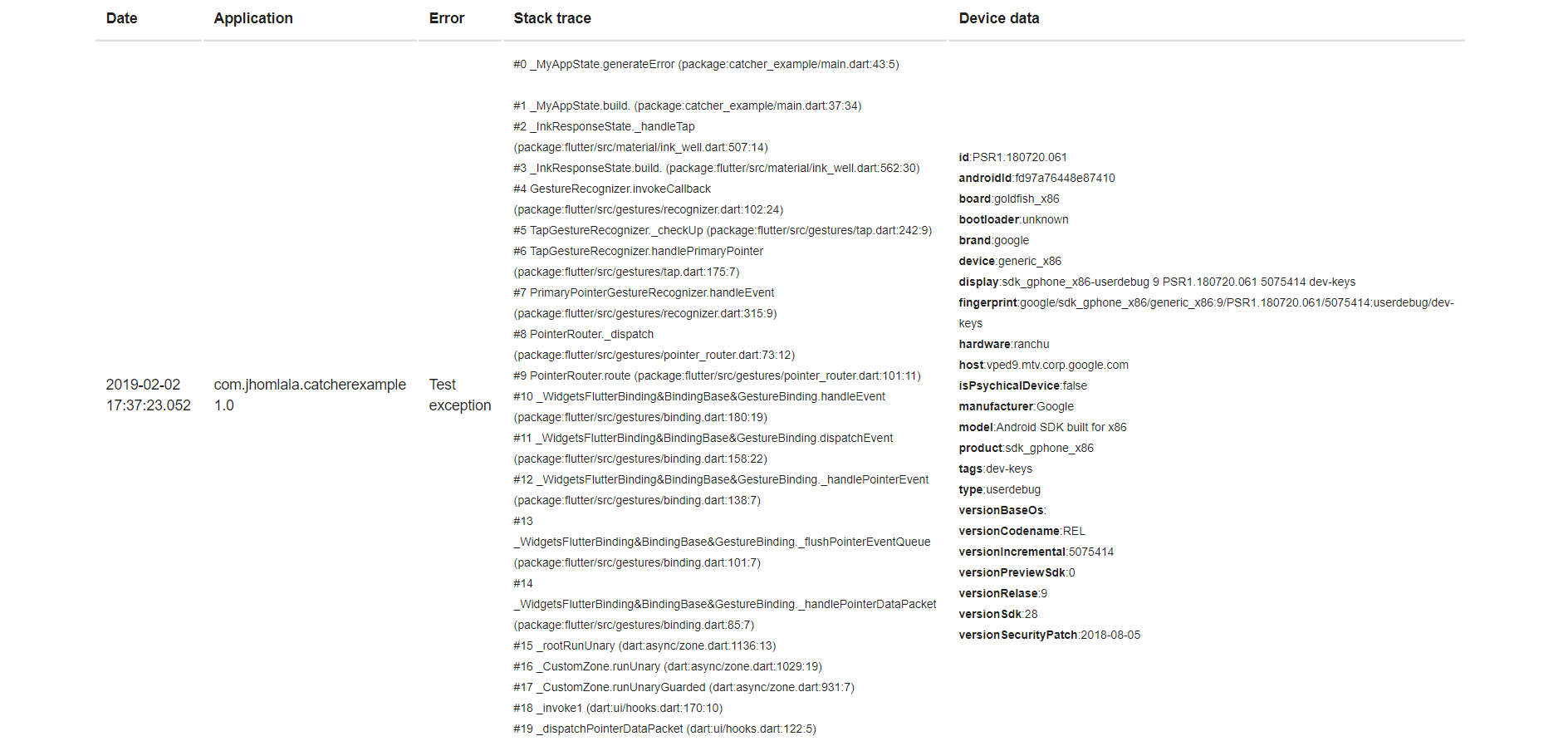
Example email:

Http Handler

Http Handler provides feature for sending report to external server. Data will be encoded in JSON and sent to specified server. Currently only POST request can be send. Minimal example:

HttpHandler(HttpRequestType.post, Uri.parse("http://logs.server.com")

All parameters list:

  • requestType (required) - type of request, currently only POST is supported
  • endpointUri (required) - uri address of server
  • headers (optional) - map of additional headers that can be send in http request
  • requestTimeout (optional) - request time in milliseconds
  • printLogs (optional) - show debug logs
  • enableDeviceParameters (optional) - please look in console handler description
  • enableApplicationParameters (optional) - please look in console handler description
  • enableStackTrace (optional) - please look in console handler description
  • enableCustomParameters (optional) - please look in console handler description

You can try using example backend server which handles logs. It's written in Java 8 and Spring Framework and uses material design. You can find code of backend server here: https://github.com/jhomlala/catcher/tree/master/backend

Note: Remeber to add Internet permission in Android Manifest:

<uses-permission android:name="android.permission.INTERNET"/>
File Handler

File handler allows to store logs in file. Minimal example:

main() {
  String path = "/storage/emulated/0/log.txt";
  CatcherOptions debugOptions = CatcherOptions(
      DialogReportMode(), [FileHandler(File(path), printLogs: true)]);
  CatcherOptions releaseOptions =
      CatcherOptions(DialogReportMode(), [FileHandler(File(path))]);

  Catcher(rootWidget: MyApp(), debugConfig: debugOptions, releaseConfig: releaseOptions);
}

All parameters list:

  • file (required) - the file where you want to store your logs
  • enableDeviceParameters (optional) - please look in console handler description
  • enableApplicationParameters (optional) - please look in console handler description
  • enableStackTrace (optional) - please look in console handler description
  • enableCustomParameters (optional) - please look in console handler description
  • printLogs (optional) - enable/disable debug logs
  • handleWhenRejected - please look in console handler description

Example of logging to file in external directory: https://github.com/jhomlala/catcher/blob/master/example/lib/file_example.dart

If you want to get file path with path_provider lib, you need to call Catcher constructor with ensureInitialized = true. Then you need to pass your catcher config with updateConfig. This is required because WidgetBindings ensureInitialized must be called first before accessing path_provider methods. See example here: https://github.com/jhomlala/catcher/blob/master/example/lib/file_example.dart

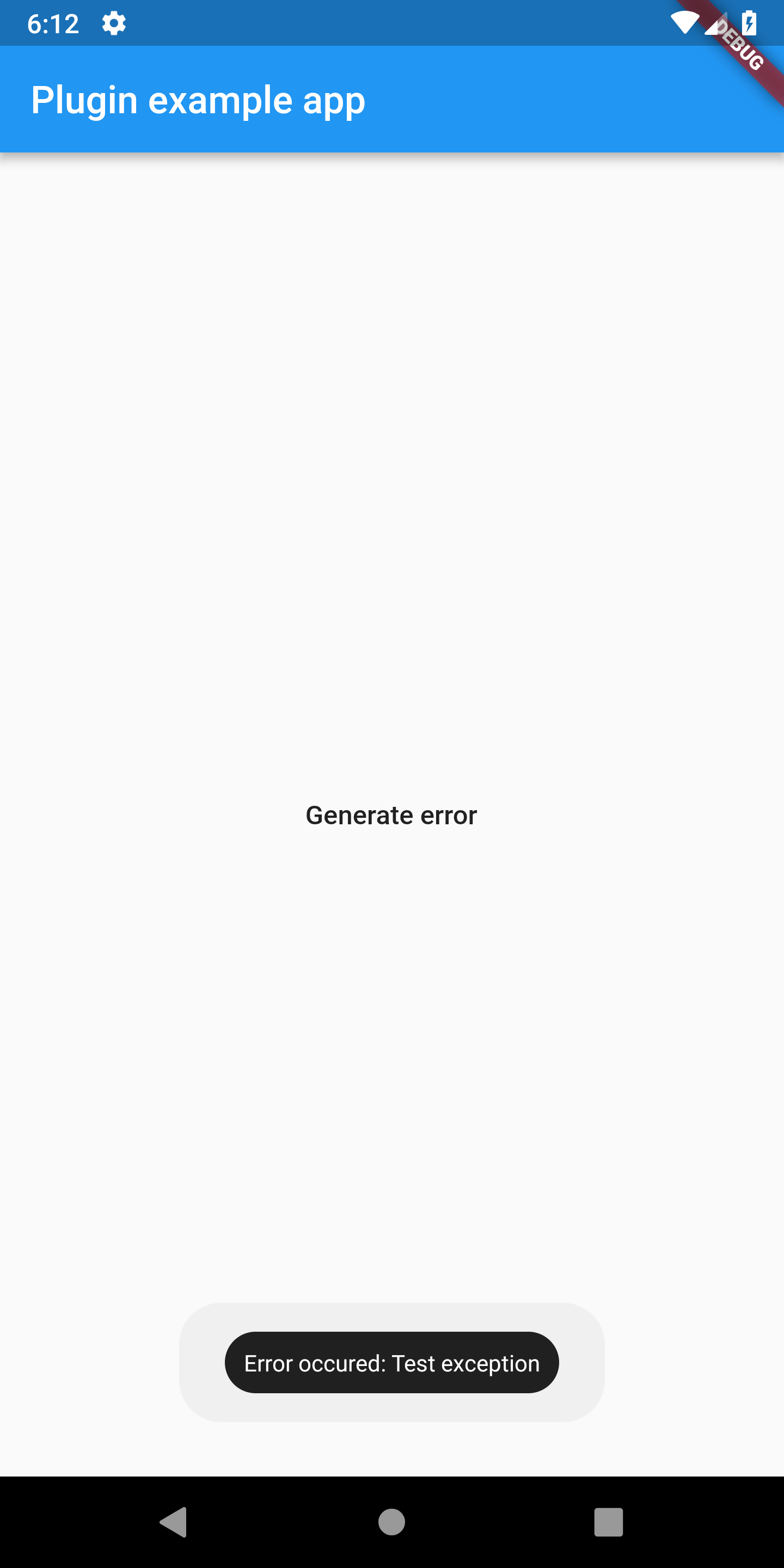
Toast Handler

Toast handler allows to show short message in toast. Minimal example:

All parameters list:

  • gravity (optional) - location of the toast on screen top/middle/bottom
  • length (optional) - length of toast: long or short
  • backgroundColor (optional) - background color of toast
  • textColor (optional) - text color of toast
  • fontSize (optional) - text size
  • customMessage (optional) - custom message for toast, if not set then "Error occured: error" will be displayed.
  • handleWhenRejected - please look in console handler description

Sentry Handler

Sentry handler allows to send handled errors to Sentry.io. Before using sentry handler, you need to create your project in Sentry.io page and then copy DSN link. Example:

main() {

  CatcherOptions debugOptions = CatcherOptions(
      DialogReportMode(), [SentryHandler(SentryClient("YOUR_DSN_HERE"))]);
  CatcherOptions releaseOptions = CatcherOptions(NotificationReportMode(), [
    EmailManualHandler(["recipient@email.com"])
  ]);

  Catcher(rootWidget: MyApp(), debugConfig: debugOptions, releaseConfig: releaseOptions);
}

All parameters list:

  • sentryClient - sentry client instance
  • enableDeviceParameters (optional) - please look in console handler description
  • enableApplicationParameters (optional) - please look in console handler description
  • enableCustomParameters (optional) - please look in console handler description
  • customEnvironment (optional) - custom environment string, if null, Catcher will generate it
  • customRelease (optional) - custom release string , if null, Catcher will generate it
  • printLogs (optional) - enable/disable debug logs
Slack Handler

Slack Handler allows to send messages to your Slack workspace. You can specify destination of your message and format. You need to register webhook in your workspace to make this handler works: https://api.slack.com/incoming-webhooks.

main() {

 CatcherOptions debugOptions = CatcherOptions(SilentReportMode(), [
     SlackHandler(
         "<web_hook_url>",
         "#catcher",
         username: "CatcherTest",
         iconEmoji: ":thinking_face:",
         enableDeviceParameters: true,
         enableApplicationParameters: true,
         enableCustomParameters: true,
         enableStackTrace: true,
         printLogs: true),
   ]);
   Catcher(rootWidget: MyApp(), debugConfig: debugOptions);
}

All parameters list:

  • webhookUrl (required) - url of your webhook
  • channel (required) - your channel name (i.e. #catcher)
  • username (optional) - name of the integration bot
  • iconEmoji (optional) - avatar of the integration bot
  • enableDeviceParameters (optional) - please look in console handler description
  • enableApplicationParameters (optional) - please look in console handler description
  • enableCustomParameters (optional) - please look in console handler description
  • enableStackTrace (optional) - please look in console handler description
  • printLogs (optional) - enable/disable debug logs
  • customMessageBuilder - provide custom message
Discord Handler

Discord Handler allows to send messages to your Discord workspace. You need to register webhook in your server to make this handler works: https://support.discordapp.com/hc/en-us/articles/228383668-Intro-to-Webhooks.

main() {
 CatcherOptions debugOptions = CatcherOptions(SilentReportMode(), [
     DiscordHandler(
         "<web_hook_url>",
         enableDeviceParameters: true,
         enableApplicationParameters: true,
         enableCustomParameters: true,
         enableStackTrace: true,
         printLogs: true),
   ]);

   Catcher(rootWidget: MyApp(), debugConfig: debugOptions);
}

All parameters list:

  • webhookUrl (required) - url of your webhook
  • enableDeviceParameters (optional) - please look in console handler description
  • enableApplicationParameters (optional) - please look in console handler description
  • enableCustomParameters (optional) - please look in console handler description
  • enableStackTrace (optional) - please look in console handler description
  • printLogs (optional) - enable/disable debug logs
  • customMessageBuilder - provide custom message
Snackbar Handler

Snackbar handler allows to show customized snackbar message.

void main() {
  CatcherOptions debugOptions = CatcherOptions(DialogReportMode(), [
    SnackbarHandler(
      Duration(seconds: 5),
      backgroundColor: Colors.green,
      elevation: 2,
      margin: EdgeInsets.all(16),
      padding: EdgeInsets.all(16),
      shape: RoundedRectangleBorder(borderRadius: BorderRadius.circular(16)),
      behavior: SnackBarBehavior.floating,
      action: SnackBarAction(
          label: "Button",
          onPressed: () {
            print("Click!");
          }),
      textStyle: TextStyle(
        color: Colors.white,
        fontSize: 16,
      ),
    ),
  ]);

  Catcher(
    runAppFunction: () {
      runApp(MyApp());
    },
    debugConfig: debugOptions,
  );
}

All parameters list:

  • duration - See [SnackBar] in Flutter docs for details.
  • backgroundColor - See [SnackBar] in Flutter docs for details.
  • elevation - See [SnackBar] in Flutter docs for details.
  • margin - See [SnackBar] in Flutter docs for details.
  • padding - See [SnackBar] in Flutter docs for details.
  • width - See [SnackBar] in Flutter docs for details.
  • shape - See [SnackBar] in Flutter docs for details.
  • behavior - See [SnackBar] in Flutter docs for details.
  • action - See [SnackBar] in Flutter docs for details.
  • animation - See [SnackBar] in Flutter docs for details.
  • onVisible - See [SnackBar] in Flutter docs for details.
  • customMessage - Custom message which can be displayed instead default one.
  • textStyle - Custom text style for text displayed within snackbar.
  • printLogs - Enable additional logs printing
Crashlytics Handler

Crashlytics handler has been removed from core package. You can re-enable it in your project by using custom report mode presented in crashlytics_example in example project.

Explicit exception report handler map

Explicit exception report handler map allows you to setup report handler for specific exception. For example if you want to setup Console Handler for FormatException, you can write:

var explicitMap = {"FormatException": ConsoleHandler()};
CatcherOptions debugOptions = CatcherOptions(
      DialogReportMode(),
      [
        ConsoleHandler(),
        HttpHandler(HttpRequestType.post, Uri.parse("https://httpstat.us/200"),
            printLogs: true)
      ],
      explicitExceptionHandlersMap: explicitMap);

Now if FormatException will be catched, then Console Handler will be used. Warning: if you setup explicit exception map for specific exception, then only this handler will be used for this exception!

Explicit exception report mode map

Same as explicit report handler map, but it's for report mode. Let's say you want to use specific report mode for some exception:

 var explicitReportModesMap = {"FormatException": NotificationReportMode()};
  CatcherOptions debugOptions = CatcherOptions(
      DialogReportMode(),
      [
        ConsoleHandler(),
        HttpHandler(HttpRequestType.post, Uri.parse("https://httpstat.us/200"),
            printLogs: true)
      ],
      explicitExceptionReportModesMap: explicitReportModesMap,);

When FormatException will be catched, then NotificationReportMode will be used. For other exceptions, Catcher will use DialogReportMode.

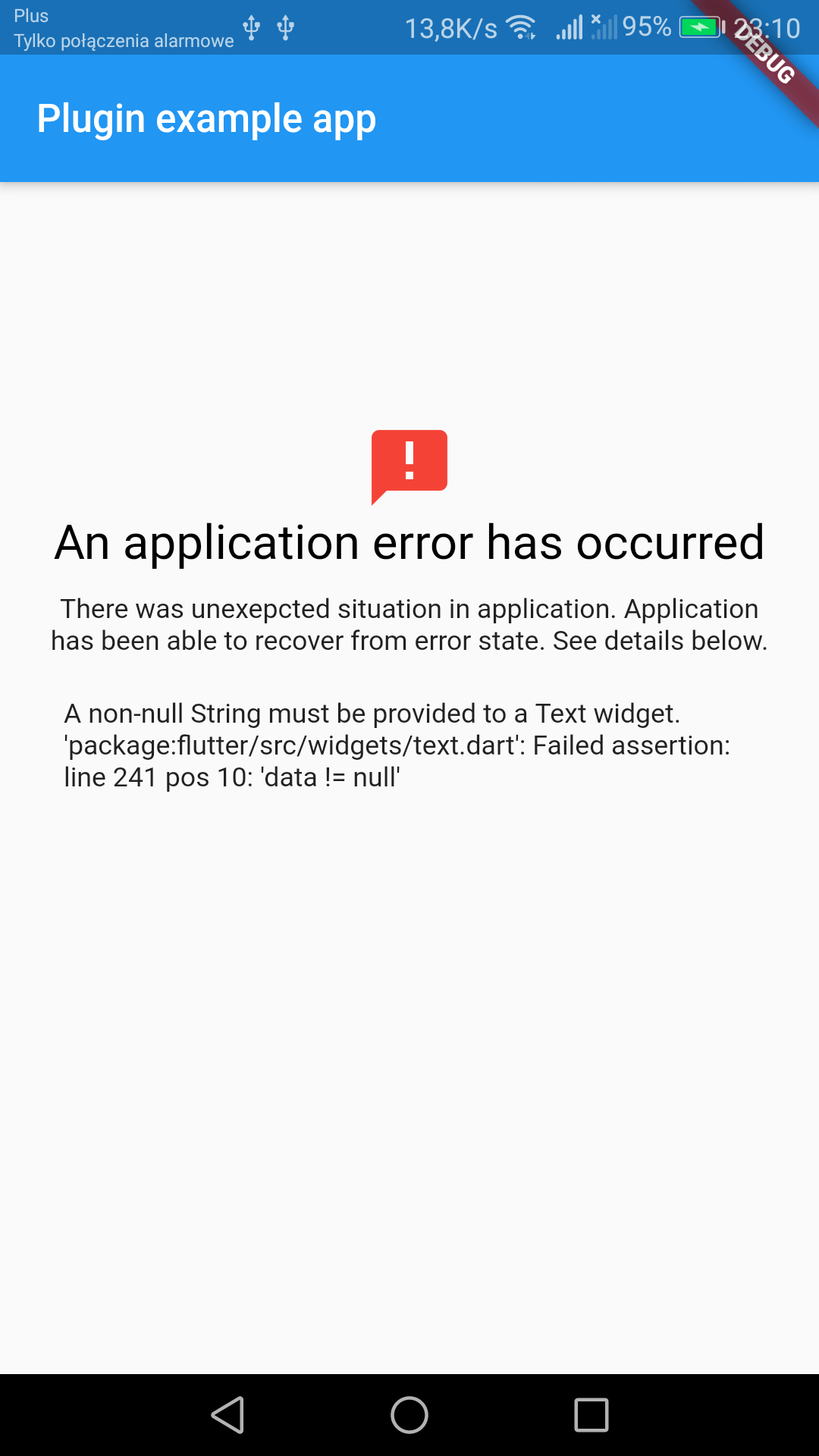
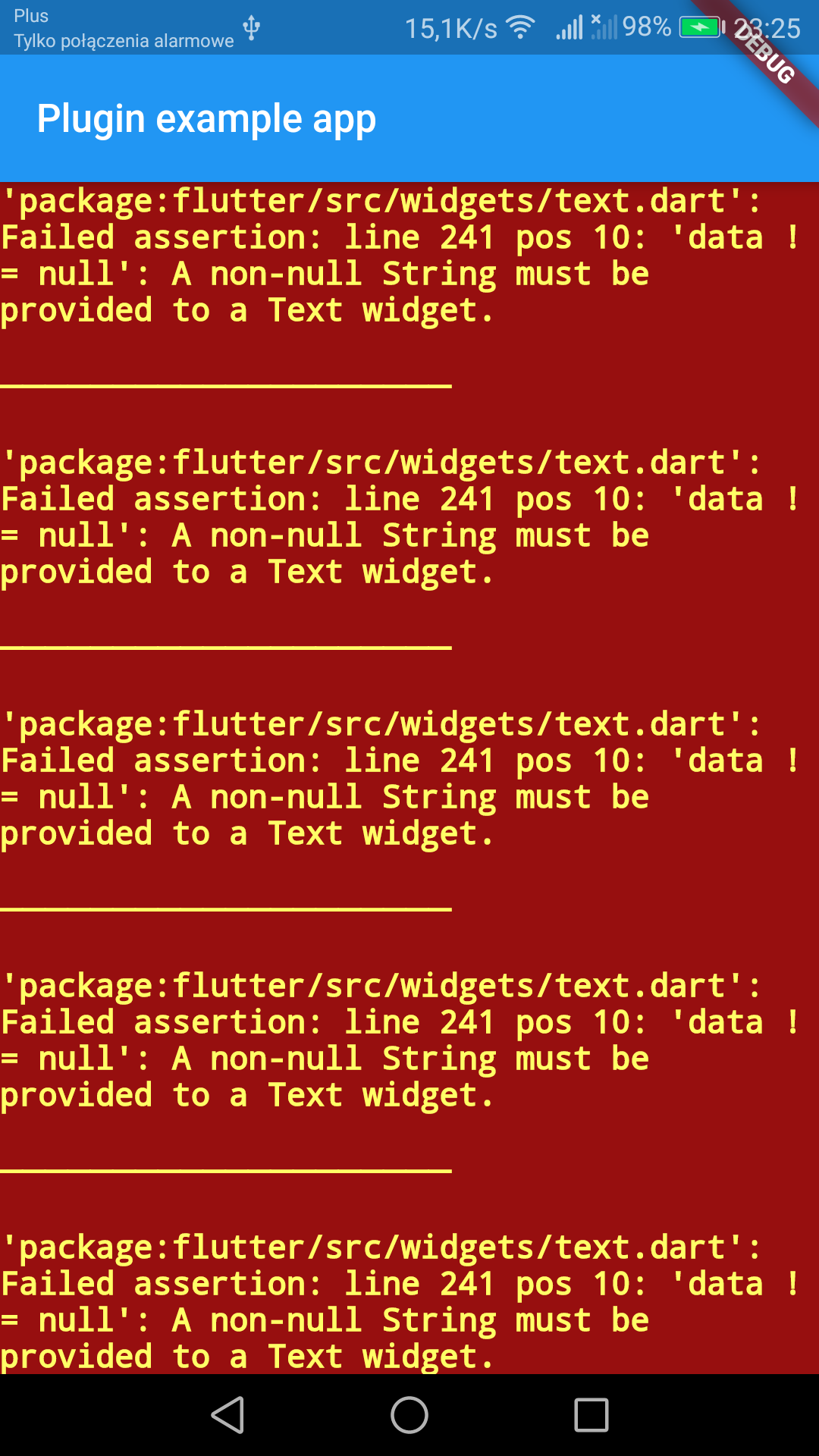
Error widget

You can add error widget which will replace red screen of death. To add this into your app, see code below:

  @override
  Widget build(BuildContext context) {
    return MaterialApp(
      navigatorKey: Catcher.navigatorKey,
      //********************************************
      builder: (BuildContext context, Widget widget) {
        Catcher.addDefaultErrorWidget(
            showStacktrace: true,
            title: "Custom error title",
            description: "Custom error description",
            maxWidthForSmallMode: 150);
        return widget;
      },
      //********************************************
      home: Scaffold(
          appBar: AppBar(
            title: const Text('Plugin example app'),
          ),
          body: ChildWidget()),
    );
  }

You need to add in your MaterialApp or CupertinoApp builder method with Catcher.addDefaultErrorWidget(). This will add error handler for each widget in your app.

You can provide optional parameters:

  • showStacktrace - show/hide stacktrace
  • title - custom title for error widget
  • description - custom description for error widget
  • maxWidthForSmallMode - max width for "small" mode, default is 150

Error widget will replace your widget if he fails to render. If width of widget is less than maxWidthForSmallMode then "small" mode will be enabled, which will show only error icon

With error widgetWithout error widget

Current config

You can get currently used config by using:

CatcherOptions options = catcher.getCurrentConfig();

This can be used for example to change custom parameters in runtime.

Test exception

Send test exception:

Catcher.sendTestException();
Update config

You can update Catcher config during runtime:

///Catcher instance initialized
Catcher catcher;
catcher.updateConfig(
     debugConfig: CatcherOptions(
       PageReportMode(),
       [ConsoleHandler()],
     ),
   );
Screenshots

Catcher can create screenshots automatically and include them in report handlers. To add screenshot support in your app, simply wrap your root widget with CatcherScreenshot widget:

MaterialApp(
      navigatorKey: Catcher.navigatorKey,
      home: CatcherScreenshot(
        catcher: Catcher.getInstance(),
        child: Scaffold(
          appBar: AppBar(
            title: const Text('Plugin example app'),
          ),
          body: ChildWidget(),
        ),
      ),
    );

Also you need to provide directory path, where Catcher will store screenshot files:

  CatcherOptions debugOptions = CatcherOptions(
    DialogReportMode(),
    [
      ToastHandler(),
    ],
    screenshotsPath: path,
  );

Screenshots will work for all platforms, except Web. Screenshots will work in:

  • Http Handler
  • Email auto handler
  • Email manual handler
  • Discord

카테고리

의존성

의존성 목록 11 개

소스 저장소

이 패키지를 사용하는 프로젝트

아직 데이터가 없습니다.