
 v0.2.0
level_map
Uma biblioteca Flutter para adicionar o recurso de mapa de nível com opções poderosas de personalização.
44Curtidas 77Downloads em 30 dias140Pontos Pub
AndroidiOSWebmacOSWindowsLinux
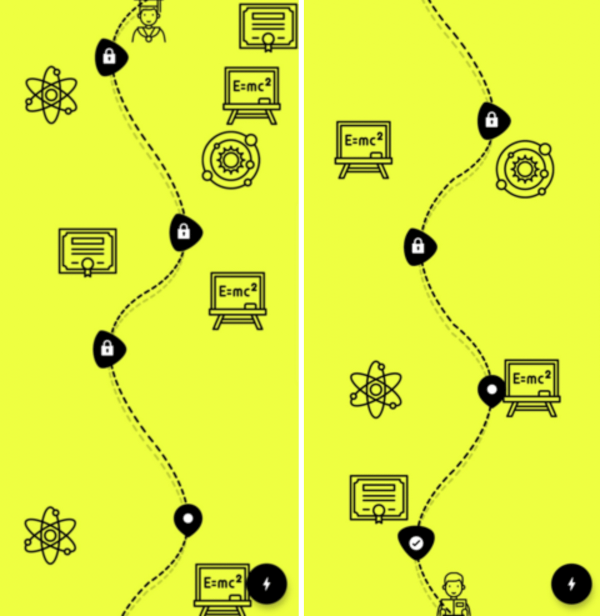
Uma biblioteca Flutter para adicionar um recurso de mapa de nível com poderosas opções de personalização.

{"sdk":"flutter"}{"sdk":"flutter"}Texto original em inglês. Visite o GitHub para a versão atual.
A Flutter library to add level-map feature with powerful customization options.
dependencies:
  level_map: ^0.2.0
import 'package:level_map/level_map.dart';
class LevelMapPage extends StatelessWidget {
    @override
    Widget build(BuildContext context) {
        return LevelMap(
            backgroundColor: Colors.limeAccent,
            levelMapParams: LevelMapParams(
                levelCount: 5,
                currentLevel: 2.4,
                currentLevelImage: ImageParams(
                  path: "<image asset path here>",
                  size: Size(imageWidth,imageHeight),
                ),
                lockedLevelImage: ImageParams(
                  path: "<image asset path here>",
                  size: Size(imageWidth,imageHeight),
                ),
                completedLevelImage: ImageParams(
                  path: "<image asset path here>",
                  size: Size(imageWidth,imageHeight),
                ),
            ),
        );
    }
}
class LevelMapParams {
  final int levelCount;

  /// Determines the current level of the user.
  /// If the user is in between levels, use decimal.
  late final double currentLevel;

  /// Determines the stroke width of the path lines.
  /// Default is 3.
  final double pathStrokeWidth;
  final Color pathColor;

  /// Default is 200.
  final double levelHeight;

  /// Used to adjust the length of the dash.
  /// Should be between 0 and 0.5.
  /// Default is 0.025.
  final double dashLengthFactor;

  /// If set to false, there won't be any variation between curves, all curves are identical.
  /// Default is true.
  final bool enableVariationBetweenCurves;

  /// Determines max offset variation between curves.
  /// Affects only if [enableVariationBetweenCurves] flag is set to true.
  /// Note: Having huge [maxVariationFactor]  causes hard edges. Ideal value is between 0 and 1 (may vary based on the [levelHeight]).
  /// Default is 0.2.
  final double maxVariationFactor;

  /// Determines the position of the reference point of the first curve.
  /// This affects all the successive reference points.
  /// Offset factor should be between 0 and 1.
  /// Default is random.
  late Offset? firstCurveReferencePointOffsetFactor;

  /// List of reference point offset of each level.
  /// Affects only if [enableVariationBetweenCurves] flag is set to true
  /// Helps to position the reference point for each curve.
  /// Default is random.
  final List<Offset> curveReferenceOffsetVariationForEachLevel;

  final bool showPathShadow;

  /// Determines how far the shadows should cast.
  /// Affects only if showPathShadow flag is set to true
  /// dx of the offset determines horizontal distance from the path,
  /// dy of the offset determines vertical distance from the path.
  /// +ve dx casts shadow to right and -ve dx casts shadow to the left,
  /// +ve dy casts shadow to the bottom and -ve dy casts shadow to the top.
  /// Default is Offset(-2, 12).
  final Offset shadowDistanceFromPathOffset;

  /// Min Amplitude factor of the curve.
  /// Affects how far the reference point at least be from mid point.
  /// Offset factor should be between 0 and 1.
  /// Default is Offset(0.4, 0.3), which means dx of Reference point should at least (0.4 * (width/2))
  /// and dy of the Reference point should at least (0.3 * (width/2))
  /// width/2 since the curve starts in center
  final Offset minReferencePositionOffsetFactor;

  /// Max Amplitude factor of the curve.
  /// Affects how far the reference point at most be from mid point.
  /// Offset factor should be between 0 and 1.
  /// Default is Offset(1, 0.7), which means dx of Reference point should at most (1 * (width/2))
  /// and dy of the Reference point should at most (0.7 * (width/2))
  /// width/2 since the curve starts in center
  final Offset maxReferencePositionOffsetFactor;

  final List<ImageParams>? bgImagesToBePaintedRandomly;

  /// It is the image positioned in the bottom center of the level map to indicate the start position.
  final ImageParams? startLevelImage;

  /// It is the image positioned on top of the completed levels of the level map to indicate the level is completed.
  final ImageParams completedLevelImage;

  /// It is the image positioned on top of the current level of the level map to indicate the current position of the user.
  final ImageParams currentLevelImage;

  /// It is the image positioned on top of the upcoming levels of the level map to indicate those levels are yet to unlock.
  final ImageParams lockedLevelImage;

  /// It is the image positioned in the top center of the level map to indicate the end of the level map.
  final ImageParams? pathEndImage;
}
class ImageParams {
  final String path;
  final Size size;

  /// It determines how close the image could get to the center of the page.
  /// Should be between 0 and 1.
  /// 0 means it wont be visible,
  /// 0.5 means it could reach from 0 to 0.25*width on the left side and from 0.75 to 1*width on the right side of the path,
  /// 1 means, image could reach the center of the page.
  /// Default is 0.6
  final double imagePositionFactor;

  /// It determines how often this image could repeat in the same level.
  /// 1 means it appear once per level.
  /// 2 means it appear twice per level.
  /// 0.5 means it appear once every two levels.
  final double repeatCountPerLevel;

  /// If an image need to be painted only on left or right to the path, set this parameter.
  final Side side;
}
level_map_sample_1 level_map_sample_2 support
Please file feature requests and bugs at the issue tracker.