
 v0.0.8
stickereditor
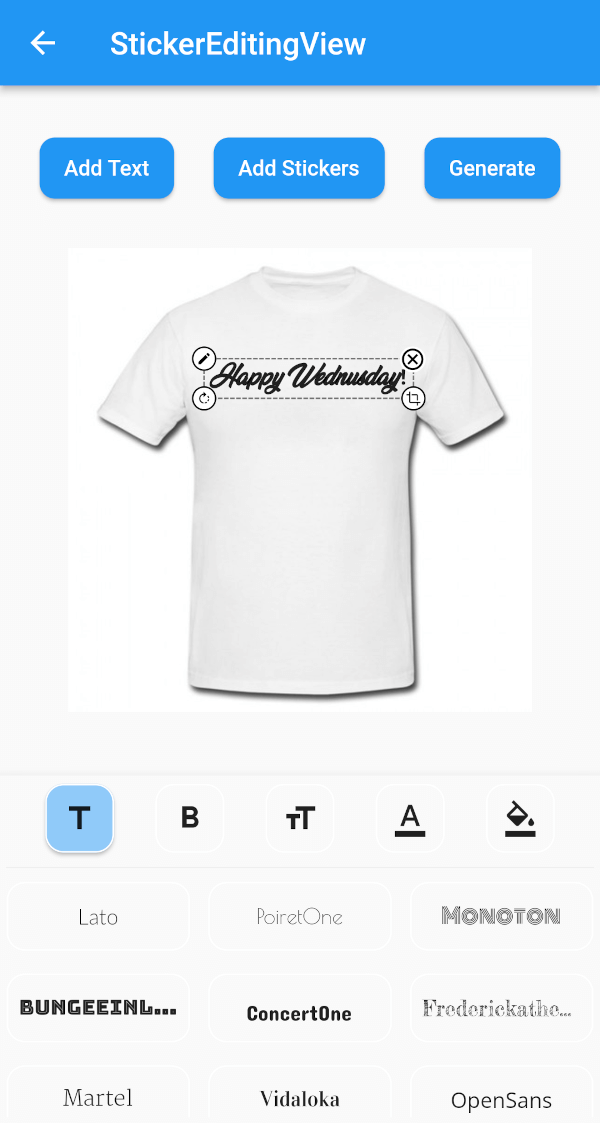
Um widget que permite modificar e mover seu texto e imagem de acordo com seus limites.
58Curtidas 20Downloads em 30 dias60Pontos Pub
Plataformas indisponíveis
Um pacote do Flutter que ajudará você a criar um widget de adesivo que pode ser arrastado pela tela e redimensionado.

{"sdk":"flutter"}{"sdk":"flutter"}^4.3.8^2.0.0+1^1.2.3^2.0.5{"sdk":"flutter"}^1.0.0Texto original em inglês. Visite o GitHub para a versão atual.
A flutter plugin for iOS, Android and Mac for Rotate, Scaling, Moving and Editing Text, Photo, Stickers
https://github.com/Harsh-Radadiya/sticker_editor/raw/master/assets/readme/demo.gif
| Sticker Editor | |
|---|---|
| https://github.com/Harsh-Radadiya/sticker_editor/raw/master/assets/readme/text_editor_box.png | https://github.com/Harsh-Radadiya/sticker_editor/raw/master/assets/readme/sticker_editor_box.png |
| Only Text | Only Photo |
|---|---|
| https://github.com/Harsh-Radadiya/sticker_editor/raw/master/assets/readme/only_text.png | https://github.com/Harsh-Radadiya/sticker_editor/raw/master/assets/readme/only_picture.png |
A flutter package Sticker Editor which will help you to create editable and scalable text or sticker widget that can be dragged around the area you given in screen.
First, add stickereditor as a dependency in your pubspec.yaml file.
Fore NetworkImage, macOS needs you to request a specific entitlement in order to access the network. To do that open macos/Runner/DebugProfile.entitlements and add the following key-value pair.
<key>com.apple.security.network.client</key>
<true/>
StickerEditingView(
  isnetwork: false,
  height: 300,
  width: 300,
  imgUrl: backgroundImageUrl,
  fonts: fonts,
  palletColor: colorPallet,
  assetList: stickerList,
),
Container(
  height: 300,
  width: 300,
  color: Colors.blue,
  child: Stack(
    children: [
      TextEditingBox(
        fonts: fonts,
        boundHeight: 200,
        boundWidth: 100,
        isSelected: true,
        palletColor: colorPallet,
        newText: TextModel(
            name: 'Text EditingBox',
            textStyle:
                GoogleFonts.pacifico(fontSize: 25, color: Colwhite),
            top: top,
            isSelected: true,
            textAlign: TextAlign.center,
            scale: 1,
            left: left),
      ),
    ],
  ),
),
Container(
  height: 300,
  width: 300,
  color: Colors.blue,
  child: Stack(
    children: [
      StickerEditingBox(
          boundHeight: 200,
          boundWidth: 200,
          pictureModel: PictureModel(
            isNetwork: true,
            isSelected: false,
            left: 50,
            top: 50,
            scale: 1,
            stringUrl:
                'https://raw.githubusercontent.com/Harsh-Radadiya/sticker_editor/master/assets/t-shirt.jpeg',
          )),
    ],
  ),
)
Run the example app in the exmaple folder to find out more about how to use it.