
 v0.2.0
flutter_annual_task
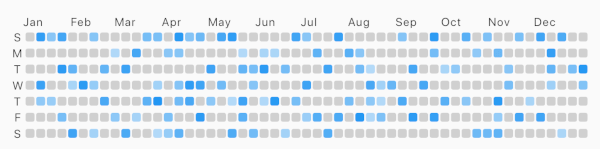
Pacote Flutter para exibir uma visualização em grade de tarefas diárias, semelhante ao calendário do GitHub (Github Contributions).
45Curtidas 34Downloads em 30 dias60Pontos Pub
Plataformas indisponíveis
Pacote Flutter para exibir uma grade de tarefas diárias como as contribuições do GitHub.

{"sdk":"flutter"}{"sdk":"flutter"}Texto original em inglês. Visite o GitHub para a versão atual.
Flutter package for displaying grid view of daily task like Github-Contributions.
Example example
Make sure to check out example project.
AnnualTaskView(
  taskItem	// List<AnnualTaskItem>
),
Add to pubspec.yaml:
dependencies:
  flutter_annual_task: ^0.1.3
Then import it to your project:
import 'package:flutter_annual_task/flutter_annual_task.dart';
And finally add AnnualTaskView widget in your project.
AnnualTaskView(
  taskItem	// List<AnnualTaskItem>
),
AnnualTaskItem
class AnnualTaskItem {
  final DateTime date;
  final double proceeding;	// 0.0 ~ 1.0

  AnnualTaskItem(this.date, [this.proceeding = 1.0]);
  ...
}
The value of proceeding affects the opacity on the each cell of daily task.
- For showing the color in visual, the minimum value of displaying is 80(max: 255).
AnnualTaskColorItem
If you want to specify color for each daily task, you can use AnnualTaskColorItem.
class AnnualTaskColorItem extends AnnualTaskItem {
  final Color color;

  AnnualTaskColorItem(
    DateTime date, {
    double proceeding = 1.0,
    this.color,
  }) : super(date, proceeding);
  ...
}
You should generate list of AnnualTaskItem(List<AnnualTaskItem>) to use this package.
Below is an example for building list of AnnualTaskItem.
//AnnualTaskItem
<your_item_list>.map(
  (item) => AnnualTaskItem(
    item.date,
    0.5,
  ),
)
.toList();

//AnnualTaskColorItem
<your_item_list>.map(
  (item) => AnnualTaskColorItem(
    item.date,
    color: <color_for_each_item>
  ),
)
.toList();
Specify cellShape with AnnualTaskCellShape with AnnualTaskCellShape.ROUNDED_SQUARE(default), AnnualTaskCellShape.SQUARE or AnnualTaskCellShape.CIRCLE.
Square
| Image |
|---|
| square |
AnnualTaskView(
  taskItem, // List<AnnualTaskItem>
  cellShape: AnnualTaskCellShape.SQUARE,
)
Circle
| Image |
|---|
| circle |
AnnualTaskView(
  taskItem, // List<AnnualTaskItem>
  cellShape: AnnualTaskCellShape.CIRCLE,
)
AnnualTaskColorItem
| Image |
|---|
| circle |
AnnualTaskView(
  taskItemWithColor, // List<AnnualTaskColorItem>
)
You can edit the labels of week or the labels of month.
AnnualTaskView(
  taskItem, // List<AnnualTaskItem>
  showMonthLabel: false, //default : true
  showWeekDayLabel: false, //default : true
)
| Image |
|---|
| without labels |
Custom label
| Image |
|---|
| custom labels |
AnnualTaskView(
  taskItem, // List<AnnualTaskItem>
  weekDayLabels: ['', 'Mon', '', 'Wed', '', 'Fri', ''],
  monthLabels: ['1','2','3','4','5','6','7','8','9','10','11','12'],
)
The type of weekDayLabels and monthLabels is List<String>.
weekDayLabels starts from Sunday.monthLabels' is ['Jan', 'Feb', 'Mar', 'Apr', 'May', 'Jun', 'Jul', 'Aug', 'Sep', 'Oct', 'Nov', 'Dec']`.''). But, weekDayLabels should be length of 7 and, monthLabels should be length of 12.Styled label
| Image |
|---|
| Styled label |
AnnualTaskView(
  taskItem, // List<AnnualTaskItem>
  labelStyle: TextStyle(
    color: Colors.blueGrey,
    fontSize: 10,
    fontWeight: FontWeight.bold,
  ),	// default label style : TextStyle(fontSize: 8)
)
| props | type | desc |
|---|---|---|
| items | List<AnnualTaskItem> |
List of AnnualTaskItem |
| year | int |
default : DateTime.now().year |
| activateColor | Color |
default : Theme.of(context).primaryColor |
| emptyColor | Color |
Color of cell with proceeding 0.0 or the day which items doesn't contain. default : Color(0xFFD0D0D0) |
| showWeekDayLabel | bool |
Show the labels of week, if true. default : true |
| cellShape | AnnualTaskCellShape |
Shape of cell. One of AnnualTaskCellShape.ROUNDED_SQUARE, AnnualTaskCellShape.SQUARE or AnnualTaskCellShape.CIRCLE.default: AnnualTaskCellShape.ROUNDED_SQUARE |
| showMonthLabel | bool |
Show the labels of month, if true. default : true |
| monthLabels | List<String> |
Labels of month. default: ['Jan', 'Feb', 'Mar', 'Apr', 'May', 'Jun', 'Jul', 'Aug', 'Sep', 'Oct', 'Nov', 'Dec'] |
| weekDayLabels | List<String> |
Labels of week. default: ['S', 'M', 'T', 'W', 'T', 'F', 'S'] |
| labelStyle | TextStyle |
TextStyle of labels.default: TextStyle(fontSize: 8) |