

 v1.0.0
animated_button_bar
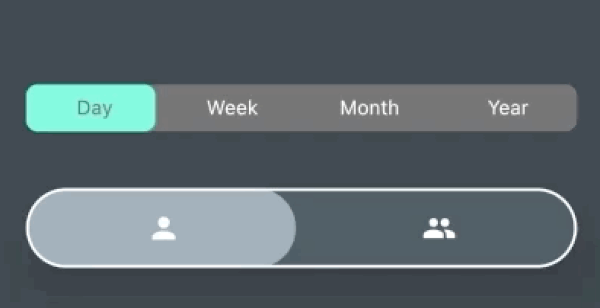
Uma barra de botões altamente personalizável com animação no item selecionado.
82Curtidas 604Downloads em 30 dias150Pontos Pub
AndroidiOSWebmacOSWindowsLinux
Uma barra de botões personalizável com animação

Texto original em inglês. Visite o GitHub para a versão atual.
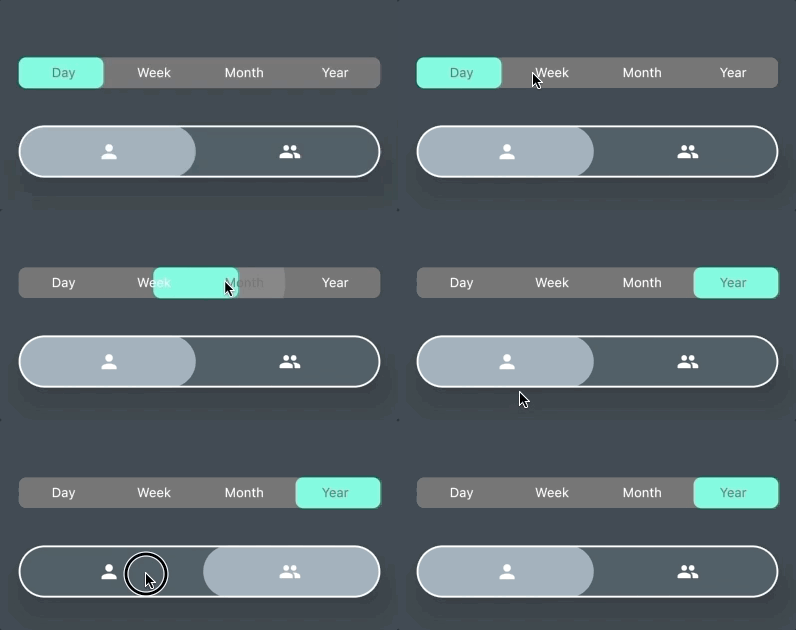
AnimatedButtonBar is a flutter library that allows you to create a row of buttons with an animation on selection.
Add this to your app's pubspec.yaml file:
dependencies:
  animated_button_bar: ^0.0.2
Then you have to import the package with:
import 'package:animated_button_bar/animated_button_bar.dart';
And use an AnimatedBarButton like this:
  Column(
          mainAxisAlignment: MainAxisAlignment.center,
          children: [
            //inverted selection button bar
            AnimatedButtonBar(
              radius: 8.0,
              padding: const EdgeInsets.all(16.0),
              invertedSelection: true,
              children: [
                ButtonBarEntry(onTap: () => print('First item tapped'), child: Text('Day')),
                ButtonBarEntry(onTap: () => print('Second item tapped'), child: Text('Week')),
                ButtonBarEntry(onTap: () => print('Third item tapped'), child: Text('Month')),
                ButtonBarEntry(onTap: () => print('Fourth item tapped'), child: Text('Year'))
              ],
            ),
            //You can populate it with different types of widgets like Icon
            AnimatedButtonBar(
              radius: 32.0,
              padding: const EdgeInsets.all(16.0),
              backgroundColor: Colors.blueGrey.shade800,
              foregroundColor: Colors.blueGrey.shade300,
              elevation: 24,
              borderColor: Colors.white,
              borderWidth: 2,
              innerVerticalPadding: 16,
              children: [
                ButtonBarEntry(onTap: () => print('First item tapped'), child: Icon(Icons.person)),
                ButtonBarEntry(onTap: () => print('Second item tapped'), child: Icon(Icons.people)),
              ],
            ),
          ],
        ),
| parameter | description | default |
|---|---|---|
| animationDuration | animation duration when tap | const Duration(milliseconds: 200) |
| backgroundColor | main color of the widget | Theme.of(context).backgroundColor |
| borderColor | color of the border | null |
| borderWidth | width of the border | borderColor != null ? 1.0 : 0.0; |
| children | A list of ButtonBarEntry to display | required |
| curve | the curve for the animation | Curves.fastOutSlowIn |
| elevation | double | 0 |
| foregroundColor | color for the selection | Theme.of(context).accentColor |
| invertedSelection | bool | false |
| radius | double | 0.0 |
| verticalPadding | double | 8.0 |
Lista de dependências 3 itens
{"sdk":"flutter"}^6.0.5{"sdk":"flutter"}Filtre pelo caso de uso, compare a atividade e confira o projeto original antes de adotá-lo.
“A repository is the most basic element of GitHub.”
GitHub Docs — About repositories ↗