
 v1.3.0
expandable_page_view
Um widget PageView ajustando sua altura para a página atualmente exibida
595Curtidas 148 milDownloads em 30 dias160Pontos Pub
AndroidiOSWebmacOSWindowsLinux
Limbou/expandable_page_view open-source repository details.

{"sdk":"flutter"}{"sdk":"flutter"}Texto original em inglês. Visite o GitHub para a versão atual.
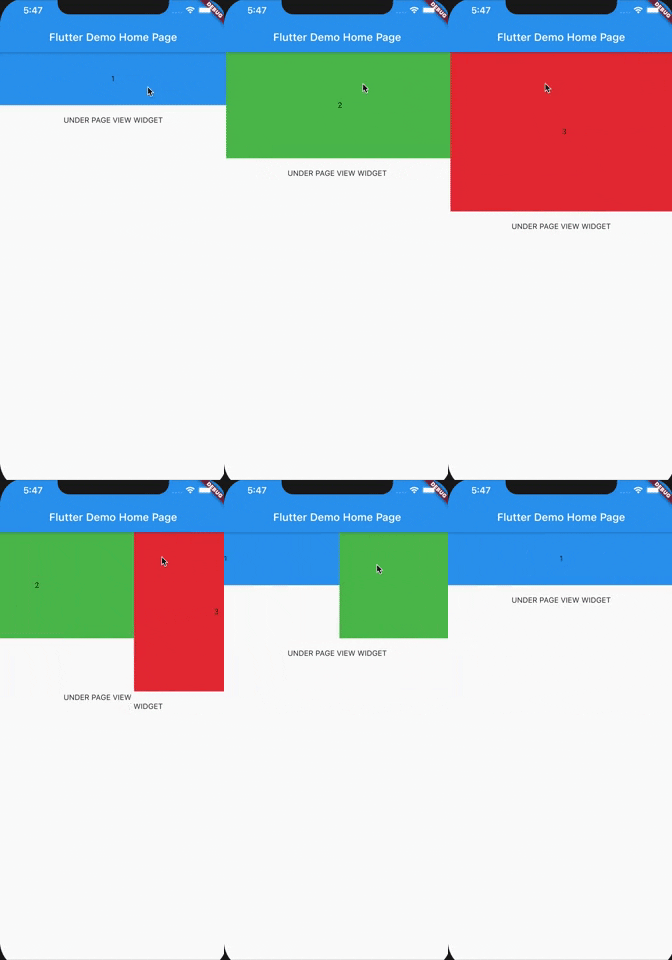
A PageView widget adjusting its height to currently displayed page. It accepts the same parameters as classic PageView.
| Horizontal | Vertical |
|---|---|
| https://github.com/Limbou/expandable_page_view/blob/main/assets/appVideo.gif?raw=true | https://github.com/Limbou/expandable_page_view/blob/main/assets/appVideo2.gif?raw=true |
In the pubspec.yaml of your flutter project, add the following dependency:
dependencies:
  ...
  expandable_page_view: ^1.0.17
Import it:
import 'package:expandable_page_view/expandable_page_view.dart';
In order to create a fixed page view just pass a list of widgets to children parameter:
ExpandablePageView(
  children: [
     ExamplePage(Colors.blue, "1", 100),
     ExamplePage(Colors.green, "2", 200),
     ExamplePage(Colors.red, "3", 300),
  ],
),
If You have multiple pages to display, and You want to build them dynamically while scrolling, use .builder constructor and pass itemCount and itemBuilder parameters:
ExpandablePageView.builder(
  itemCount: 3,
  itemBuilder: (context, index) {
    return ExamplePage(Colors.blue, index.toString(), (index + 1) * 100.0);
  },
),
To create an infinitely scrolling page view, set loop: true:
ExpandablePageView(
  loop: true,
  children: [
    ExamplePage(Colors.blue, "1", 100),
    ExamplePage(Colors.green, "2", 200),
    ExamplePage(Colors.red, "3", 300),
  ],
),
To programmatically navigate pages in loop mode (e.g., for auto-play carousels or custom indicators), use ExpandablePageController:
final controller = ExpandablePageController(itemCount: 3);

ExpandablePageView(
  controller: controller,
  loop: true,
  children: [
    ExamplePage(Colors.blue, "1", 100),
    ExamplePage(Colors.green, "2", 200),
    ExamplePage(Colors.red, "3", 300),
  ],
),

// Navigate programmatically
controller.jumpToPage(2);
controller.animateToPage(0, duration: Duration(milliseconds: 300), curve: Curves.ease);

// Read current page
print(controller.page);     // e.g., 1.5 (fractional during scroll)
print(controller.realPage); // e.g., 1 (rounded)
Note:
ExpandablePageControlleruses shortest-path navigation — animating from page 0 to the last page will scroll backward (1 step) rather than forward through all pages.
Check out example project to play with ExpandablePageView.