
 v1.1.2
colored_json
Um pacote que converte uma string JSON em um widget personalizável do Flutter.
27Curtidas 2,6 milDownloads em 30 dias160Pontos Pub
AndroidiOSWebmacOSWindowsLinux
Este é um plugin Flutter que recebe uma string JSON e a converte em um widget Flutter personalizável.

Lista de dependências 3 itens
{"sdk":"flutter"}{"sdk":"flutter"}^1.0.0Texto original em inglês. Visite o GitHub para a versão atual.
Convert JSON string into customizable widget.
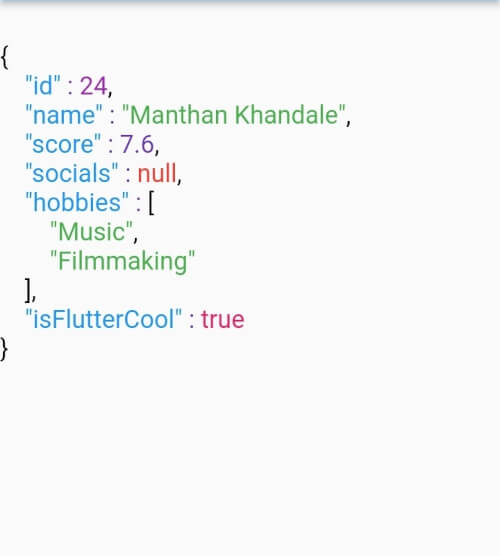
ColoredJson is a stateless widget that produces a structured view of JSON string provided. It can be used like any other flutter widget.
It's fully customizable where you can set different colors to different datatypes including colon, comma and brackets. Set indent length. Use text style of your choice. You can also change the background color.
| Defaut View | Customised View 1 | Customised View 2 |
|---|---|---|
| Default View | Customized View 1 | Customized View 2 |
data parameter of ColoredJson Widgetconst String responseBody = '''
{
'id' : 1,
'name' : 'Colored Json',
'isFlutterAwesome' : true,
}
''';
ColoredJson(
data: responseBody,
)
final dartMap = {
  "id": 24,
  "name": "Manthan Khandale",
  "score": 7.6,
  "socials": null,
  "hobbies": [
    "Music",
    "Filmmaking",
  ],
  "isFlutterCool": true,
};

ColoredJson(
 data: jsonEncode(dartMap),
 indentLength: 5,
 keyColor: Colors.green,
 backgroundColor: Colors.black,
 boolColor: Colors.white,
 nullColor: Colors.redAccent,
 stringColor: Colors.cyan,
 curlyBracketColor: Colors.yellow,
 doubleColor: Colors.deepOrange,
 squareBracketColor: Colors.amber,
 commaColor: Colors.yellow,
 colonColor: Colors.purple,
 intColor: Colors.lime,
 textStyle: const TextStyle(
  fontSize: 20,
  letterSpacing: 2,
  ),
 )
| Parameter | Info |
|---|---|
| data (required) | A JSON string to be formatted |
| keyColor | Color of Json Key |
| intColor | Color of integer type value |
| doubleColor | Color of decimal type value |
| stringColor | Color of string type value |
| boolColor | Color of boolean type value |
| nullColor | Color of null type value |
| curlyBracketColor | Color of curly brackets {} |
| squareBracketColor | Color of square brackets [] |
| commaColor | Color of comma ( , ) |
| colonColor | Color of colon ( : ) |
| backgroundColor | Background color of widget |
| textStyle | Textstyle of texts in the widget |
| indentLength | Indent length |