
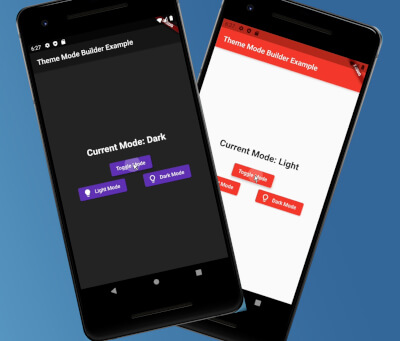
 v2.0.0
theme_mode_builder
Um pacote Flutter para lidar com temas em um aplicativo e também salvá-lo no dispositivo com preferências compartilhadas
24Curtidas 14Downloads em 30 dias160Pontos Pub
AndroidiOSmacOSWindowsLinux
Um pacote Flutter para gerenciar temas em um aplicativo e também salvá-los no dispositivo em uma caixa Hive.

{"sdk":"flutter"}^2.2.3^6.1.2^2.1.3^1.9.0{"sdk":"flutter"}^4.0.0Texto original em inglês. Visite o GitHub para a versão atual.
Pub Version GitHub GitHub Issues GitHub Pull Requests
I created this package to help standardize my apps way of theme handling.
Web Demo: https://theme-mode-builder.netlify.app/
First run the initialization which is asynchronous so you will need to change the return type of your main() method from void to Future<void>:
Future<void> main() async {
  /// ensure widgets are initialized
  WidgetsFlutterBinding.ensureInitialized();

  /// initialize theme mode builder
  await ThemeModeBuilderConfig.ensureInitialized();

  /// Runs the app :)
  runApp(MyCoolApp());
}
Then just wrap your MaterialApp widget with the ThemeModeBuilder and return the MaterialApp widget from the builder.
The builder gives you two arguments, builder: (BuildContext context, ThemeMode themeMode) {}.
Pass the themeMode to themeMode on your MaterialApp.
Now this code below explains better than I do 🙈🚀😂:
import "package:flutter/material.dart";
import "package:theme_mode_builder/theme_mode_builder.dart";

class MyCoolApp extends StatelessWidget {
  @override
  Widget build(BuildContext context) {
    return ThemeModeBuilder(
      builder: (BuildContext context, ThemeMode themeMode) {
        return MaterialApp(
          title: "My Cool App",

          /// here is the `themeMode` passed form the `builder`
          themeMode: themeMode,
          theme: ThemeData(
            colorScheme: ColorScheme.fromSeed(
              brightness: Brightness.light,
              seedColor: Colors.red,
            ),

            /// put your light theme data here
          ),
          darkTheme: ThemeData(
            colorScheme: ColorScheme.fromSeed(
              brightness: Brightness.dark,
              seedColor: Colors.deepPurple,
            ),

            /// put your dark theme data here
          ),
          home: Home(),
        );
      },
    );
  }
}
themeMode you just call:await ThemeModeBuilderConfig.toggleTheme();
And the theme will change instantly given you followed the steps above correctly 🎉.
To change to dark mode:
await ThemeModeBuilderConfig.setDark();
To change to light mode:
await ThemeModeBuilderConfig.setLight();
To change to system mode:
await ThemeModeBuilderConfig.setSystem();
final ThemeMode themeMode = ThemeModeBuilderConfig.getThemeMode();
final bool isDarkTheme = ThemeModeBuilderConfig.isDarkTheme();