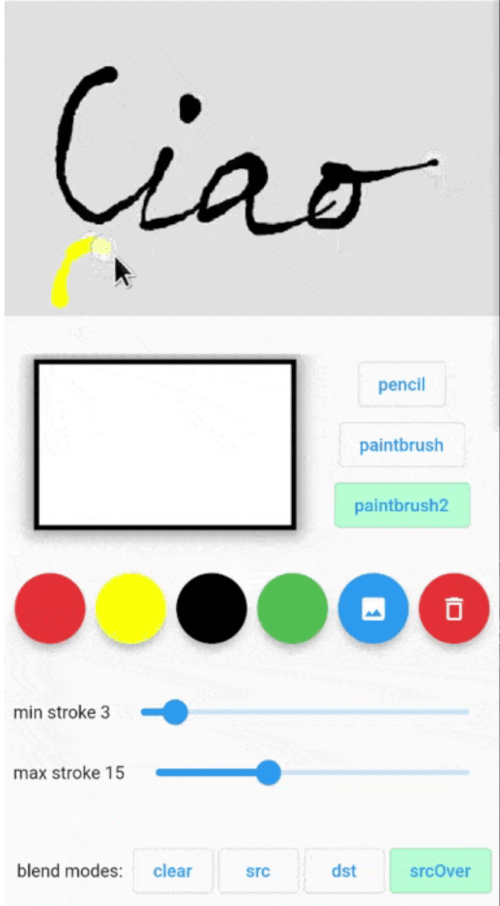
Painting package that let you finger paint with different brushes and different blend modes. The result can be read as a bitmap or list of Points to be used ie on a Map.
Features
Pub Version Pub Publisher
Image
Getting started
The usage is simple: put the Painter() widget into your widget tree then use PainterController()
to control its parameters and to get current painting image and/or drawn points.
Try online
Features
- 3 kinds of pens
- min and max stroke width for paintbrush strokes
- get the last drawing image and drawing points
- set a background widget (like Google Map)
- set background color
- uses image blending modes while painting
Usage
initialize the painter controller ie in the initState():
@override
void initState() {
  super.initState();
  painterController = PainterController()
    ..setPenType(PenType.pencil)
    ..setStrokeColor(Colors.black)
    ..setMinStrokeWidth(3)
    ..setMaxStrokeWidth(10)
    ..setBlurSigma(0.0)
    ..setBlendMode(ui.BlendMode.srcOver);
}
insert Painter() widget somewhere in your widget tree:
Painter(
  controller: painterController,
  backgroundColor: Colors.green.withOpacity(0.4),
  size: const Size(300, 300),
  child: Image.asset(...),
  onDrawingEnded: (Uint8List bytes) async{
    ...
  },
  // the child could be ie a Google Map
  // PS: the [backgroundColor] and child are not rendered in the resulting image
  child: Image.asset('assets/...'),
),
Full example
📜 Painter widget properties
| Properties |
Required |
Default |
Description |
| key |
false |
|
Widget key. |
| controller |
false |
|
Get and set Painter parameters (see PainterController below). |
| backgroundColor |
false |
Colors.transparent |
Color of the active painting area. |
| size |
false |
|
Size of painting area. If not set it takes the child area. If also the child is not set, it will take the available size from the parent. |
| child |
false |
|
Child Widget to put as the background of the painting area |
| onDrawingEnded |
false |
|
Callbackd that returns the last drawing as Uint8List filled with uncompressed BMP 32 bpp format. Here it's possible to get the drawn point with controller.getPoints() |
📜 PainterController
| Method |
return type |
Description |
| getState() |
PenState? |
Get the penType, strokeColor, strokeMinWidth, strokeMaxWidth, blendMode. |
| getImageBytes() |
Uint8List? |
Get current drawing image as uncompressed 32bit BMP Uint8List. |
| getPoints() |
List<Offset>? |
Get the point list drawn. |
| clearContent({Color? clearColor}) |
|
Clear current drawings with [clearColor] color. Default is transparent. |
| setPenType(PenType type) |
|
Set pen type: pencil, paintbrush, paintbrush2. |
| setBlendMode(ui.BlendMode mode) |
|
Set the painting blending mode. ui.BlendMode.dstOut can be used as an eraser pen. |
| setStrokeColor(Color color) |
|
Set stroke color. |
| setMinStrokeWidth(double width) |
|
Set the minimum stroke width. |
| setMaxStrokeWidth(double width) |
|
Set the maximum stroke width. |
| setBlurSigma(double sigma) |
|
Set the blur. 0 means no blur. |
| setBackgroundImage(Uint8List image) |
|
Set the background image. The painting will not modify this image. |
📜 PenState
| Method |
Default |
Description |
| penType |
PenType.paintbrush |
enum with pencil, paintbrush, paintbrush2.
pencil: constant stroke width using strokeMinWidth
paintBrush: variable stroke width. Near strokeMinWidth when moving slowly, near strokeMaxWidth when moving fast.
paintBrush2: variable stroke width. Near strokeMaxWidth when moving slowly, near strokeMinWidth when moving fast. |
| strokeColor |
Colors.black |
pen color |
| strokeMinWidth |
3 |
Pen width when moving slowing. |
| strokeMaxWidth |
10 |
Pen width when moving fast. |
| blurSigma |
0 |
Blur stroke. |
| blendMode |
ui.BlendMode.srcOver |
Painting blending mode. See ui.BlendMode |
⚠️ Note on web
The html renderer running on Web is not supported and using it will not save the drawing.
https://github.com/flutter/flutter/issues/42767
Hence when using this package on web, the canvaskit renderer must be used, ie:
flutter run -d chrome --web-renderer canvaskit


 v1.1.0