Buy Me A Coffee
Simple and robust FindDropdown with item search feature, making it possible to use an offline item list or filtering URL for easy customization.
https://github.com/davidsdearaujo/find_dropdown/blob/master/screenshots/Screenshot_4.png?raw=true
https://github.com/davidsdearaujo/find_dropdown/blob/master/screenshots/GIF_Simple.gif?raw=true https://github.com/davidsdearaujo/find_dropdown/blob/master/screenshots/GIF_Custom_Layout.gif?raw=true
https://user-images.githubusercontent.com/16373553/94360038-f0c22000-0080-11eb-8687-d5e8af02ed7b.png
ATTENTION
If you use rxdart in your project in a version lower than 0.23.x, use version 0.1.7+1 of this package. Otherwise, you can use the most current version!
Versions
Null Safety Version: 1.0.0 or more
Non Null Safety Version: 0.2.3 or less
RxDart 0.23.x or less: 0.1.7+1
packages.yaml
find_dropdown: <lastest version>
Import
import 'package:find_dropdown/find_dropdown.dart';
Simple implementation
FindDropdown(
  items: ["Brasil", "Itália", "Estados Unidos", "Canadá"],
  label: "País",
  onChanged: (String item) => print(item),
  selectedItem: "Brasil",
);
Multiple selectable items
FindDropdown<String>.multiSelect(
  items: ["Brasil", "Itália", "Estados Unidos", "Canadá"],
  label: "País",
  onChanged: (List<String> items) => print(items),
  selectedItems: ["Brasil"],
);
Validation
FindDropdown(
  items: ["Brasil", "Itália", "Estados Unidos", "Canadá"],
  label: "País",
  onChanged: (String item) => print(item),
  selectedItem: "Brasil",
  validate: (String item) {
    if (item == null)
      return "Required field";
    else if (item == "Brasil")
      return "Invalid item";
    else
      return null; //return null to "no error"
  },
);
Endpoint implementation (using Dio package)
FindDropdown<UserModel>(
  label: "Nome",
  onFind: (String filter) async {
    var response = await Dio().get(
        "http://5d85ccfb1e61af001471bf60.mockapi.io/user",
        queryParameters: {"filter": filter},
    );
    var models = UserModel.fromJsonList(response.data);
    return models;
  },
  onChanged: (UserModel data) {
    print(data);
  },
);
Clear selected items
var countriesKey = GlobalKey<FindDropdownState>();

Column(
  children: [
    FindDropdown<String>(
      key: countriesKey,
      items: ["Brasil", "Itália", "Estados Unidos", "Canadá"],
      label: "País",
      selectedItem: "Brasil",
      showSearchBox: false,
      onChanged: (selectedItem) => print("country: $selectedItem"),
    ),
    RaisedButton(
      child: Text('Limpar Países'),
      color: Theme.of(context).primaryColor,
      textColor: Theme.of(context).primaryIconTheme.color,
      onPressed: () => countriesKey.currentState?.clear(),
    ),
  ],
)
Change selected items
var countriesKey = GlobalKey<FindDropdownState>();

Column(
  children: [
    FindDropdown<UserModel>(
      label: "Nome",
      onFind: (String filter) => getData(filter),
      searchBoxDecoration: InputDecoration(
        hintText: "Search",
        border: OutlineInputBorder(),
      ),
      onChanged: (UserModel data) {
        print(data);
        countriesKey.currentState.setSelectedItem("Brasil");
      },
    ),
    FindDropdown<String>(
      key: countriesKey,
      items: ["Brasil", "Itália", "Estados Unidos", "Canadá"],
      label: "País",
      selectedItem: "Brasil",
      showSearchBox: false,
      onChanged: (selectedItem) => print("country: $selectedItem"),
    ),
  ],
)
Layout customization
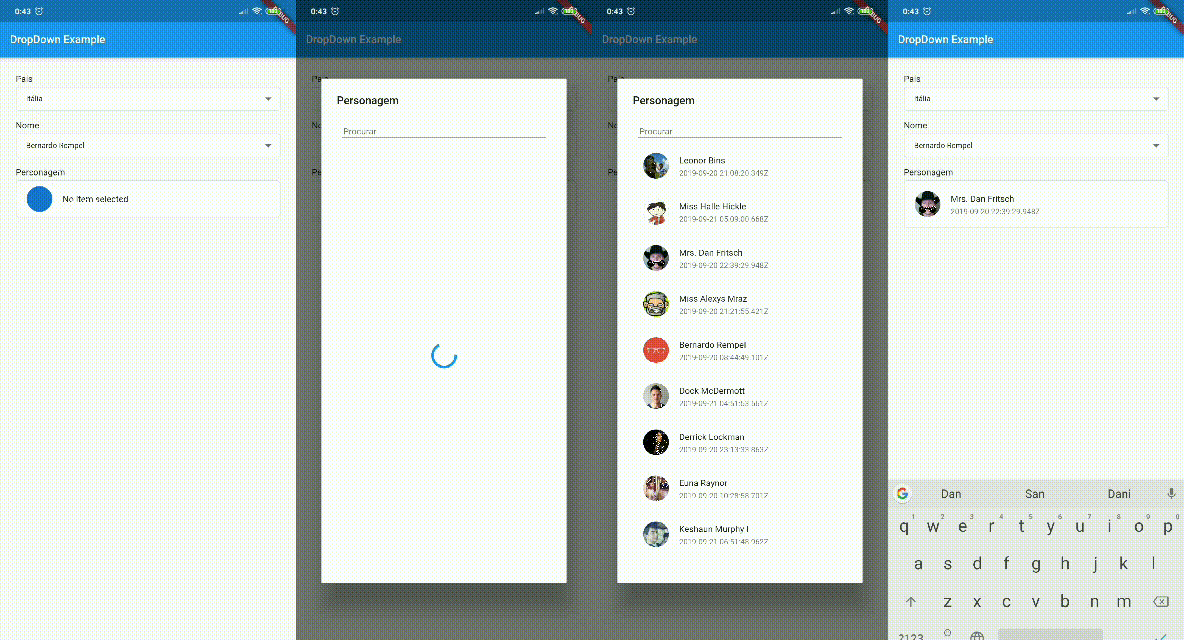
You can customize the layout of the FindDropdown and its items. EXAMPLE
To customize the FindDropdown, we have the dropdownBuilder property, which takes a function with the parameters:
BuildContext context: current context;T item: Current item, where T is the type passed in the FindDropdown constructor.
To customize the items, we have the dropdownItemBuilder property, which takes a function with the parameters:
BuildContext context: current context;T item: Current item, where T is the type passed in the FindDropdown constructor.bool isSelected: Boolean that tells you if the current item is selected.
Attention
To use a template as an item type, you need to implement toString, equals and hashcode, as shown below:
class UserModel {
  final String id;
  final DateTime createdAt;
  final String name;
  final String avatar;

  UserModel({this.id, this.createdAt, this.name, this.avatar});

  @override
  String toString() => name;

  @override
  operator ==(o) => o is UserModel && o.id == id;

  @override
  int get hashCode => id.hashCode^name.hashCode^createdAt.hashCode;

}


 v1.0.0