
 v2.0.1
country_calling_code_picker
Seletor de país flexível para obter código do país e código de chamada.
45Curtidas 242Downloads em 30 dias150Pontos Pub
AndroidiOS
Seletor de país flexível para obter código do país e código de chamada.

{"sdk":"flutter"}{"sdk":"flutter"}^6.0.0Texto original em inglês. Visite o GitHub para a versão atual.
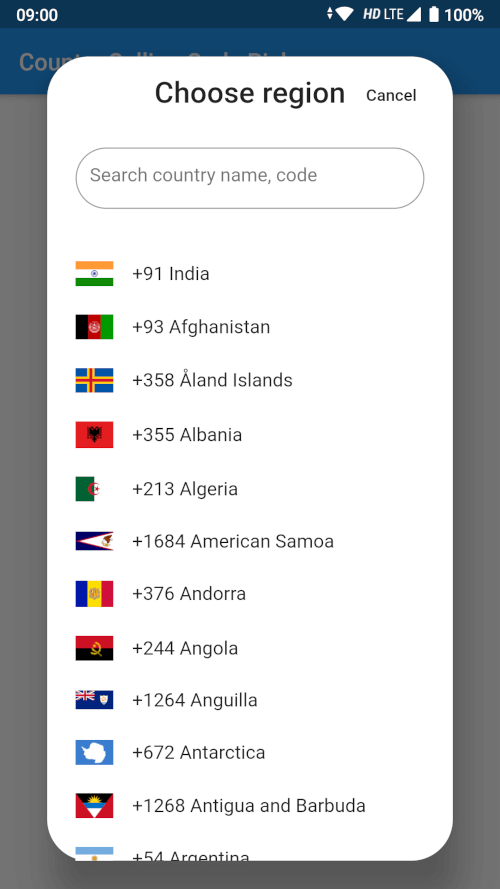
A searchable country picker for Flutter, ready to use in a dialog, a bottom sheet or full screen. Gives you the country name, its ISO code, its international calling code and a bundled flag image for 250 countries and territories.
Pure Dart — no platform channels, no native build setup. It runs on Android, iOS, web, macOS, Windows and Linux.
https://user-images.githubusercontent.com/65971744/83264373-9782d680-a1dd-11ea-88f2-cebe687da65a.pngdependencies:
country_calling_code_picker: ^3.0.0
import 'package:country_calling_code_picker/picker.dart';
class _MyPageState extends State<MyPage> {
  Country? _selectedCountry;
  bool _didInit = false;

  @override
  void didChangeDependencies() {
    super.didChangeDependencies();
    if (!_didInit) {
      _didInit = true;
      _initCountry();
    }
  }

  Future<void> _initCountry() async {
    final country = await getDefaultCountry(context);
    if (!mounted) return;
    setState(() => _selectedCountry = country);
  }
}
getDefaultCountry resolves the device region from the platform locale. Pass
fallbackCountryCode to choose what happens when the platform reports a region
that is not in the list:
final country = await getDefaultCountry(context, fallbackCountryCode: 'US');
final country = await showCountryPickerSheet(context);
if (country != null) {
  setState(() => _selectedCountry = country);
}
final country = await showCountryPickerDialog(context);
class PickerPage extends StatelessWidget {
  const PickerPage({super.key});

  @override
  Widget build(BuildContext context) {
    return Scaffold(
      appBar: AppBar(title: const Text('Select country')),
      body: CountryPickerWidget(
        onSelected: (country) => Navigator.pop(context, country),
      ),
    );
  }
}
// Every country, for your own custom picker.
final List<Country> countries = await getCountries(context);

// Or without a BuildContext, e.g. from a repository or a unit test.
final List<Country> countries = await getCountriesFromBundle();

// A single country by ISO code (case insensitive, null when unknown).
final Country? india = await getCountryByCountryCode(context, 'IN');

// The device region, e.g. 'IN'. Null when the platform reports none.
final String? code = getDeviceCountryCode(context);
Flag images ship inside this package, so they need the package name:
Image.asset(country.flag, package: countryCodePackageName, width: 32);
Or skip the images entirely and use the emoji flag:
Text(country.flagEmoji); // 🇮🇳
CountryPickerWidget options| Parameter | Default | Description |
|---|---|---|
onSelected |
null |
Called with the tapped Country. |
itemTextStyle |
TextStyle(fontSize: 16) |
Text style of a list item. |
searchInputStyle |
TextStyle(fontSize: 16) |
Text style of the search box. |
searchInputDecoration |
null |
Replaces the search box decoration entirely. |
searchHintText |
'Search country name, code' |
Hint of the search box. |
flagIconSize |
32 |
Width of the flag image. |
showSeparator |
false |
Draw a Divider between items. |
focusSearchBox |
false |
Open the keyboard as soon as the picker shows. |
showDeviceCountryFirst |
true |
Move the device's country to the top of the list. |
Search matches the country name (accent insensitive, so aland finds Åland),
the ISO code, and the calling code with or without its leading +.
Version 3.0.0 requires Dart 3 / Flutter 3.24 or newer.
flutter_sim_country_code dependency is gone. getDefaultCountry
now reads the device region from the platform locale instead of the SIM card,
which is why the package no longer needs any native code and works on web and
desktop. On a device whose region setting and SIM disagree, the resolved
country can differ from 2.x.getCountryByCountryCode now really returns null for an unknown code.
It used to throw a StateError. Its match is also case insensitive now.getDefaultCountry takes an optional fallbackCountryCode.CountryPickerWidget.focusSearchBox is now actually forwarded by
showCountryPickerSheet and showCountryPickerDialog.MIT — see LICENSE.